I have 3 major complaints about changes made to Windows since XP Pro that are not just really annoying but were valuable functionality removed and it seems as though Microsoft has no intention of restoring these back. I would really like to know WHY?
1. Advanced Search - (XP options got the job done, Vista's A.S. was very workable and Windows 7 is completely and totally unacceptable!). (I have been in the IT field for 37 years, I had worked with dozens of operating systems before Microsoft had DOS. I am proficient with every operating system Microsoft has released with the exception Windows Server 2008 and even with that I am working towards my certification. How could you deliver an OPERATING SYSTEM with such a poor search function? The search functionality in Windows 7 is beneath Microsoft. A screen/form similar to the Advanced Search in Vista is something Microsoft could probably due is Days. Why you haven’t done it is beyond comprehension!)
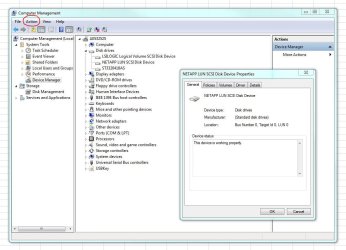
2. Computer Management - Missing the Properties Menu (was on option was initiated via Right click).
In XP PRO it worked as follows:
Right click on My Computer->Manage->Action->Connect to another computer
->Right click on "Computer Management" -> Properties - Now missing
There were 2 tabs (Computer Name and Advanced)
In Computer Name you could change the "Computer Description associated with a PC"
In Advanced tab you had the same options as the Advanced Tab as in XP's
system properties advanced tab.
I am an IT Manager for 2 companies currently and I have managed sites for most of the last 25 years. I have used this management function daily for the last 7 years, viewed events and monitor systems throughout our company both locally and remotely. I have seen/reviewed some of the proposed solutions for remotely logging off or shutdown and systems. Why should we have to go through this with your latest release operation systems supposedly designed to improve our productivity? Improved productivity is how I convince my employers that it makes since to invest in your new products.
3. Desktop Tool bars – Since Windows 7 you can no longer have/allow desktop tool bars. Again for the last 8 years, I have for used and configured desktop tool bars for users of just about every system I have installed both as a Reseller and as an IT manager. A single line of icons at the top of each screen representing each user’s most actively used programs. The location along with single click functionality equals productivity. Why would you prevent this function? If you your answer is to allow a moved Window to the top of screen to provide full screen display, I would say to you that this “so called option or enhancement” is one of the most annoying features you have added.
Please Microsoft, address these issues. We need your help to sell our company’s management on the advantages of your new products! PLEASE
1. Advanced Search - (XP options got the job done, Vista's A.S. was very workable and Windows 7 is completely and totally unacceptable!). (I have been in the IT field for 37 years, I had worked with dozens of operating systems before Microsoft had DOS. I am proficient with every operating system Microsoft has released with the exception Windows Server 2008 and even with that I am working towards my certification. How could you deliver an OPERATING SYSTEM with such a poor search function? The search functionality in Windows 7 is beneath Microsoft. A screen/form similar to the Advanced Search in Vista is something Microsoft could probably due is Days. Why you haven’t done it is beyond comprehension!)
2. Computer Management - Missing the Properties Menu (was on option was initiated via Right click).
In XP PRO it worked as follows:
Right click on My Computer->Manage->Action->Connect to another computer
->Right click on "Computer Management" -> Properties - Now missing
There were 2 tabs (Computer Name and Advanced)
In Computer Name you could change the "Computer Description associated with a PC"
In Advanced tab you had the same options as the Advanced Tab as in XP's
system properties advanced tab.
I am an IT Manager for 2 companies currently and I have managed sites for most of the last 25 years. I have used this management function daily for the last 7 years, viewed events and monitor systems throughout our company both locally and remotely. I have seen/reviewed some of the proposed solutions for remotely logging off or shutdown and systems. Why should we have to go through this with your latest release operation systems supposedly designed to improve our productivity? Improved productivity is how I convince my employers that it makes since to invest in your new products.
3. Desktop Tool bars – Since Windows 7 you can no longer have/allow desktop tool bars. Again for the last 8 years, I have for used and configured desktop tool bars for users of just about every system I have installed both as a Reseller and as an IT manager. A single line of icons at the top of each screen representing each user’s most actively used programs. The location along with single click functionality equals productivity. Why would you prevent this function? If you your answer is to allow a moved Window to the top of screen to provide full screen display, I would say to you that this “so called option or enhancement” is one of the most annoying features you have added.
Please Microsoft, address these issues. We need your help to sell our company’s management on the advantages of your new products! PLEASE
My Computer
At a glance
Windows 7 Ultimate x64Core I7 95012GB OCZNvidia Geforce 8800 GTS
- Computer Manufacturer/Model Number
- Custom Build
- OS
- Windows 7 Ultimate x64
- CPU
- Core I7 950
- Motherboard
- Asus P6TD Deluxe
- Memory
- 12GB OCZ
- Graphics Card(s)
- Nvidia Geforce 8800 GTS
- Sound Card
- Integrated
- Monitor(s) Displays
- 24" Samsung 2493
- Hard Drives
- 3 x 150GB VelociRaptors
- PSU
- Enermax 620 Watt
- Case
- Cooler Master CM690
- Cooling
- lots


 Hopefully you will know what you are talking about before you comment again!