Lag on "Welcome..." Screen

MattyGSI

New member
Local time
5:59 PM
Messages
12
Hi all,

Newly registered here as im having some issues with a recent 7 upgrade!

Now i had been using a fresh copy of 7 RC on my Acer Netbook for a while, everything working great, and i really liked the speed/interface. So, i decided i should go ahead and upgrade my home PC to 7 RC as well.

Upgrade went fine, took a fair while but i thought that was to be expected due to the mass amount of programs i have installed lol :o Anyway, booted up, everything as far as i can see working good.

Now, after installing, i upgraded my nVidia drivers for my 8600GT to the latest from their site. This was a massive fail as it seemed to remove the 1440x900 resolution of my monitor! Anywho, cut a long story short, i had to revert back to 182.50 drivers to get things working correctly.

Right, well thats pretty much the background info covered i think, heres my problem;

Windows 7 loads up fine, i put in my password, to which it then sits on the "Welcome..." screen for a good minute before then giving me my desktop! While its just sitting on that screen, there is no disk activity and the PC seems to be doing naff all. As soon as it does perk up and think about doing something, the disk goes nuts and away we have my desktop!

Now, this never used to happen on Vista, it did occationally take a little longer than usual, but like 20 secs max.

Any ideas?

Thanks

Matty
 

My Computer My Computer

At a glance

Windows 7 RC 7100
OS
Windows 7 RC 7100
Hi MattyGSI, welcome to the forums.

It's more than likely something to do with the upgrade. Upgrading still leaves remnants of the old OS on your HD and in the registry. 1 thing to try would be to uninstall your antivirus then re-install it as some AV software can cause delays in the startup/shutdown of you computer.

Hope this helps :)


Jeff
 

My Computer My Computer

At a glance

Windows 7 Ultimate x64AMD Sempron Dual Core3GBNVIDIA GeForce 6150SE nForce 430
Computer Manufacturer/Model Number
Compaq Desktop
OS
Windows 7 Ultimate x64
CPU
AMD Sempron Dual Core
Memory
3GB
Graphics Card(s)
NVIDIA GeForce 6150SE nForce 430
Screen Resolution
1024x768
Hard Drives
150GB Sata
Ok i'll give that a shot. I'm using the old 2.7 version of NOD32 for my Anti-Virus. I was thinking of upgrading to the latest one to keep it all new so i'll see how that affects it.

Still, i had the same version of NOD32 installed on Vista with no issues.
 

My Computer My Computer

At a glance

Windows 7 RC 7100
OS
Windows 7 RC 7100
Ok i'll give that a shot. I'm using the old 2.7 version of NOD32 for my Anti-Virus. I was thinking of upgrading to the latest one to keep it all new so i'll see how that affects it.

Still, i had the same version of NOD32 installed on Vista with no issues.

I am running the NOD x64 4.0.437 no problems with all the latest build of Windows 7.

I always uninstall ATI catalyst and NOD prior to my upgrade of build if dont clean install.
 

My Computer My Computer

At a glance

Windowa 7Intel Q94504 X 2gb OCZHIS 4890
OS
Windowa 7
CPU
Intel Q9450
Motherboard
Asus Rampage Formula
Memory
4 X 2gb OCZ
Graphics Card(s)
HIS 4890
Sound Card
Onboard
Monitor(s) Displays
DELL 3007
Screen Resolution
2560 X 1600
Hard Drives
WD VelociRaptor,
Seagate 7200.12 X 2
PSU
Pc & Power cooling 750watt
Case
Lian Li 71B
Keyboard
Steelseries 7G
Mouse
Roccat Kone
Early versions of AV software are not 100% compatible with Windows 7. I use Avast! with no issues (since build 7000) and little or no resource usage :)

100% best bet is to upgrade your AV software :p
 

My Computer My Computer

At a glance

Windows 7 Ultimate x64AMD Sempron Dual Core3GBNVIDIA GeForce 6150SE nForce 430
Computer Manufacturer/Model Number
Compaq Desktop
OS
Windows 7 Ultimate x64
CPU
AMD Sempron Dual Core
Memory
3GB
Graphics Card(s)
NVIDIA GeForce 6150SE nForce 430
Screen Resolution
1024x768
Hard Drives
150GB Sata
Ok i will try it. Got a feeling its something else though as i just remembered i have Win 7 on my Acer Netbook as i said earlier, and that is running the same v2.7 of NOD32. No issues with the welcome screen at all with that one
 

My Computer My Computer

At a glance

Windows 7 RC 7100
OS
Windows 7 RC 7100
Was that installed as an upgrade too? And is there different apps you've installed on it? We may as well try the 'process of elimination' tactic first :)
 

My Computer My Computer

At a glance

Windows 7 Ultimate x64AMD Sempron Dual Core3GBNVIDIA GeForce 6150SE nForce 430
Computer Manufacturer/Model Number
Compaq Desktop
OS
Windows 7 Ultimate x64
CPU
AMD Sempron Dual Core
Memory
3GB
Graphics Card(s)
NVIDIA GeForce 6150SE nForce 430
Screen Resolution
1024x768
Hard Drives
150GB Sata
Nah that was a fresh install!

I wanted to try and avoid doing a fresh install on my home PC for a little while (well, until i can afford to buy a new faster primary hard disk), hence the upgrade!

I assumed it was to do with it loading up the graphics driver first as i had so much hassle with that. But now its all working OK it still takes ages on the Welcome screen
 

My Computer My Computer

At a glance

Windows 7 RC 7100
OS
Windows 7 RC 7100
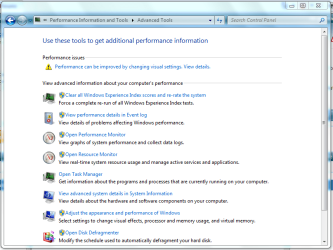
There is 1 thing you could try.

If you click the start menu and type 'performance' and click Performance Information and Tools then click 'Advanced Tools' and see if there is anything highlighted.

This is the screen you should see (results will differ)
Capture.PNG
 

My Computer My Computer

At a glance

Windows 7 Ultimate x64AMD Sempron Dual Core3GBNVIDIA GeForce 6150SE nForce 430
Computer Manufacturer/Model Number
Compaq Desktop
OS
Windows 7 Ultimate x64
CPU
AMD Sempron Dual Core
Memory
3GB
Graphics Card(s)
NVIDIA GeForce 6150SE nForce 430
Screen Resolution
1024x768
Hard Drives
150GB Sata
OK will that a go too... it shouldnt be a "performance" issue though, Pc Specs;

Core 2 Duo E6320 @ 2.33Ghz
4GB DDR667 RAM
Asus P5N-E SLI
GeForce 8600GT
2x WD Raptor 37GB in RAID0
WD Greenpower 1TB
Seagate 250GB
 

My Computer My Computer

At a glance

Windows 7 RC 7100
OS
Windows 7 RC 7100
Probably not but it does highlight startup/shutdown performance issues too.
 

My Computer My Computer

At a glance

Windows 7 Ultimate x64AMD Sempron Dual Core3GBNVIDIA GeForce 6150SE nForce 430
Computer Manufacturer/Model Number
Compaq Desktop
OS
Windows 7 Ultimate x64
CPU
AMD Sempron Dual Core
Memory
3GB
Graphics Card(s)
NVIDIA GeForce 6150SE nForce 430
Screen Resolution
1024x768
Hard Drives
150GB Sata
Oh really? Cool! I'll give all this a go when i get home and post up results!

Thanks all
 

My Computer My Computer

At a glance

Windows 7 RC 7100
OS
Windows 7 RC 7100
Ok, home now :)

Just checked the Event Log first (via a link from Performance Information & Tools, Advanced Tools).

These four things popped up under Boot Performance Monitoring;

Error;
Windows has started up:
Boot Duration : 150098ms
IsDegradation : true
Incident Time (UTC) : ‎2009‎-‎06‎-‎19T16:47:12.609200000Z

Critical;
Application of user policy caused a slow down in the system start up process:
Name : PreShellInit
Total Time : 83363ms
Degradation Time : 79363ms
Incident Time (UTC) : ‎2009‎-‎06‎-‎19T16:47:12.609200000Z

Warning;
This application took longer than usual to start up, resulting in a performance degradation in the system startup process:
File Name : wmpnetwk.exe
Friendly Name : Windows Media Player Network Sharing Service
Version : 12.0.7100.0 (winmain_win7rc.090421-1700)
Total Time : 11781ms
Degradation Time : 6781ms
Incident Time (UTC) : ‎2009‎-‎06‎-‎19T16:47:12.609200000Z

Warning;
Application of machine policy caused a slow down in the system start up process:
Name : MachinePolicyApplication
Total Time : 1054ms
Degradation Time : 793ms
Incident Time (UTC) : ‎2009‎-‎06‎-‎19T16:47:12.609200000Z


Any idea what i should do?
 

My Computer My Computer

At a glance

Windows 7 RC 7100
OS
Windows 7 RC 7100
Sorry to say i'm stumped now :o

No doubt someone will be able to help you though :)
 

My Computer My Computer

At a glance

Windows 7 Ultimate x64AMD Sempron Dual Core3GBNVIDIA GeForce 6150SE nForce 430
Computer Manufacturer/Model Number
Compaq Desktop
OS
Windows 7 Ultimate x64
CPU
AMD Sempron Dual Core
Memory
3GB
Graphics Card(s)
NVIDIA GeForce 6150SE nForce 430
Screen Resolution
1024x768
Hard Drives
150GB Sata
I think the PreShellInit one is the main culprit... 79 seconds delay!!
 

My Computer My Computer

At a glance

Windows 7 RC 7100
OS
Windows 7 RC 7100
Ok, update;

Removed my Anti-Virus program, have nothing installed atm. No difference.
Disabled Windows Media Player Network Sharing Service. No difference.

Cant find out anything about PreShellInit. Im sure this is the problem.
 

My Computer My Computer

At a glance

Windows 7 RC 7100
OS
Windows 7 RC 7100
Whoop!! Fixed :D

Turned out to be my nForce motherboard drivers! I installed the latest ones before the update as setup recommended a new SATA RAID driver. It seems that it kindly reverted them back to default Windows ones, which were obviously crap lol! Back to normal now :D

Thanks to all for the help!
 

My Computer My Computer

At a glance

Windows 7 RC 7100
OS
Windows 7 RC 7100
Excellent new mate. Glad it's sorted :D
 

My Computer My Computer

At a glance

Windows 7 Ultimate x64AMD Sempron Dual Core3GBNVIDIA GeForce 6150SE nForce 430
Computer Manufacturer/Model Number
Compaq Desktop
OS
Windows 7 Ultimate x64
CPU
AMD Sempron Dual Core
Memory
3GB
Graphics Card(s)
NVIDIA GeForce 6150SE nForce 430
Screen Resolution
1024x768
Hard Drives
150GB Sata
Yea me too lol!

Now to fixing my start menu lol!
 

My Computer My Computer

At a glance

Windows 7 RC 7100
OS
Windows 7 RC 7100
My welcome screen takes ages then the desktop comes with no icons then after 20 seconds it appears. I use fences btw and i've just done a clean install plus my AV is up to date. Please help me!!!!
 

My Computer My Computer

At a glance

Windows 7 Ultimate 32-Bit (x86)Intel Quad Core Q8200 2.33 GHZ4GB
Computer Manufacturer/Model Number
Dell Inspiron 545
OS
Windows 7 Ultimate 32-Bit (x86)
CPU
Intel Quad Core Q8200 2.33 GHZ
Memory
4GB
Monitor(s) Displays
LG Flatron W1943SB
Internet Speed
8MB
Back
Top