| Windows 7: Save page has changed |
16 Jan 2011
|
#1 | | |
Save page has changed Dell Intel Core 2 Duo Processor E7500 Computer
Inspirion 545s 00
Windows 7 Home Premium 64-bit
6GB Memory
Antivirus: Avast; Spyware Prevention: Spybot, Spyware Blaster. MalwareBytes, CCleaner, and Super AntiSpyware
I'm not sure if this is a Windows situation or something with a program I use called Paint Shop Pro (PSP), but the page has changed that I view when saving a file within PSP. My apologies for posting if it's not windows related, but thought I'd try here first.
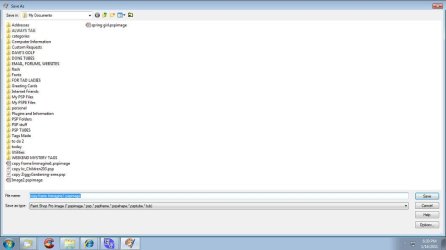
When I save a file, the page save dialog box comes up for me to tell it where to save it. It used to be that the page underneath that box would show the files and folders in the right pane, and in the left pane would be the Explore tree showing what's on computer. Now, when I save something in PSP, I only see the files and folders and not the tree.
If I save a Works document, I do see what I'm used to seeing, so that's what made me think it may just be a malfunction of my PSP program.
I have tried to resize the window as it comes up full screen and it will not let me grab any side to resize. The 2 small black arrows show up only on the left-hand side and won't appear on any other side of the page. However, even with that, it just won't budge.
It just started appearing in this format in the past week -- until then, I saw the Explore Tree as well. It's no biggie and I can live with it, but just wondered why it changed and if there was a way to get it back to what I was used to seeing.
Any ideas, please?
Thanks,
windsorlady | My System Specs |
| System Manufacturer/Model Number Dell Intel Core 2 Duo Processor E7500 Computer OS Windows 7 Memory 6GB |
16 Jan 2011
|
#2 | | Windows 7 Pro X64 Space Coast of Florida |
In the Save as dialog, click on Organize, Layout then check Navigation Pane. | My System Specs | | System Manufacturer/Model Number Dell Precision 370 OS Windows 7 Pro X64 CPU Intel Pentium 4 Dual LP 3.4Ghz Memory 4GB DDR PC2-5200 ECC Graphics Card NVIDIA Quadro FX 3400/4400 Sound Card SoundMAX Integrated Digital Audio Monitor(s) Displays HP 22" w2207 LCD Screen Resolution 1680 x 1050 Hard Drives 300GB Maxtor 6L300RD PATA
128GB Kingston SV200S3128G SSD (boot)
1.5TB Seagate ST3150041AS SATA Internet Speed Cable via Road Runner 2MB Upload, 20MB Download |
16 Jan 2011
|
#3 | | |
When saving from PSP, I do not have those options available. I do have those options and they are defaulted to that if saving something from Wordpad, Works, etc. If I could figure out how to attach a screen shot of what I get, I do have a .jpg of it, but don't know how to do that.
windsorlady | My System Specs | | System Manufacturer/Model Number Dell Intel Core 2 Duo Processor E7500 Computer OS Windows 7 Memory 6GB |
16 Jan 2011
|
#4 | | Several, including Windows 7 x64 Ultimate |
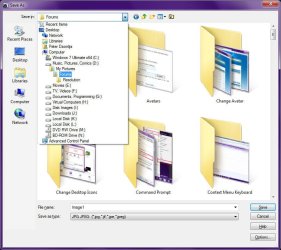
The file open/save dialogs can vary somewhat depending on the software in use, and any modifications one has made to the user interface, however, they are usually quite similar at least. You may have the option to "Hide Folders"; ( Outlined in red in the screen shot below),
If you click on this it will once again show your navigation tree pane.
Also, if you have the option "Organise" ( Highlighted red in the screen shot);
You can change the layout to show the navigation pane by clicking on it.
Regards....Mike Connor | My System Specs | | OS Several, including Windows 7 x64 Ultimate |
16 Jan 2011
|
#5 | | Windows 7 Pro X64 Space Coast of Florida |
windsorlady, to post a picture, click on the little wedge next to the paper clip icon, then browse to find the jpg then upload it. Close the window then click on the paper clip wedge again and now the uploaded jpg will be there, click on it to insert into your post. Screenshots and Files - Upload and Post in Seven Forums | My System Specs | | System Manufacturer/Model Number Dell Precision 370 OS Windows 7 Pro X64 CPU Intel Pentium 4 Dual LP 3.4Ghz Memory 4GB DDR PC2-5200 ECC Graphics Card NVIDIA Quadro FX 3400/4400 Sound Card SoundMAX Integrated Digital Audio Monitor(s) Displays HP 22" w2207 LCD Screen Resolution 1680 x 1050 Hard Drives 300GB Maxtor 6L300RD PATA
128GB Kingston SV200S3128G SSD (boot)
1.5TB Seagate ST3150041AS SATA Internet Speed Cable via Road Runner 2MB Upload, 20MB Download |
16 Jan 2011
|
#6 | | |
THanks for the directions on this and the attachments. I'm not having problems when viewing the area you're showing me. It's just when I save it in PSP, it gives me this page. Up until today (and I've not made any changes - not even a windows update (LOL)), it appeared like image below, but the Explore tree appeared on the left. It's no biggie -- at least I can still save it where I need to. | My System Specs | | System Manufacturer/Model Number Dell Intel Core 2 Duo Processor E7500 Computer OS Windows 7 Memory 6GB |
16 Jan 2011
|
#8 | | Several, including Windows 7 x64 Ultimate |
That's a bit unusual, something has changed your dialog boxes. Have you installed any other software?
What do you get when you click on "options" at the lower right?
Regards....Mike Connor | My System Specs | | OS Several, including Windows 7 x64 Ultimate |
16 Jan 2011
|
#9 | | Windows 7 Pro X64 Space Coast of Florida |
There is also an icon of a yellow folder with a wedge in it at the top. What options do you get if you click on that? | My System Specs | | System Manufacturer/Model Number Dell Precision 370 OS Windows 7 Pro X64 CPU Intel Pentium 4 Dual LP 3.4Ghz Memory 4GB DDR PC2-5200 ECC Graphics Card NVIDIA Quadro FX 3400/4400 Sound Card SoundMAX Integrated Digital Audio Monitor(s) Displays HP 22" w2207 LCD Screen Resolution 1680 x 1050 Hard Drives 300GB Maxtor 6L300RD PATA
128GB Kingston SV200S3128G SSD (boot)
1.5TB Seagate ST3150041AS SATA Internet Speed Cable via Road Runner 2MB Upload, 20MB Download |
16 Jan 2011
|
#10 | | Several, including Windows 7 x64 Ultimate |
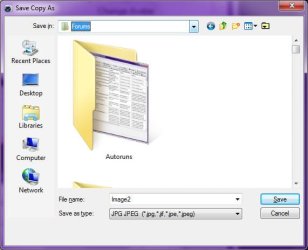
Here is another variation of the "save" dialog, which is opened by another program, in this case "Photo Filtre";
It is similar to yours, but has other options;
I suppose that you should be able to reach the display options through one of the "extra" options you have in your screen shot.
QUOTE Oh gosh --- you can't even see that (LOL). I can zoom the attachment on my computer at my end. I've uploaded it here if that helps. UNQUOTE
Clicking on the attachment makes it large enough to see.
Regards....Mike Connor | My System Specs | | OS Several, including Windows 7 x64 Ultimate Save page has changed problems? All times are GMT -5. The time now is 06:10 AM. | |