Windows 7 Forums


Windows 7: Pinning Shortcuts to Taskbar

18 Jan 2011   #1

7 - 32
 
 
Pinning Shortcuts to Taskbar

How do I pin a shortcut to the task bar? I have a shortcut on my desktop that I frequently use, and I want it to be on the task bar - it is the address to a documents file that I use all the time. When I drag and drop, it won't stick there.

thanks,
carl

My System SpecsSystem Spec

18 Jan 2011   #2

64-bit Windows 7 Ultimate SP1 & Windows 8 Enterprise
Texas


Hello Carl,

If you right click on the shortcut, does it have a "Pin to Taskbar" option?

http://www.sevenforums.com/tutorials...ram-links.html

If not, could you post a screenshot of the properties page (right click) with the General tab showing?

Hope this helps for now,
Shawn
My System SpecsSystem Spec
19 Jan 2011   #3

7 - 32
 
 
Can't pin to task bar

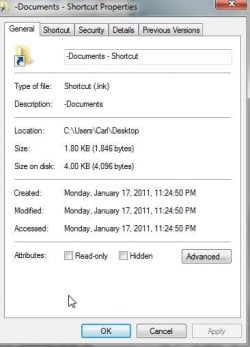
The shortcut does NOT have the option to pin to task bar. It is a shortcut to a document folder. One thing I DID notice, however, is that I have Windows Explorer pinned to the toolbar, and if I right click on that, it shows the pinned folder. I want the folder itself pinned to the toolbar because I'm constantly referring to it.

here's the general tab: Pinning Shortcuts to Taskbar-screenshot001.jpg
My System SpecsSystem Spec
.


19 Jan 2011   #4

Windows 7 Home Premium 64bit
California


aintnorock,
Go to start/click on documents/find and right click on your address file/send to desktop.
Post back if this is what you wanted.
My System SpecsSystem Spec
19 Jan 2011   #5

Windows 7 Pro 64 SP1
East Bay Area, CA


My System SpecsSystem Spec
19 Jan 2011   #6

64-bit Windows 7 Ultimate SP1 & Windows 8 Enterprise
Texas


Quote   Quote: Originally Posted by aintnorock View Post
The shortcut does NOT have the option to pin to task bar. It is a shortcut to a document folder. One thing I DID notice, however, is that I have Windows Explorer pinned to the toolbar, and if I right click on that, it shows the pinned folder. I want the folder itself pinned to the toolbar because I'm constantly referring to it.

here's the general tab: Attachment 133145
Ah, ok.

The problem is that it's a shortcut of a folder. By default, you can only pin applications or shortcuts of applications to the taskbar.

The tutorial below will show you a workaround for how to pin a folder to the taskbar though.

Taskbar - Pin or Unpin a Folder

Hope this helps,
Shawn
My System SpecsSystem Spec
Reply

 Pinning Shortcuts to Taskbar problems?


Thread Tools


Similar help and support threads for: Pinning Shortcuts to Taskbar
Thread Forum
Shortcuts, Pinning and Jump Lists - how do they work? General Discussion
Pinning shortcuts to the taskbar? General Discussion
Pinning IE 9 Shortcuts Browsers & Mail
Pinning network shared folder shortcuts from LAN General Discussion
Pinning website shortcuts to the taskbar Customization


All times are GMT -5. The time now is 02:26 PM.


Seven Forums Android App Seven Forums IOS App Follow us on Facebook

Windows 7 Forums is an independent web site and has not been authorized,
sponsored, or otherwise approved by Microsoft Corporation.
"Windows 7" and related materials are trademarks of Microsoft Corp.
© Designer Media Ltd
  

1 2 3 4 5 6 7 8 9 10 11 12 13 14 15 16 17 18 19 20 21 22 23 24 25 26 27 28 29 30 31 32