Windows 7 Forums


Windows 7: Which external harddrive do I use for Windows Easy Transfer(XP to W7)?

18 Jan 2011  
Skooby

Windows 7 home premium 64 bit
4 posts
 
 
Which external harddrive do I use for Windows Easy Transfer(XP to W7)?

Hello,

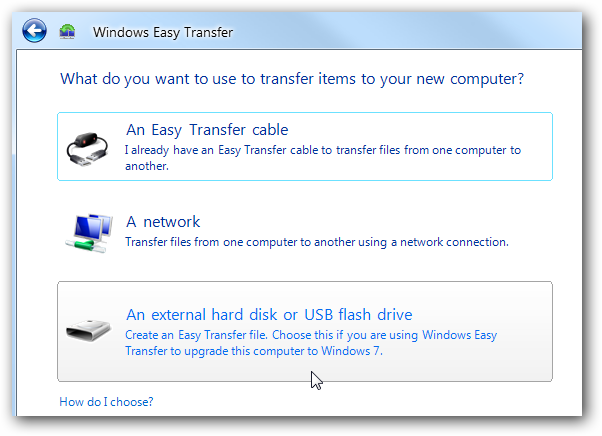
I'm trying to tranfer files from my XP pc to my new pc with Windows 7. I know I need W.E.T. and an external HD. I found this one that I wanted to get:

Newegg.com - TOSHIBA Canvio 320GB USB 2.0 Raven Black Portable External Hard Drive E05A032CAU2XK

However, when I started reading reviews on it on Amazon.com...one of the users stated that he could not use it for the transfer since the preloaded software isn't compatible windows 7, even though the website for the product says the harddrive is.

So my question is which external hard drive (brand or type) do I have to choose to do this?

My System SpecsSystem Spec

18 Jan 2011  
fishnbanjo

Vista 64 Ultimate, Windows 7 64 Ultimate, Ubuntu 9.10
1,041 posts
S. ME and W. ME


I did it using a USB 32Gb flash drive since I doubt you'll need more than 32Gb that should work as long as you have downloaded and installed Windows Easy Transfer on your XP PC.

My System SpecsSystem Spec
18 Jan 2011  
Skooby

Windows 7 home premium 64 bit
4 posts


Thanks.

But I have about 100-120 gb worth of music, movies, and documents to move over.

I thought everything had to be moved at once...can they be moved over in chunks?

Also, I really didn't want to go over $60.
My System SpecsSystem Spec
.


18 Jan 2011  
DocBrown

Win7 Enterprise, Win7 x86 (Ult 7600), Win7 x64 Ult 7600, TechNet RTM on AMD x64 (2.8Ghz)
8,577 posts
SomeWhere in the HOT Arizona Desert !


Start the Easy Transfer Program & see if it gives you an estimate how much HD space you will need.
My System SpecsSystem Spec
18 Jan 2011  
DeaconFrost

Windows 7 Ultimate x64 SP1
5,854 posts
Philadelphia, PA


Any external hard drive would work, assuming it is large enough to hold your data. I would recommend doing it manually, rather than letting some program try to decide what is important to you or not. This way, you are sure to get everything you need.
My System SpecsSystem Spec
18 Jan 2011  
Skooby

Windows 7 home premium 64 bit
4 posts


Quote   Quote: Originally Posted by DeaconFrost View Post
Any external hard drive would work, assuming it is large enough to hold your data. I would recommend doing it manually, rather than letting some program try to decide what is important to you or not. This way, you are sure to get everything you need.
So the one I put in the first post should work?

What do you mean manually?
My System SpecsSystem Spec
18 Jan 2011  
DeaconFrost

Windows 7 Ultimate x64 SP1
5,854 posts
Philadelphia, PA


Yes, that should work fine, but if you can go bigger, there's no harm in that. Manually means don't rely on some wizard to guess at what data is important. Just cut/copy and paste what you need to the external drive. I wouldn't ever trust some software to do that for me, when it is so simple to do it myself. Besides...I know what apps and data I store on my computer, so I'll know what I need to save.
My System SpecsSystem Spec
19 Jan 2011  
Skooby

Windows 7 home premium 64 bit
4 posts


http://www.newegg.com/Product/Produc...-179-_-Product

I'm probably going to it.

But could you guess as to why this person said this, what could they have done wrong?:


"I purchased this in order to backup my files so I could upgrade from Windows XP to Windows 7. The product says that it is compatible with both so I didn't worry. Now that I have Windows 7 on my computer I can't restore my files because it says that the preloaded software is not compatible with Windows 7. How can the hard drive be compatible and the software not! You can't get them off manually because the file type is not supported by Windows 7 either."
My System SpecsSystem Spec
19 Jan 2011  
DeaconFrost

Windows 7 Ultimate x64 SP1
5,854 posts
Philadelphia, PA


Some drives come with pre-loaded software that's usually junk and might not be compatible. Honestly, I format my external drives as soon as I take them out of the box, because I don't need/use any of the preloaded junk.
My System SpecsSystem Spec
19 Jan 2011  
whs

Vista, Windows7, Mint Mate, Zorin, Windows 8
17,868 posts
Florida in winter, Black Forest/Germany


Quote   Quote: Originally Posted by DeaconFrost View Post
Any external hard drive would work, assuming it is large enough to hold your data. I would recommend doing it manually, rather than letting some program try to decide what is important to you or not. This way, you are sure to get everything you need.
+1 absolutely. Too many people had trouble with Easy Transfer. Just copy the files from XP to any external drive. Then at least you know that it works. On the Windows 7 side, copy them back into the appropriate folders in the library.

You can use this function in XP and Windows 7 (beats Copy/paste): Context Menu - Add Copy To Folder and Move To Folder
My System SpecsSystem Spec
Reply

 Which external harddrive do I use for Windows Easy Transfer(XP to W7)? problems?


Thread Tools


Similar help and support threads for: Which external harddrive do I use for Windows Easy Transfer(XP to W7)?
Thread Forum
Windows Easy Transfer - Transfer To & From Computers Tutorials
Windows 7 Easy Transfer Backup and Restore
How do I transfer only Windows Live Mail using Windows Easy Transfer Software
Can an Easy Transfer archive be used/read without using Easy Transfer? General Discussion
Windows Easy Transfer Performance & Maintenance


All times are GMT -5. The time now is 01:16 AM.


Windows 7 Forums is an independent web site and has not been authorized,
sponsored, or otherwise approved by Microsoft Corporation.
"Windows 7" and related materials are trademarks of Microsoft Corp.
© Designer Media Ltd