
Windows 7 Forums


Windows 7: How to show time and date on taskbar?

19 Jan 2011   #1

Windows 7 Home Premium 64Bits SP1
Pocomoke City, Maryland
 
 
How to show time and date on taskbar?

Noticed on a browser picture submitted by another member that the task-bar displays the time and date. Mine only displays the time.

Is this a windows 7 option I can turn on? Looked in properties but could not find out how.
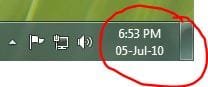
Name:  Capture.JPG
Views: 14754
Size:  11.7 KB

My System SpecsSystem Spec

19 Jan 2011   #2

64-bit Windows 7 Ultimate SP1 & Windows 8 Enterprise
Texas


Hello Manuel,

You can get the time and date by setting the "Short date" format using dd-MMM-yy as below.

Date Format for Taskbar System Tray - Show Full Day and Month Names

How to show time and date on taskbar?-date.jpg

Hope this helps,
Shawn

Last edited by Brink; 29 Aug 2012 at 11:34 AM.. Reason: updated link
My System SpecsSystem Spec
19 Jan 2011   #3

Windows 7 Home Premium 64Bits SP1
Pocomoke City, Maryland


Thanks Brink.

Also found out I have to un-check the "Use small icons" option in the "Taskbar and Start Menu Properties window (Taskbar tab)". If set to small, the date is not displayed.
My System SpecsSystem Spec
.


19 Jan 2011   #4

64-bit Windows 7 Ultimate SP1 & Windows 8 Enterprise
Texas


You're welcome.

I didn't think about having small or large icons on the taskbar. Nice catch.
My System SpecsSystem Spec
29 Aug 2012   #5

w7 pro


Registered just to thank Manigue for the tip...and for berating MS for once again changing a totally unrelated feature due to a setting. Shame on those idiots who programmed this issue to happen.
My System SpecsSystem Spec
06 Feb 2013   #6

Windows 7 Professional


Windows has a long way to go
My System SpecsSystem Spec
22 Hours Ago   #7

Windows 7 x64


I stretched my taskbar display (because I don't want to use large icons). I'd prefer one line but would accept two, but now have 3 lines:
8:23 AM
Friday
Fri, 5-24-13

How can I get rid of that middle "Friday"?

Thanks!
My System SpecsSystem Spec
21 Hours Ago   #8

Windows 7 Home Premium 32 bit


Programming, both an operating system and applications, is about making decisions. Sometimes those decisions are hard. Sometimes no matter what choice you make somebody will say it was a stupid one. You can't please everybody.

Don't be too critical about the user interface decisions made by Microsoft and others until you have had to make those hard choices yourself. Designing a good user interface is a lot more difficult than most people think.
My System SpecsSystem Spec
Reply

 How to show time and date on taskbar? problems?


Thread Tools


Similar help and support threads for: How to show time and date on taskbar?
Thread Forum
Solved Sort by date takes long time for items to show Performance & Maintenance
Solved How do i get the OS to show both date and time on the taskbar? General Discussion
Hide Time & Date In Taskbar Customization
how to get date AND time to show up on a ONE line taskb Customization


All times are GMT -5. The time now is 07:48 AM.


Seven Forums Android App Seven Forums IOS App Follow us on Facebook

Windows 7 Forums is an independent web site and has not been authorized,
sponsored, or otherwise approved by Microsoft Corporation.
"Windows 7" and related materials are trademarks of Microsoft Corp.
© Designer Media Ltd
  

1 2 3 4 5 6 7 8 9 10 11 12 13 14 15 16 17 18 19 20 21 22 23 24 25 26 27 28 29 30 31 32