I am the only person on my computer and I am the administrator but

eaglepi

New member
Member
VIP
Local time
10:47 PM
Messages
193
I am the only person on my computer and I am the administrator but whenever I try to delete a folder or do anything in Windows Explorer I get a dialog message telling me I need admin permissions to do what I was trying to do, I click "continue" and whatever I wanted to do is done.

Since I am logged in as the administrator why do I get these extra windows and how can I prevent them from coming up.
 

My Computer My Computer

At a glance

Windows 7 ultimate SP1Intel Core i7-870 Lynnfield 4.00GHzCorsair Vengeance 16GB (2x8GB) DDR3 1600 MHz ...MSI NX8600GTS T2D256EZ
Computer type
PC/Desktop
Computer Manufacturer/Model Number
Home made :)
OS
Windows 7 ultimate SP1
CPU
Intel Core i7-870 Lynnfield 4.00GHz
Motherboard
ASUS Z97-A ATX DDR3 2600 LGA 1150 Motherboards Z97-A
Memory
Corsair Vengeance 16GB (2x8GB) DDR3 1600 MHz (PC3 12800) Des
Graphics Card(s)
MSI NX8600GTS T2D256EZ
Sound Card
intergraded on MB
Monitor(s) Displays
Two 24" Samsung
Screen Resolution
1920 X1200
Hard Drives
3 of: Seagate 2TB Desktop HDD SATA 6Gb/s 64MB Cache 3.5-Inch Internal Bare Drive
1 of: Seagate 1TB Desktop HDD SATA 6Gb/s 64MB Cache 3.5-Inch Internal Bare Drive
PSU
OCZ GameXStream OCZ700GXSSLI 700W ATX12V
Case
Antec Performance TX640B ATX Mini Tower Case
Cooling
Thermalright Ultima 90
Keyboard
Logitech
Mouse
Logitec
Internet Speed
10 Mbps cable
I am the only person on my computer and I am the administrator but whenever I try to delete a folder or do anything in Windows Explorer I get a dialog message telling me I need admin permissions to do what I was trying to do, I click "continue" and whatever I wanted to do is done.

Since I am logged in as the administrator why do I get these extra windows and how can I prevent them from coming up.

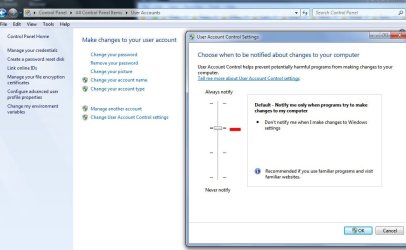
go into your control panel > user accounts > user accounts > change user account settings > slide the bar down to never notify.
 

My Computer My Computer

At a glance

Windows 7 Ultimate x64Intel Core i7 9206gb DDR3 Patriot Viper w/ XMP supportNvidia Maxcore GTX295 (BFG Tech Overclocked)
Computer Manufacturer/Model Number
Custom
OS
Windows 7 Ultimate x64
CPU
Intel Core i7 920
Motherboard
Intel DX58SO
Memory
6gb DDR3 Patriot Viper w/ XMP support
Graphics Card(s)
Nvidia Maxcore GTX295 (BFG Tech Overclocked)
Sound Card
Creative XFi
Monitor(s) Displays
21" LCD
Hard Drives
Western Digital Blue 500GB
PSU
750 Watt Corsair
Case
Antec 900
Cooling
Stock Cooling for the CPU, 8" fan on top, (3) 5" case fans
Keyboard
Logitech Wave
Mouse
Logitech MX Revolution
Internet Speed
30mbps
Other Info
Water Cooled CPU w/ Corsair H60
Personally I would leave User Account Settings in the recommended position. It offers a good level of protection and it takes little enough effort to check before hitting the continue button - IMHO, of course!
 

My Computer My Computer

At a glance

Microsoft Windows 7 Home Premium 64-bit 7601 ...Intel(R) Core(TM) i7-3770 CPU @ 3.40GHz8.00 GBIntel(R) HD Graphics 4000
Computer type
PC/Desktop
OS
Microsoft Windows 7 Home Premium 64-bit 7601 Multiprocessor Free Service Pack 1
CPU
Intel(R) Core(TM) i7-3770 CPU @ 3.40GHz
Motherboard
ASUSTeK COMPUTER INC. P8H77-M
Memory
8.00 GB
Graphics Card(s)
Intel(R) HD Graphics 4000
Sound Card
On Board
Monitor(s) Displays
Dell 24"
Screen Resolution
1920 x 1080
Hard Drives
(1) INTEL SSDSC2CT180A3 ATA Device (2) ST500DM002-1BD142 ATA Device (3) WDC WD3200AAKS-75L9A0 ATA Device (4) Generic- Compact Flash USB Device (5) Generic- MS/MS-Pro USB Device (6) Generic- SD/MMC USB Device (7) Generic- SM/xD-Picture USB
PSU
500w Corsair
Case
Cooler Master
Cooling
3 Fans
Keyboard
Logitech MK300
Mouse
Logitech WOM
Internet Speed
75Mb
Antivirus
Norton 360
Browser
Firefox, Opera, IE
I am the only person on my computer and I am the administrator but whenever I try to delete a folder or do anything in Windows Explorer I get a dialog message telling me I need admin permissions to do what I was trying to do, I click "continue" and whatever I wanted to do is done.

Since I am logged in as the administrator why do I get these extra windows and how can I prevent them from coming up.

go into your control panel > user accounts > user accounts > change user account settings > slide the bar down to never notify.

A very bad suggestion for several reasons. One, what the OP is experiencing is not normal behaviour. Changing UAC is like putting a bandaid on a bullet wound. Second, UAC is there for your protection. It does not interfere like it did in Vista and it should be left alone.
 

My Computer My Computer

At a glance

Windows 7 Ultimate RTM (Technet)3.00 gigahertz Intel Core2 Duo E84004GBATI Radeon X1950 Pro
Computer Manufacturer/Model Number
Custom
OS
Windows 7 Ultimate RTM (Technet)
CPU
3.00 gigahertz Intel Core2 Duo E8400
Motherboard
ASUSTeK Computer INC. P5K/EPU Rev 1.xx
Memory
4GB
Graphics Card(s)
ATI Radeon X1950 Pro
Sound Card
Built in HD Audio
Monitor(s) Displays
22" Gateway LCD
Screen Resolution
1920 x 1200
Hard Drives
ST3160023A [Hard drive] (160.04 GB) -- drive 0, rev 8.01, ST3500630AS [Hard drive] (500.11 GB) -- drive 2, rev 3.AAK
ST3500630AS [Hard drive] (500.11 GB) -- drive 1, rev 3.AAK
Keyboard
Logitech G11
Mouse
Microsoft Wireless Laser Mouse 5000
Internet Speed
13.44 Mbps
I am the only person on my computer and I am the administrator but whenever I try to delete a folder or do anything in Windows Explorer I get a dialog message telling me I need admin permissions to do what I was trying to do, I click "continue" and whatever I wanted to do is done.

Since I am logged in as the administrator why do I get these extra windows and how can I prevent them from coming up.

Give us a specific example of a path you are trying to delete from please.
 

My Computer My Computer

At a glance

Windows 7 Ultimate RTM (Technet)3.00 gigahertz Intel Core2 Duo E84004GBATI Radeon X1950 Pro
Computer Manufacturer/Model Number
Custom
OS
Windows 7 Ultimate RTM (Technet)
CPU
3.00 gigahertz Intel Core2 Duo E8400
Motherboard
ASUSTeK Computer INC. P5K/EPU Rev 1.xx
Memory
4GB
Graphics Card(s)
ATI Radeon X1950 Pro
Sound Card
Built in HD Audio
Monitor(s) Displays
22" Gateway LCD
Screen Resolution
1920 x 1200
Hard Drives
ST3160023A [Hard drive] (160.04 GB) -- drive 0, rev 8.01, ST3500630AS [Hard drive] (500.11 GB) -- drive 2, rev 3.AAK
ST3500630AS [Hard drive] (500.11 GB) -- drive 1, rev 3.AAK
Keyboard
Logitech G11
Mouse
Microsoft Wireless Laser Mouse 5000
Internet Speed
13.44 Mbps
I am the only person on my computer and I am the administrator but whenever I try to delete a folder or do anything in Windows Explorer I get a dialog message telling me I need admin permissions to do what I was trying to do, I click "continue" and whatever I wanted to do is done.

Since I am logged in as the administrator why do I get these extra windows and how can I prevent them from coming up.

This happens even when in an admin account to prevent unauthorized programs from installing themselves or unathorized actions being taken. If you were in a Standard User account, you would have to enter a password rather than just click 'Continue'.

It generally doesn't happen with every folder I delete, but it does happen with some.

Turning off UAC is a very bad idea, but if it's set at its highest security level, that may be causing the issue. I've attached a screenshot showing my settings (2nd level). I don't recommend turning it down lower. I get asked for permission to accomplish some tasks, but not enough to irritate me.

James

UAC Settings.JPG
 

My Computer My Computer

At a glance

Win7U 64 RTMQ95508GB GskillASUS|EAH4850/HTDI/1GD3/A
OS
Win7U 64 RTM
CPU
Q9550
Motherboard
GA-EP45-UD3R
Memory
8GB Gskill
Graphics Card(s)
ASUS|EAH4850/HTDI/1GD3/A
Sound Card
xfi Plat
Monitor(s) Displays
Dell 2405fpw
Screen Resolution
1920x1200
Hard Drives
Seagate & WD sata Drives
PSU
Antec
Case
Antec
Keyboard
MS Natural Ergonomic 4000
Mouse
Logitech MX610 USB Cordless
I am the only person on my computer and I am the administrator but whenever I try to delete a folder or do anything in Windows Explorer I get a dialog message telling me I need admin permissions to do what I was trying to do, I click "continue" and whatever I wanted to do is done.

Since I am logged in as the administrator why do I get these extra windows and how can I prevent them from coming up.

This happens even when in an admin account to prevent unauthorized programs from installing themselves or unathorized actions being taken. If you were in a Standard User account, you would have to enter a password rather than just click 'Continue'.

It generally doesn't happen with every folder I delete, but it does happen with some.

Turning off UAC is a very bad idea, but if it's set at its highest security level, that may be causing the issue. I've attached a screenshot showing my settings (2nd level). I don't recommend turning it down lower. I get asked for permission to accomplish some tasks, but not enough to irritate me.

James

View attachment 133881

I have mine set just like yours. I just thought that if I am in Admin mode I shouldn't have to click the extra boxes that pop up from time to time but I guess being safe is worth a few extra clicks from time to time
 

My Computer My Computer

At a glance

Windows 7 ultimate SP1Intel Core i7-870 Lynnfield 4.00GHzCorsair Vengeance 16GB (2x8GB) DDR3 1600 MHz ...MSI NX8600GTS T2D256EZ
Computer type
PC/Desktop
Computer Manufacturer/Model Number
Home made :)
OS
Windows 7 ultimate SP1
CPU
Intel Core i7-870 Lynnfield 4.00GHz
Motherboard
ASUS Z97-A ATX DDR3 2600 LGA 1150 Motherboards Z97-A
Memory
Corsair Vengeance 16GB (2x8GB) DDR3 1600 MHz (PC3 12800) Des
Graphics Card(s)
MSI NX8600GTS T2D256EZ
Sound Card
intergraded on MB
Monitor(s) Displays
Two 24" Samsung
Screen Resolution
1920 X1200
Hard Drives
3 of: Seagate 2TB Desktop HDD SATA 6Gb/s 64MB Cache 3.5-Inch Internal Bare Drive
1 of: Seagate 1TB Desktop HDD SATA 6Gb/s 64MB Cache 3.5-Inch Internal Bare Drive
PSU
OCZ GameXStream OCZ700GXSSLI 700W ATX12V
Case
Antec Performance TX640B ATX Mini Tower Case
Cooling
Thermalright Ultima 90
Keyboard
Logitech
Mouse
Logitec
Internet Speed
10 Mbps cable
I am the only person on my computer and I am the administrator but whenever I try to delete a folder or do anything in Windows Explorer I get a dialog message telling me I need admin permissions to do what I was trying to do, I click "continue" and whatever I wanted to do is done.

Since I am logged in as the administrator why do I get these extra windows and how can I prevent them from coming up.

This happens even when in an admin account to prevent unauthorized programs from installing themselves or unathorized actions being taken. If you were in a Standard User account, you would have to enter a password rather than just click 'Continue'.

It generally doesn't happen with every folder I delete, but it does happen with some.

Turning off UAC is a very bad idea, but if it's set at its highest security level, that may be causing the issue. I've attached a screenshot showing my settings (2nd level). I don't recommend turning it down lower. I get asked for permission to accomplish some tasks, but not enough to irritate me.

James

View attachment 133881

I don't know what you guys have going on with your systems, but deleting a file or folder SHOULD NOT generate a UAC prompt for an administrator user.
 

My Computer My Computer

At a glance

Windows 7 Ultimate RTM (Technet)3.00 gigahertz Intel Core2 Duo E84004GBATI Radeon X1950 Pro
Computer Manufacturer/Model Number
Custom
OS
Windows 7 Ultimate RTM (Technet)
CPU
3.00 gigahertz Intel Core2 Duo E8400
Motherboard
ASUSTeK Computer INC. P5K/EPU Rev 1.xx
Memory
4GB
Graphics Card(s)
ATI Radeon X1950 Pro
Sound Card
Built in HD Audio
Monitor(s) Displays
22" Gateway LCD
Screen Resolution
1920 x 1200
Hard Drives
ST3160023A [Hard drive] (160.04 GB) -- drive 0, rev 8.01, ST3500630AS [Hard drive] (500.11 GB) -- drive 2, rev 3.AAK
ST3500630AS [Hard drive] (500.11 GB) -- drive 1, rev 3.AAK
Keyboard
Logitech G11
Mouse
Microsoft Wireless Laser Mouse 5000
Internet Speed
13.44 Mbps
well it does with my system
 

My Computer My Computer

At a glance

Windows 7 ultimate SP1Intel Core i7-870 Lynnfield 4.00GHzCorsair Vengeance 16GB (2x8GB) DDR3 1600 MHz ...MSI NX8600GTS T2D256EZ
Computer type
PC/Desktop
Computer Manufacturer/Model Number
Home made :)
OS
Windows 7 ultimate SP1
CPU
Intel Core i7-870 Lynnfield 4.00GHz
Motherboard
ASUS Z97-A ATX DDR3 2600 LGA 1150 Motherboards Z97-A
Memory
Corsair Vengeance 16GB (2x8GB) DDR3 1600 MHz (PC3 12800) Des
Graphics Card(s)
MSI NX8600GTS T2D256EZ
Sound Card
intergraded on MB
Monitor(s) Displays
Two 24" Samsung
Screen Resolution
1920 X1200
Hard Drives
3 of: Seagate 2TB Desktop HDD SATA 6Gb/s 64MB Cache 3.5-Inch Internal Bare Drive
1 of: Seagate 1TB Desktop HDD SATA 6Gb/s 64MB Cache 3.5-Inch Internal Bare Drive
PSU
OCZ GameXStream OCZ700GXSSLI 700W ATX12V
Case
Antec Performance TX640B ATX Mini Tower Case
Cooling
Thermalright Ultima 90
Keyboard
Logitech
Mouse
Logitec
Internet Speed
10 Mbps cable
I have ruled out any infections, it is just one of those things that is happening to me and many others as well.
 

My Computer My Computer

At a glance

Windows 7 ultimate SP1Intel Core i7-870 Lynnfield 4.00GHzCorsair Vengeance 16GB (2x8GB) DDR3 1600 MHz ...MSI NX8600GTS T2D256EZ
Computer type
PC/Desktop
Computer Manufacturer/Model Number
Home made :)
OS
Windows 7 ultimate SP1
CPU
Intel Core i7-870 Lynnfield 4.00GHz
Motherboard
ASUS Z97-A ATX DDR3 2600 LGA 1150 Motherboards Z97-A
Memory
Corsair Vengeance 16GB (2x8GB) DDR3 1600 MHz (PC3 12800) Des
Graphics Card(s)
MSI NX8600GTS T2D256EZ
Sound Card
intergraded on MB
Monitor(s) Displays
Two 24" Samsung
Screen Resolution
1920 X1200
Hard Drives
3 of: Seagate 2TB Desktop HDD SATA 6Gb/s 64MB Cache 3.5-Inch Internal Bare Drive
1 of: Seagate 1TB Desktop HDD SATA 6Gb/s 64MB Cache 3.5-Inch Internal Bare Drive
PSU
OCZ GameXStream OCZ700GXSSLI 700W ATX12V
Case
Antec Performance TX640B ATX Mini Tower Case
Cooling
Thermalright Ultima 90
Keyboard
Logitech
Mouse
Logitec
Internet Speed
10 Mbps cable

My Computer My Computer

At a glance

Windows 7 Professional 64-bit
OS
Windows 7 Professional 64-bit
I am the only person on my computer and I am the administrator but whenever I try to delete a folder or do anything in Windows Explorer I get a dialog message telling me I need admin permissions to do what I was trying to do, I click "continue" and whatever I wanted to do is done.

Since I am logged in as the administrator why do I get these extra windows and how can I prevent them from coming up.

does this happen every time you try to delete from a local disk and an external drive?

I get a UAC notice when I delete or copy files to my friends USB hard disk, but not with any of my local or USB hard disks.
 

My Computer My Computer

At a glance

Windows 7 Ultimate 64bitIntel i7 3770K16GB DDR3 1333 Corsair XMS3XFX HD6950 2GB EyeFinity
Computer Manufacturer/Model Number
HAL-9000
OS
Windows 7 Ultimate 64bit
CPU
Intel i7 3770K
Motherboard
Asus Sabertooth Z77
Memory
16GB DDR3 1333 Corsair XMS3
Graphics Card(s)
XFX HD6950 2GB EyeFinity
Sound Card
Logitech G35 & Sennheiser PC135 & VIA HD
Monitor(s) Displays
23" HP 2310e, 23" Samsung B2230, 21.5" Viewsonic
Screen Resolution
5760x1080
Hard Drives
16TB of Storage
128GB & 256GB Crucial M4 SSD's, 2X 1TB WD Black, 3x 2TB WD, 3x 2TB Samsung F4, 1.5TB Seagate, WD 500GB,
PSU
Antec True Power New 650watt
Case
Cooler Master HAF-932
Cooling
Corsair H60 Hydro Cooler, 3x 230mm Fans, 2x120mm Fan
Keyboard
Logitech G15 and G13
Mouse
Logitech G700 Gaming Mouse
Internet Speed
50/10 Mbit
Other Info
Speakers : Alesis M1 Active Mk2 Studio Monitors , APC RS 1200 UPS, HP 4500DN Color Laser, HP P1006 mono Laser, Kodak 8500 Dye-Sub, Epson 1280 inkjet, Epson Worforce 610 MFC
I have ruled out any infections, it is just one of those things that is happening to me and many others as well.

You still never answered my question of what exactly you are trying to delete and from where.
 

My Computer My Computer

At a glance

Windows 7 Ultimate RTM (Technet)3.00 gigahertz Intel Core2 Duo E84004GBATI Radeon X1950 Pro
Computer Manufacturer/Model Number
Custom
OS
Windows 7 Ultimate RTM (Technet)
CPU
3.00 gigahertz Intel Core2 Duo E8400
Motherboard
ASUSTeK Computer INC. P5K/EPU Rev 1.xx
Memory
4GB
Graphics Card(s)
ATI Radeon X1950 Pro
Sound Card
Built in HD Audio
Monitor(s) Displays
22" Gateway LCD
Screen Resolution
1920 x 1200
Hard Drives
ST3160023A [Hard drive] (160.04 GB) -- drive 0, rev 8.01, ST3500630AS [Hard drive] (500.11 GB) -- drive 2, rev 3.AAK
ST3500630AS [Hard drive] (500.11 GB) -- drive 1, rev 3.AAK
Keyboard
Logitech G11
Mouse
Microsoft Wireless Laser Mouse 5000
Internet Speed
13.44 Mbps
I found out in a very roundabout way a few months ago that a sole user on a Windows 7 machine is by default NOT logged in as administrator. In fact, the admin account is by default DISABLED, and you therefore need to enable it before you can log in as admin. See here for how to activate it:

http://www.sevenforums.com/tutorials/507-built-administrator-account-enable-disable.html

This is not entirely true. You are administrator equivalent, but THE Administrator account does have higher privileges.
 

My Computer My Computer

At a glance

Windows 7 Ultimate RTM (Technet)3.00 gigahertz Intel Core2 Duo E84004GBATI Radeon X1950 Pro
Computer Manufacturer/Model Number
Custom
OS
Windows 7 Ultimate RTM (Technet)
CPU
3.00 gigahertz Intel Core2 Duo E8400
Motherboard
ASUSTeK Computer INC. P5K/EPU Rev 1.xx
Memory
4GB
Graphics Card(s)
ATI Radeon X1950 Pro
Sound Card
Built in HD Audio
Monitor(s) Displays
22" Gateway LCD
Screen Resolution
1920 x 1200
Hard Drives
ST3160023A [Hard drive] (160.04 GB) -- drive 0, rev 8.01, ST3500630AS [Hard drive] (500.11 GB) -- drive 2, rev 3.AAK
ST3500630AS [Hard drive] (500.11 GB) -- drive 1, rev 3.AAK
Keyboard
Logitech G11
Mouse
Microsoft Wireless Laser Mouse 5000
Internet Speed
13.44 Mbps
This is not entirely true. You are administrator equivalent, but THE Administrator account does have higher privileges.

No not higher privileges. You have, as part of the Administrators group, the same amount of power. The difference is the Administrator user is always in the elevated mode. That is all.

* You are elevated when you click "OK" or "Allow" from a UAC prompt. Until then your user account is not given Administrative powers.
 

My Computer My Computer

At a glance

Windows 10 Pro (x64)Intel Core i7-3930K (3.2GHz - 4.5GHz)4x Samsung 4GB PC3-12800 DDR3 (16GB 1600MHz)Nvidia Geforce GTX 690
Computer type
PC/Desktop
Computer Manufacturer/Model Number
Alienware Aurora ALX R4
OS
Windows 10 Pro (x64)
CPU
Intel Core i7-3930K (3.2GHz - 4.5GHz)
Motherboard
Alienware Aurora-R4 x79
Memory
4x Samsung 4GB PC3-12800 DDR3 (16GB 1600MHz)
Graphics Card(s)
Nvidia Geforce GTX 690
Sound Card
SteelSeries Siberia Elite
Monitor(s) Displays
Dell UltraSharp U3011
Screen Resolution
2560x1600
Hard Drives
Samsung 850 Pro 256 GB, Seagate 1TB Desktop Hybrid HDD, 2x Western Digital 4TB Green HDD
PSU
875W Some Dell PSU <.<
Case
Alienware Aurora ALX
Cooling
Custom Liquid Cooling (EK CPU & GPU blocks) dual EK 480RAD
Keyboard
Logitech G710+ Mechanical
Mouse
Logitech G700s
Internet Speed
Verizon Fios (50 mbps average)
Other Info
Server: Intel NUC D54250WYK: i5-4250U, 16GB, 256 GB mSATA, Windows Server 2012 R2
I don't know what you guys have going on with your systems, but deleting a file or folder SHOULD NOT generate a UAC prompt for an administrator user.
I'm pretty sure it's a normal behaviour. Try with your "C:\" or "C:\Program Files" folders and subfolders. Some of them are protected.
I cannot test this now since I "fixed" this some time ago by giving the rights to "Everyone". [sorry if the terms are not correct, I am Italian and use an Italian OS]

I know this may be a security little hole, but I am the owner and the admin, not my stupid OS (I feel like I'm less stupid than him).
 

My Computer My Computer

At a glance

Windows XP 32bit / Windows 7 Ultimate 32bit
OS
Windows XP 32bit / Windows 7 Ultimate 32bit
I don't know what you guys have going on with your systems, but deleting a file or folder SHOULD NOT generate a UAC prompt for an administrator user.
I'm pretty sure it's a normal behaviour. Try with your "C:\" or "C:\Program Files" folders and subfolders. Some of them are protected.
I cannot test this now since I "fixed" this some time ago by giving the rights to "Everyone". [sorry if the terms are not correct, I am Italian and use an Italian OS]

I know this may be a security little hole, but I am the owner and the admin, not my stupid OS (I feel like I'm less stupid than him).


How did you fix your permissions problem ?? can you give details?
 

My Computer My Computer

At a glance

Windows 7 ultimate SP1Intel Core i7-870 Lynnfield 4.00GHzCorsair Vengeance 16GB (2x8GB) DDR3 1600 MHz ...MSI NX8600GTS T2D256EZ
Computer type
PC/Desktop
Computer Manufacturer/Model Number
Home made :)
OS
Windows 7 ultimate SP1
CPU
Intel Core i7-870 Lynnfield 4.00GHz
Motherboard
ASUS Z97-A ATX DDR3 2600 LGA 1150 Motherboards Z97-A
Memory
Corsair Vengeance 16GB (2x8GB) DDR3 1600 MHz (PC3 12800) Des
Graphics Card(s)
MSI NX8600GTS T2D256EZ
Sound Card
intergraded on MB
Monitor(s) Displays
Two 24" Samsung
Screen Resolution
1920 X1200
Hard Drives
3 of: Seagate 2TB Desktop HDD SATA 6Gb/s 64MB Cache 3.5-Inch Internal Bare Drive
1 of: Seagate 1TB Desktop HDD SATA 6Gb/s 64MB Cache 3.5-Inch Internal Bare Drive
PSU
OCZ GameXStream OCZ700GXSSLI 700W ATX12V
Case
Antec Performance TX640B ATX Mini Tower Case
Cooling
Thermalright Ultima 90
Keyboard
Logitech
Mouse
Logitec
Internet Speed
10 Mbps cable
I am the only person on my computer and I am the administrator but whenever I try to delete a folder or do anything in Windows Explorer I get a dialog message telling me I need admin permissions to do what I was trying to do, I click "continue" and whatever I wanted to do is done.

Since I am logged in as the administrator why do I get these extra windows and how can I prevent them from coming up.

does this happen every time you try to delete from a local disk and an external drive?

I get a UAC notice when I delete or copy files to my friends USB hard disk, but not with any of my local or USB hard disks.


I really haven't kept track of when it happens but no it doesn't happen every time. I have been trying to make it happen again but of course when I want it to it won't.............lol
 

My Computer My Computer

At a glance

Windows 7 ultimate SP1Intel Core i7-870 Lynnfield 4.00GHzCorsair Vengeance 16GB (2x8GB) DDR3 1600 MHz ...MSI NX8600GTS T2D256EZ
Computer type
PC/Desktop
Computer Manufacturer/Model Number
Home made :)
OS
Windows 7 ultimate SP1
CPU
Intel Core i7-870 Lynnfield 4.00GHz
Motherboard
ASUS Z97-A ATX DDR3 2600 LGA 1150 Motherboards Z97-A
Memory
Corsair Vengeance 16GB (2x8GB) DDR3 1600 MHz (PC3 12800) Des
Graphics Card(s)
MSI NX8600GTS T2D256EZ
Sound Card
intergraded on MB
Monitor(s) Displays
Two 24" Samsung
Screen Resolution
1920 X1200
Hard Drives
3 of: Seagate 2TB Desktop HDD SATA 6Gb/s 64MB Cache 3.5-Inch Internal Bare Drive
1 of: Seagate 1TB Desktop HDD SATA 6Gb/s 64MB Cache 3.5-Inch Internal Bare Drive
PSU
OCZ GameXStream OCZ700GXSSLI 700W ATX12V
Case
Antec Performance TX640B ATX Mini Tower Case
Cooling
Thermalright Ultima 90
Keyboard
Logitech
Mouse
Logitec
Internet Speed
10 Mbps cable
I found out in a very roundabout way a few months ago that a sole user on a Windows 7 machine is by default NOT logged in as administrator. In fact, the admin account is by default DISABLED, and you therefore need to enable it before you can log in as admin. See here for how to activate it:

http://www.sevenforums.com/tutorials/507-built-administrator-account-enable-disable.html

This is not entirely true. You are administrator equivalent, but THE Administrator account does have higher privileges.

I really haven't kept track of when it happens but no it doesn't happen every time. I have been trying to make it happen again but of course when I want it to it won't.............lol
 

My Computer My Computer

At a glance

Windows 7 ultimate SP1Intel Core i7-870 Lynnfield 4.00GHzCorsair Vengeance 16GB (2x8GB) DDR3 1600 MHz ...MSI NX8600GTS T2D256EZ
Computer type
PC/Desktop
Computer Manufacturer/Model Number
Home made :)
OS
Windows 7 ultimate SP1
CPU
Intel Core i7-870 Lynnfield 4.00GHz
Motherboard
ASUS Z97-A ATX DDR3 2600 LGA 1150 Motherboards Z97-A
Memory
Corsair Vengeance 16GB (2x8GB) DDR3 1600 MHz (PC3 12800) Des
Graphics Card(s)
MSI NX8600GTS T2D256EZ
Sound Card
intergraded on MB
Monitor(s) Displays
Two 24" Samsung
Screen Resolution
1920 X1200
Hard Drives
3 of: Seagate 2TB Desktop HDD SATA 6Gb/s 64MB Cache 3.5-Inch Internal Bare Drive
1 of: Seagate 1TB Desktop HDD SATA 6Gb/s 64MB Cache 3.5-Inch Internal Bare Drive
PSU
OCZ GameXStream OCZ700GXSSLI 700W ATX12V
Case
Antec Performance TX640B ATX Mini Tower Case
Cooling
Thermalright Ultima 90
Keyboard
Logitech
Mouse
Logitec
Internet Speed
10 Mbps cable
Depending on where the file is, that message is quite normal AFAIK.

One thing I have noticed from experience in this area. As per the original post a popup occurs asking for permission. Once granted it removes the file.

If you turn off UAC completely then you are not going to get that confirmation popup - and - you may not be able to delete the file/folder at all.

There is some feature in Win7 that without 'confirmation' it just won't do it.
 

My Computer My Computer

At a glance

MSDN Home PremiumIntel i54GbATI Radeon HD 5770
Computer Manufacturer/Model Number
Novatech (UK) iRush Pro
OS
MSDN Home Premium
CPU
Intel i5
Motherboard
Intel DP55WB
Memory
4Gb
Graphics Card(s)
ATI Radeon HD 5770
Sound Card
On Board
Monitor(s) Displays
Philips 170B
Hard Drives
1 x 1Tb
(7 Partitions)
PSU
750W
Case
Antec 300
Cooling
Tricool Fans
Keyboard
Microsoft 3000 Wireless
Mouse
Microsoft 5000 Wireless BlueTrack
Internet Speed
6.1 Mbps
Back
Top