Windows 7 Forums


Windows 7: Maximize Windows using batch file during startup

23 Jan 2011   #1

Windows 7 Ultimate x64
 
 
Maximize Windows using batch file during startup

Hi,
I would like to write a batch file(or more simple set up) to open a Website (Using IE) during Windows Startup and after this website open, its windows will be maximize(or full screen) automatically.
Anybody how to do this? Thanks!

My System SpecsSystem Spec

23 Jan 2011   #2

Windows 7 Ultimate x64
Leesburg, Virginia


Create a shortcut to your browser. In the Target field, add SPACE followed by URL enclosed in parentheses.

Set shortcut property to open maximized. Place shortcut in Startup folder (or a more advanced startup location. If you don't know how, just use the Startup folder).
My System SpecsSystem Spec
24 Jan 2011   #3

Windows 7 Ultimate x64


how to set the shortcut property for particular a website?
I can set Shortcut property of IE, but while I open the shortcut of the website, it;s not maximized.
Also, how can I open a shortcut in full screen(F11). I can change from regedit, but after the computer restart, it back to the regular screen.
My System SpecsSystem Spec
.


24 Jan 2011   #4

Windows 7 Ultimate x64
Leesburg, Virginia


Quote   Quote: Originally Posted by beidog View Post
how to set the shortcut property for particular a website?
In the Target field, add SPACE followed by URL enclosed in parentheses.
Quote   Quote: Originally Posted by beidog View Post
while I open the shortcut of the website, it;s not maximized.
Set shortcut property to open maximized.
Quote   Quote: Originally Posted by beidog View Post
Also, how can I open a shortcut in full screen(F11).
I don't know. Wait, I was schooled...
Attached Thumbnails
Maximize Windows using batch file during startup-capture.png  

Last edited by DeVandal; 24 Jan 2011 at 01:28 AM.. Reason: It was Kari's faut
My System SpecsSystem Spec
24 Jan 2011   #5

Windows 7 x64 Ultimate
A Finnish immigrant in Leipzig, Germany


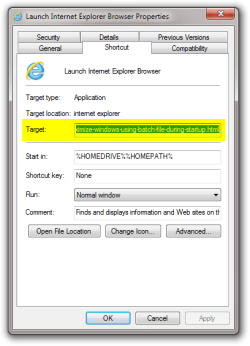
You mean the so called kiosk mode (F11). That can be done with -k switch in shortcut target. For instance to open this page in kiosk mode in IE from a shortcut, just create a new shortcut and add this to Target:

Shortcut to open this page in 32-bit IE (default), in kiosk mode on a 64-bit Windows 7:

"%programfiles(x86)%\internet explorer\iexplore.exe" -k http://www.sevenforums.com/general-discussion/139966-maximize-windows-using-batch-file-during-startup.html

Shortcut to open this page in 64-bit IE, in kiosk mode on a 64-bit Windows 7, OR to open this page in 32-bit IE, in kiosk mode on a 32-bit Windows 7:

"%programfiles%\internet explorer\iexplore.exe" -k http://www.sevenforums.com/general-discussion/139966-maximize-windows-using-batch-file-during-startup.html

To "decode" that line, there's first the path to IE, followed by the switch -k which opens IE in borderless kiosk mode, followed by the URL of the site you want to open.

Maximize Windows using batch file during startup-shortcut_target.png

Kari

Last edited by Kari; 24 Jan 2011 at 01:53 AM..
My System SpecsSystem Spec
24 Jan 2011   #6

Windows 7 Ultimate x64


I can find these all in the IE shortcut, but not the website shortcut(No Maximize windows options and the "Target")
Everything I changed on the IE Shortcut(the Maximize Windows and the -K options) doesn't affect anything on the website shortcut. Thus, I put the website shortcut on the startup, the webpage still pops up like the normal screen.
My System SpecsSystem Spec
24 Jan 2011   #7

Windows 7 x64 Ultimate
A Finnish immigrant in Leipzig, Germany


Let's try one more time. Follow these instructions exactly as written, doing every step as told and nothing else.

This example creates a shortcut that opens Seven Forums in Internet Explorer borderless kiosk mode (same as if F11 is pressed), and saves the shortcut in Startup folder so it is automatically run every time Windows is launched:
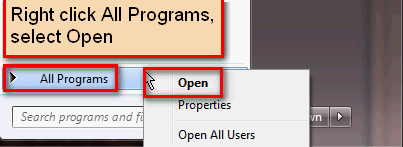
  1. Click Start Orb
  2. If you want this shortcut to be launched only when logging in to the current user account, right click All Programs, select Open, continue then from step 4
    .
    Maximize Windows using batch file during startup-startmenu_programs_open.png
    .
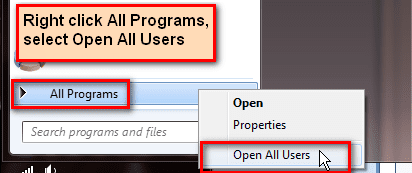
  3. If you want this shortcut to be launched when logging in to any user account, right click All Programs, select Open All Users
    .
    Maximize Windows using batch file during startup-startmenu_programs_open_all_users.png
    .
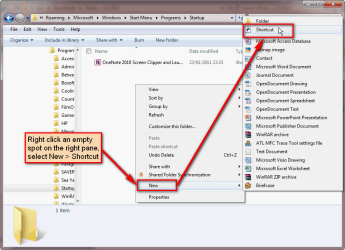
  4. An explorer window opens, showing your personal Start Menu folder or the Start Menu folder for all users, depending on your choice above (step 2 or 3). Double click Programs, then double click Startup
  5. When in Startup folder, right click an empty spot on the right pane
  6. Select New > Shortcut
    .
    Maximize Windows using batch file during startup-shortcut_create_1.png
    .
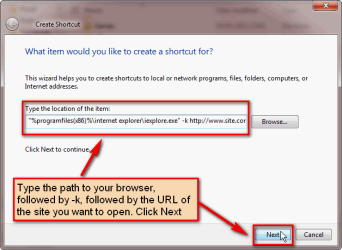
  7. Type this under Type the location of the item exactly as written here:
    1. If you are using Windows x64:
      "%programfiles(x86)%\internet explorer\iexplore.exe" -k http://www.sevenforums.com
    2. If you are using Windows x86:
      "%programfiles%\internet explorer\iexplore.exe" -k http://www.sevenforums.com
  8. Click Next
    .
    Maximize Windows using batch file during startup-shortcut_create_2.png
    .
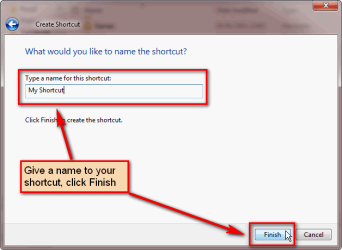
  9. Name the shortcut as you wish, click Finish
    .
    Maximize Windows using batch file during startup-shortcut_create_3.png
That's it. Now you have a shortcut that opens IE in kiosk mode, showing Seven Forums front page every time when Windows is started. You can replace the Seven Forums URL used in this example with any web address you want to, to open any site.
Maximize Windows using batch file during startup-shortcut_create_4.png
Kari

Last edited by Kari; 29 Jan 2011 at 06:37 AM.. Reason: Added option for All Users (step 3)
My System SpecsSystem Spec
Reply

 Maximize Windows using batch file during startup problems?


Thread Tools


Similar help and support threads for: Maximize Windows using batch file during startup
Thread Forum
[Help] Crash Windows 7 Computer, Batch File [Wrong Section?] General Discussion
Solved Batch File that grabs file names from folder to insert into batch file General Discussion
Is it possible to create a windows batch file to do this? General Discussion
batch file open file for program in the startup folder General Discussion
Batch File Error Windows 7 x64 General Discussion


All times are GMT -5. The time now is 03:29 AM.


Seven Forums Android App Seven Forums IOS App Follow us on Facebook

Windows 7 Forums is an independent web site and has not been authorized,
sponsored, or otherwise approved by Microsoft Corporation.
"Windows 7" and related materials are trademarks of Microsoft Corp.
© Designer Media Ltd
  

1 2 3 4 5 6 7 8 9 10 11 12 13 14 15 16 17 18 19 20 21 22 23 24 25 26 27 28 29 30 31 32