hi Brink
on Page one of this topic:
http://www.sevenforums.com/tutorials/265-start-menu-customize.html
option one
section 3 To Customize the Start Menu
screenshot 3
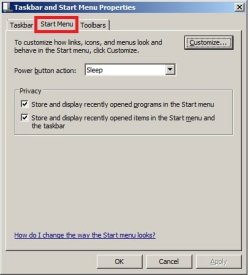
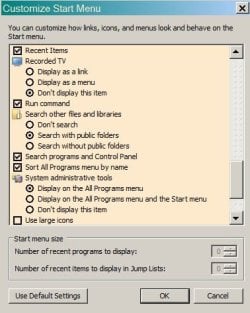
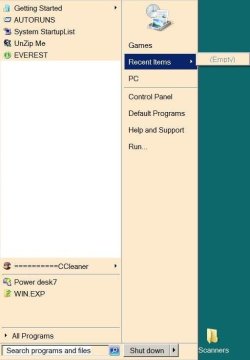
I have "recent items" checked, however in the "Start menu size" I have no option to change the # of items displayed (see s/shot #1), so consequently I have no recent items to show in the start menu (s/shot #2)... sigh. Is this a "feature" when using the classic theme in Win7Pro perchance?
I don't want a context menu to drop down... just a list of my most recently used documents/jpgs/programs. I don't want a recent items list on the taskbar. Also I don't want it appearing under the programs list (see s/shot #2).
Am I asking too much?
argh... ty for any help/advice you can offer
bootsmom
on Page one of this topic:
http://www.sevenforums.com/tutorials/265-start-menu-customize.html
option one
section 3 To Customize the Start Menu
screenshot 3
I have "recent items" checked, however in the "Start menu size" I have no option to change the # of items displayed (see s/shot #1), so consequently I have no recent items to show in the start menu (s/shot #2)... sigh. Is this a "feature" when using the classic theme in Win7Pro perchance?
I don't want a context menu to drop down... just a list of my most recently used documents/jpgs/programs. I don't want a recent items list on the taskbar. Also I don't want it appearing under the programs list (see s/shot #2).
Am I asking too much?
argh... ty for any help/advice you can offer
bootsmom
Attachments
My Computer
At a glance
Windows 7 Pro 64-bitIntel Pentium III Xeon, 2600 MHz (7.5 x3036 MBIntel
- Computer Manufacturer/Model Number
- Dell Vostro 220
- OS
- Windows 7 Pro 64-bit
- CPU
- Intel Pentium III Xeon, 2600 MHz (7.5 x
- Motherboard
- Intel Eaglelake
- Memory
- 3036 MB
- Graphics Card(s)
- Intel
- Sound Card
- Realtek High Definition Audio
- Monitor(s) Displays
- ASUS VH1920 (April 2011)
- Screen Resolution
- 1366 x 768(recommended)
- Hard Drives
- WDC WD3200AAKS-75L9A0 (298 GB, IDE)
- Case
- Dell desktop
- Cooling
- unknown
- Keyboard
- Microsoft
- Mouse
- Logitech rollerball
- Other Info
- Classic Theme