Windows 7 Forums


Windows 7: Icon changes when pinned to taskbar

28 Jan 2011   #1
whs

Vista, Windows7, Mint Mate, Zorin, Windows 8
Florida in winter, Black Forest/Germany
 
 
Icon changes when pinned to taskbar

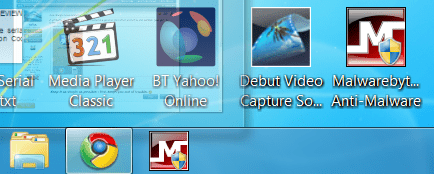
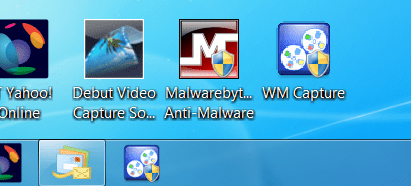
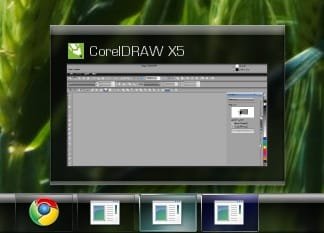
A perfectly good shortcut icon will becoma a generic icon when pinned to the taskbar (see pic). Is there any cure for that?

Attached Images
 
My System SpecsSystem Spec

28 Jan 2011   #2

Microsoft Windows 7 Home Premium 64-bit 7601 Multiprocessor Free Service Pack 1
Cornwall UK


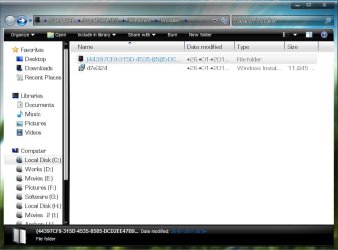
It doesn't change it on my set up.see here:
Icon changes when pinned to taskbar-capture84.png
Perhaps running sfc /scannow might help!
My System SpecsSystem Spec
28 Jan 2011   #3

Windows 7 Ultimate x64 SP1, Windows 8 Pro x64
Florida, USA


Is it all shortcuts or just that one?
My System SpecsSystem Spec
.


28 Jan 2011   #4

64-bit Windows 7 Ultimate SP1 & Windows 8 Enterprise
Texas


Hello Wolfgang,

If you had moved or deleted the shortcut from the desktop after you had pinned it to the taskbar, then it's icon would turn like that since the link between them is broken.

As a test, see if right clicking directly on that program's exe file and clicking on "Pin to taskbar" may keep it's icon instead.
My System SpecsSystem Spec
28 Jan 2011   #5
whs

Vista, Windows7, Mint Mate, Zorin, Windows 8
Florida in winter, Black Forest/Germany


Quote   Quote: Originally Posted by pbcopter View Post
Is it all shortcuts or just that one?
Just that one.
My System SpecsSystem Spec
28 Jan 2011   #6
whs

Vista, Windows7, Mint Mate, Zorin, Windows 8
Florida in winter, Black Forest/Germany


Shawn, I did not delete the shortcut from the desktop. But the funny thing is, the program.exe has the same generic icon. Only the desktop shortcut comes out right - is also correct in Properties > Change Icon.
My System SpecsSystem Spec
28 Jan 2011   #7

64-bit Windows 7 Ultimate SP1 & Windows 8 Enterprise
Texas


What program is that?

I'll do some playing with it to see if it does the same for me as well.
My System SpecsSystem Spec
28 Jan 2011   #8

Windows 7 Ultimate x64 SP1, Windows 8 Pro x64
Florida, USA


I've had a few applications that the program.exe icon was the same generic icon and I renamed the .exe to something different and the correct icon appeared. This then allowed the correct icon to be pinned.

I really don't know why this happens.
My System SpecsSystem Spec
28 Jan 2011   #9
whs

Vista, Windows7, Mint Mate, Zorin, Windows 8
Florida in winter, Black Forest/Germany


Quote   Quote: Originally Posted by Brink View Post
What program is that?

I'll do some playing with it to see if it does the same for me as well.
Thanks Shawn, it is this program WM Capture - Super High Quality Video Recorder But please don't waste too much time on it. It is only a little annoyance and not a big problem.
My System SpecsSystem Spec
28 Jan 2011   #10

Microsoft Windows 7 Home Premium 64-bit 7601 Multiprocessor Free Service Pack 1
Cornwall UK


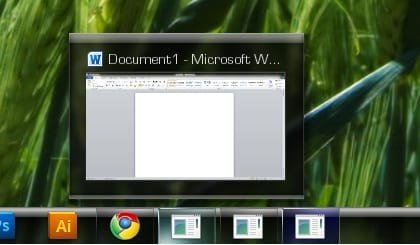
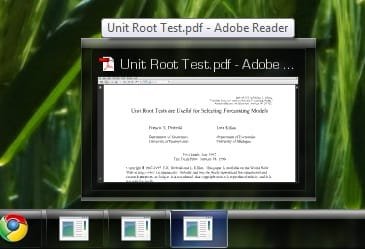
Tis OK on mine:
Icon changes when pinned to taskbar-capture85.png
My System SpecsSystem Spec
Reply

 Icon changes when pinned to taskbar problems?


Thread Tools


Similar help and support threads for: Icon changes when pinned to taskbar
Thread Forum
Solved Pinned Taskbar item open new icon instead of on top of pinned item? General Discussion
Solved pinned taskbar icon always hovered . General Discussion
Solved No icon when steam is pinned to taskbar General Discussion
Icon Pinned to taskbar General Discussion
Icon pinned to taskbar and cannot be unpinned General Discussion


All times are GMT -5. The time now is 10:37 AM.


Seven Forums Android App Seven Forums IOS App Follow us on Facebook

Windows 7 Forums is an independent web site and has not been authorized,
sponsored, or otherwise approved by Microsoft Corporation.
"Windows 7" and related materials are trademarks of Microsoft Corp.
© Designer Media Ltd
  

1 2 3 4 5 6 7 8 9 10 11 12 13 14 15 16 17 18 19 20 21 22 23 24 25 26 27 28 29 30 31 32