| Windows 7: Help my friend. |
05 Feb 2011
|
#1 | | Windows 7 Home Premium 64-Bit OS New Zealand |
Help my friend. Okay, So my friend is having issues with his taskbar....He is using vista but I tried to sort it using team viewer but that did not work.
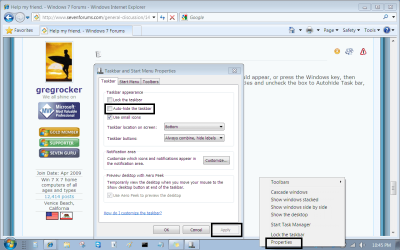
Please help him. Picture below xD | My System Specs |
| System Manufacturer/Model Number HP-Pavillion a6000 case, Hp Pavillion dv5000 NoteBook OS Windows 7 Home Premium 64-Bit OS CPU Pentium D 3gh Desktop, 1.86gh t1350 Notebook Motherboard Asus P5ld2-vm Memory 4 gb DDR2 Graphics Card ATI Radeon Hd 4670 Sound Card Realtek-HD audio Monitor(s) Displays H-P vp17'', Hp 15" Notebook. Screen Resolution 1280x1024, 1280x800 Keyboard Logitech MK 250 Mouse Logitech MK 250 PSU ATX 12v 500w Case Pavilion Cooling 2x fans 3x Heatsink Hard Drives 1x 500 gb Sata
1x 160 Sata
1x 250 IDE
1x120gb Sata Internet Speed Depends Other Info Yay, this is info. |
06 Feb 2011
|
#2 | | Windows 8 Release Preview Belgrade, Serbia |

Are you referring to the white bar between your taskbar and... whatever that weird window thing is in the background. | My System Specs | | System Manufacturer/Model Number Custom OS Windows 8 Release Preview CPU Intel Core2Duo E7500 Motherboard Gigabyte EP43-UD3L Memory Kingston 4GB DDR2 (2x2GB) Graphics Card nVidia GeForce 9800GT Sound Card Realtek High Definition Audio Monitor(s) Displays ASUS VH222D WIDE HD 1080P Screen Resolution 1920x1080 Keyboard Logitech Wireless Combo MK260 Mouse Logitech Wireless Combo MK260 PSU 500W Case Custom Midi Tower Hard Drives Western Digital WD3200KS. SATA Internet Speed DSL 1.5M Other Info Speakers: Labtec Pulse 285 S-0158B
Webcam: Logitech Webcam C100 |
06 Feb 2011
|
#3 | | |
If that is Vista then I have to ask did the Windows 7 style task bar come from a reputable source? Also what is the problem in question? I see nothing other than a task bar and a program that looks suspiciously like a keygen or intro of sorts. More info is needed. | My System Specs | | System Manufacturer/Model Number Samsung Chronos 7 OS windows 7 Pro 64Bit CPU 2.2 GHz Intel Core i7-2675QM Memory 8GB Graphics Card Intel HD Graphics 3000/Radeon HD 6490M Sound Card Realtek High Definition Audio Monitor(s) Displays Built in LCD and external Dell 22 inch LCD Screen Resolution 1600x900 Hard Drives 1 TB HDD Internet Speed 20 MBPS Down 1500 KBPS Up |
06 Feb 2011
|
#4 | | Windows 7 Home Premium 64-Bit OS New Zealand |
This will solve both questions.
That is my friends computer...everything in that window...Windows 7 is mine
Teamviewer allows me to see his desktop, use his mouse and keyboard via my own.
That white bar you're seeing is his taskbar. I used the snipper tool for that. xD
Please help.
Kinda regards Rangi and his friend Sam | My System Specs | | System Manufacturer/Model Number HP-Pavillion a6000 case, Hp Pavillion dv5000 NoteBook OS Windows 7 Home Premium 64-Bit OS CPU Pentium D 3gh Desktop, 1.86gh t1350 Notebook Motherboard Asus P5ld2-vm Memory 4 gb DDR2 Graphics Card ATI Radeon Hd 4670 Sound Card Realtek-HD audio Monitor(s) Displays H-P vp17'', Hp 15" Notebook. Screen Resolution 1280x1024, 1280x800 Keyboard Logitech MK 250 Mouse Logitech MK 250 PSU ATX 12v 500w Case Pavilion Cooling 2x fans 3x Heatsink Hard Drives 1x 500 gb Sata
1x 160 Sata
1x 250 IDE
1x120gb Sata Internet Speed Depends Other Info Yay, this is info. |
06 Feb 2011
|
#5 | | Win7 x 6 PC's California, Florida, Boston |
Does your friend have a taskbar at all, or can you just not see it?
If the taskbar doesn't reappear after restart, press the Windows flag on keyboard, type CMD in Start Search box, rightclick on Command Box result to Run as Admin, then run sfc /scannow
If this doesn't repair it, have him put in his Vista DVD, run a Repair Install from the desktop.
Last edited by gregrocker; 06 Feb 2011 at 09:42 PM..
| My System Specs | | |
06 Feb 2011
|
#6 | | Windows 7 Home Premium 64-Bit OS New Zealand |
lololol. He has windows vista.
When ever I press "start" on my keyboard his taskbabr will show.
I do this via TeamViewer.
I shall ask him if he has a repair disc or something. | My System Specs | | System Manufacturer/Model Number HP-Pavillion a6000 case, Hp Pavillion dv5000 NoteBook OS Windows 7 Home Premium 64-Bit OS CPU Pentium D 3gh Desktop, 1.86gh t1350 Notebook Motherboard Asus P5ld2-vm Memory 4 gb DDR2 Graphics Card ATI Radeon Hd 4670 Sound Card Realtek-HD audio Monitor(s) Displays H-P vp17'', Hp 15" Notebook. Screen Resolution 1280x1024, 1280x800 Keyboard Logitech MK 250 Mouse Logitech MK 250 PSU ATX 12v 500w Case Pavilion Cooling 2x fans 3x Heatsink Hard Drives 1x 500 gb Sata
1x 160 Sata
1x 250 IDE
1x120gb Sata Internet Speed Depends Other Info Yay, this is info. |
06 Feb 2011
|
#7 | | Win7 x 6 PC's California, Florida, Boston |
So the problem could be on your end. What performance problems is your friend having exactly? | My System Specs | | |
06 Feb 2011
|
#8 | | Windows 7 Home Premium 64-Bit OS New Zealand |
He has no performance problems per-say, But he can only view his task bar when her hits the windows key.
And he really wanted me to help but unfortunately, I know nothing of this sort of thing. 
Forgot to mention, he said it happened when he was randomly pressing keys on his keyboard out of boredom. :Roflmao:
He's only 12, lol. xD | My System Specs | | System Manufacturer/Model Number HP-Pavillion a6000 case, Hp Pavillion dv5000 NoteBook OS Windows 7 Home Premium 64-Bit OS CPU Pentium D 3gh Desktop, 1.86gh t1350 Notebook Motherboard Asus P5ld2-vm Memory 4 gb DDR2 Graphics Card ATI Radeon Hd 4670 Sound Card Realtek-HD audio Monitor(s) Displays H-P vp17'', Hp 15" Notebook. Screen Resolution 1280x1024, 1280x800 Keyboard Logitech MK 250 Mouse Logitech MK 250 PSU ATX 12v 500w Case Pavilion Cooling 2x fans 3x Heatsink Hard Drives 1x 500 gb Sata
1x 160 Sata
1x 250 IDE
1x120gb Sata Internet Speed Depends Other Info Yay, this is info. |
06 Feb 2011
|
#9 | | Win7 x 6 PC's California, Florida, Boston |
It looks like it's set to Auto-hide.
If you move the mouse cursor down to the bottom it should appear, or press the Windows key, then rightclick on an empty area of the task bar, select Properties and uncheck the box to Autohide Task bar, Apply. | My System Specs | | |
06 Feb 2011
|
#10 | | Windows 7 Home Premium 64-Bit OS New Zealand |
I know about auto-hide. And it isn't that, because auto-hide still shows the rest of the screen and not a white line. | My System Specs | | System Manufacturer/Model Number HP-Pavillion a6000 case, Hp Pavillion dv5000 NoteBook OS Windows 7 Home Premium 64-Bit OS CPU Pentium D 3gh Desktop, 1.86gh t1350 Notebook Motherboard Asus P5ld2-vm Memory 4 gb DDR2 Graphics Card ATI Radeon Hd 4670 Sound Card Realtek-HD audio Monitor(s) Displays H-P vp17'', Hp 15" Notebook. Screen Resolution 1280x1024, 1280x800 Keyboard Logitech MK 250 Mouse Logitech MK 250 PSU ATX 12v 500w Case Pavilion Cooling 2x fans 3x Heatsink Hard Drives 1x 500 gb Sata
1x 160 Sata
1x 250 IDE
1x120gb Sata Internet Speed Depends Other Info Yay, this is info. Help my friend. problems? All times are GMT -5. The time now is 12:52 AM. | |