
| Windows 7: My laptop wakes immediately after I put it to Sleep mode |
06 Feb 2011
|
#1 | | Microsoft Windows 7 Ultimate x64 (Build 7601 SP1) Bulgaria, Europe |
My laptop wakes immediately after I put it to Sleep mode It's been like this since I installed Windows 7.
No device is wake armed except for the keyboard but I sure don't press anything (I'd have noticed and wouldn't be here).
When I put it to Sleep it sleeps for a second and then wakes up. If I try again, it may sleep without problems but suddenly after a while it wakes up again.
I used -lastwake and -devicequery wake_armed, "unarmed" everything and now it's like this ...
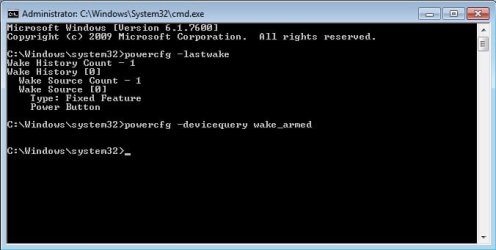
I don't know what's this fixed feature but I don't press ANYTHING. Any suggestions are welcome.
PS: The laptop is Asus x51lr. | My System Specs |
| OS Microsoft Windows 7 Ultimate x64 (Build 7601 SP1) CPU AMD Phenom II X2 555 @ X4 B55 (3.2Ghz, 2MB L2/6MB L3 Cache) Motherboard ASUS M4A785TD-V Evo Memory 4GB (2x2GB) Corsair DDR3, 1333Mhz Graphics Card ASUS ENGTX560, DirectCU, 1GD5 Sound Card 8-Channel HD Audio Monitor(s) Displays Philips 226CL2SB Screen Resolution 1920x1080p PSU Corsair TX650 v2 Hard Drives 500GB Seagate, SATA2, 7200rpm, 16MB/s Internet Speed 90mbps Fiber Optics |
06 Feb 2011
|
#2 | | Windows 7 Professional SP1 - x64 Lost In Space, Vol 8-New Kind Of Kick |
This might be a 3rd party that is set to update itself in automatic mode, so it triggers when it wants.
Can be also Windows Media Center, but hopefully there's a fix for that: HERE
That might Temporarily or check again your Power Plan Settings in the Control Panel.
Last edited by NoN; 06 Feb 2011 at 05:22 PM..
| My System Specs | | Computer type PC/Desktop System Manufacturer/Model Number [May-Dec-2012] - New Mid-tower - (is done!) OS Windows 7 Professional SP1 - x64 CPU Ivy Bridge Core i5 K Motherboard Asus H77 Chipset (ATX) Memory G.Skill DDR3 PC3-12800 (16Gb) Graphics Card Sapphire HD 7770 Vapor-X Oc Sound Card SBXi-Fi Xtreme Audio (w/5.1 sound system) Monitor(s) Displays Asus Led 21,5" Screen Resolution 16/9 Keyboard Razer + Razer gamepad Mouse Razer PSU 700w 80+ Gold (ErP 6 ready) Case Cooler Master Silencio 550-v2 (modded) Cooling Gelid Solutions (PWM Push/pull Fans) Hard Drives Internal:
500Go Sata 6Gb/s (x2)
500Go Sata 3Gb/s (x2)
SSD 60Go Sata 6Gb/s Antivirus MSE 4.2 Browser IE10 Rtm |
06 Feb 2011
|
#3 | | Microsoft Windows 7 Ultimate x64 (Build 7601 SP1) Bulgaria, Europe |
No triggers in Media Center. What should I check in Power Options exactly? Strange, but I put it to sleep and when I picked it up after 30-40mins, it woke up even before I had the chance to open it. | My System Specs | | OS Microsoft Windows 7 Ultimate x64 (Build 7601 SP1) CPU AMD Phenom II X2 555 @ X4 B55 (3.2Ghz, 2MB L2/6MB L3 Cache) Motherboard ASUS M4A785TD-V Evo Memory 4GB (2x2GB) Corsair DDR3, 1333Mhz Graphics Card ASUS ENGTX560, DirectCU, 1GD5 Sound Card 8-Channel HD Audio Monitor(s) Displays Philips 226CL2SB Screen Resolution 1920x1080p PSU Corsair TX650 v2 Hard Drives 500GB Seagate, SATA2, 7200rpm, 16MB/s Internet Speed 90mbps Fiber Optics |
06 Feb 2011
|
#4 | | Windows 7 Professional SP1 - x64 Lost In Space, Vol 8-New Kind Of Kick |

Quote: Originally Posted by nekov4ego No triggers in Media Center. What should I check in Power Options exactly? Strange, but I put it to sleep and when I picked it up after 30-40mins, it woke up even before I had the chance to open it. Have alook at this section: Tutorials - Windows 7 Forums[2]=Power%20Management
Go in "Power Management" section. Those tutorials might help you. | My System Specs | | Computer type PC/Desktop System Manufacturer/Model Number [May-Dec-2012] - New Mid-tower - (is done!) OS Windows 7 Professional SP1 - x64 CPU Ivy Bridge Core i5 K Motherboard Asus H77 Chipset (ATX) Memory G.Skill DDR3 PC3-12800 (16Gb) Graphics Card Sapphire HD 7770 Vapor-X Oc Sound Card SBXi-Fi Xtreme Audio (w/5.1 sound system) Monitor(s) Displays Asus Led 21,5" Screen Resolution 16/9 Keyboard Razer + Razer gamepad Mouse Razer PSU 700w 80+ Gold (ErP 6 ready) Case Cooler Master Silencio 550-v2 (modded) Cooling Gelid Solutions (PWM Push/pull Fans) Hard Drives Internal:
500Go Sata 6Gb/s (x2)
500Go Sata 3Gb/s (x2)
SSD 60Go Sata 6Gb/s Antivirus MSE 4.2 Browser IE10 Rtm |
06 Feb 2011
|
#5 | | Win7 x 6 PC's California, Florida, Boston |
Check the Performance Log on Advanced Tools page accessed by clicking your WEI score link at Computer>Properties for what might be hanging at suspend.
Update your display driver, try all versions of driver including Vista to see if Sleep will work correctly.
If these fail, tool the Pro's use to trace these issues: Trace Windows 7 boot/shutdown/hibernate/standby/resume issues - MSFN
Last edited by gregrocker; 06 Feb 2011 at 05:59 PM..
| My System Specs | | |
06 Feb 2011
|
#6 | | Windows 7 Professional SP1 - x64 Lost In Space, Vol 8-New Kind Of Kick |
Here a quick fix that might help either...: Fix for Windows 7 "random wake from sleep" problem « Jack Ukleja
This is for Wired Connection but can give a clue on Wireless. | My System Specs | | Computer type PC/Desktop System Manufacturer/Model Number [May-Dec-2012] - New Mid-tower - (is done!) OS Windows 7 Professional SP1 - x64 CPU Ivy Bridge Core i5 K Motherboard Asus H77 Chipset (ATX) Memory G.Skill DDR3 PC3-12800 (16Gb) Graphics Card Sapphire HD 7770 Vapor-X Oc Sound Card SBXi-Fi Xtreme Audio (w/5.1 sound system) Monitor(s) Displays Asus Led 21,5" Screen Resolution 16/9 Keyboard Razer + Razer gamepad Mouse Razer PSU 700w 80+ Gold (ErP 6 ready) Case Cooler Master Silencio 550-v2 (modded) Cooling Gelid Solutions (PWM Push/pull Fans) Hard Drives Internal:
500Go Sata 6Gb/s (x2)
500Go Sata 3Gb/s (x2)
SSD 60Go Sata 6Gb/s Antivirus MSE 4.2 Browser IE10 Rtm |
06 Feb 2011
|
#7 | | Microsoft Windows 7 Ultimate x64 (Build 7601 SP1) Bulgaria, Europe |
Thanks a lot guys. I will have to try after a week (it's my father's laptop, and he travels). But I will read everything tomorrow. I hope it will work.
As for the display driver -- there is only one (I know) for that GPU (and I am using the one for Vista) -- ATI Radeon X1100. | My System Specs | | OS Microsoft Windows 7 Ultimate x64 (Build 7601 SP1) CPU AMD Phenom II X2 555 @ X4 B55 (3.2Ghz, 2MB L2/6MB L3 Cache) Motherboard ASUS M4A785TD-V Evo Memory 4GB (2x2GB) Corsair DDR3, 1333Mhz Graphics Card ASUS ENGTX560, DirectCU, 1GD5 Sound Card 8-Channel HD Audio Monitor(s) Displays Philips 226CL2SB Screen Resolution 1920x1080p PSU Corsair TX650 v2 Hard Drives 500GB Seagate, SATA2, 7200rpm, 16MB/s Internet Speed 90mbps Fiber Optics |
12 Feb 2011
|
#8 | | Microsoft Windows 7 Ultimate x64 (Build 7601 SP1) Bulgaria, Europe |
My laptop keeps waking up and it is still because of that Fixed Feature Power Button, which I found is listed in Device Manager, in System Devices as ACPI Fixed Feature Power Button. It is the button I use to turn on my notebook, but I don't press it at all and it wakes up the machine; how is that possible? If it were because of the button, the laptop would be not only waking up but also turning on when it's completely off.
How can I fix this? Has anyone experienced something similar o_O? All my drivers are for Vista because there aren't any for Windows 7. | My System Specs | | OS Microsoft Windows 7 Ultimate x64 (Build 7601 SP1) CPU AMD Phenom II X2 555 @ X4 B55 (3.2Ghz, 2MB L2/6MB L3 Cache) Motherboard ASUS M4A785TD-V Evo Memory 4GB (2x2GB) Corsair DDR3, 1333Mhz Graphics Card ASUS ENGTX560, DirectCU, 1GD5 Sound Card 8-Channel HD Audio Monitor(s) Displays Philips 226CL2SB Screen Resolution 1920x1080p PSU Corsair TX650 v2 Hard Drives 500GB Seagate, SATA2, 7200rpm, 16MB/s Internet Speed 90mbps Fiber Optics My laptop wakes immediately after I put it to Sleep mode problems? All times are GMT -5. The time now is 01:33 PM. | |