Windows 7 Forums Search
Welcome to Windows 7 Forums. Our forum is dedicated to helping you find solutions with any problems, errors or issues you are experiencing with Windows 7. The Windows 7 forum also covers news and updates and has an extensive Windows 7 tutorial section that covers a wide range of tips and tricks.


Windows 7 - Batteries

 
02-06-2011   #1


Windows 7 Home Premium 64 bit SP1


Batteries

Is it bad to keep a computer plugged in?

Keeping it maxed out @ 100% I heard was bad.... Does it really matter? I go through the process of draining and charging, and I had my computer for 7 months.... In fact I am draining it now... So is it true? Does it really hurt the battery? Thanks


Last edited by 2010MegaScooter; 02-08-2011 at 08:19 PM..
My System SpecsSystem Spec
02-06-2011   #2


Windows 7 Ultimate x64


It's good to put it on battery and drain it down from time to time. Keeping it plugged in 100% of the time isn't ideal.
My System SpecsSystem Spec
02-08-2011   #3


Windows 7 Home Premium 64 bit SP1


Quote   Quote: Originally Posted by pparks1 View Post
It's good to put it on battery and drain it down from time to time. Keeping it plugged in 100% of the time isn't ideal.

Its Not Ideal? So It Would Be Bad For The Battery.. ?
My System SpecsSystem Spec
.


02-08-2011   #4


Windows 7 Home Premium


I've found that different brands give different information to maximize the life of the battery. I noticed that the manual for your laptop says that there is information on maximizing the life of the battery here:

The Battery information section of the Help and Support Learning Center provides the following tools and information:
● Battery Check tool to test battery performance
● Information on calibration, power management, and proper care and storage to maximize battery life
● Information on battery types, specifications, life cycles, and capacity
To access Battery information:
▲ Select Start > Help and Support > Learning Center > HP Power and Battery Learning
Center.

Not sure if that will help...
My System SpecsSystem Spec
02-09-2011   #5


W7 X-64 RTM,SUSE 11.1, XP PRO SP3 as a VM, VMware ESXi


Hi there
I think this is a hangover from the days of older batteries (NI CD / Nickel Cadmium)that used to have a "memory effect" which would "remember" the charging levels and deteriorate much more quickly. These batteries would hold their charge for shorter and shorter periods.

Modern batteries don't suffer from this memory effect but they still have a "Duty Cycle" (finite number of charge / discharge cycles) after which it will have to be replaced.

I don't think leaving a modern battery fully charged most f the time makes any difference at all although some people recommend that a BRAND NEW battery should be conditioned by charging and completely discharging a few times (3 or 4).

The Jury's still out on that one however.

Cheers
jimbo
My System SpecsSystem Spec
02-09-2011   #6
NoN


Windows 7 Professional SP1 - x64


Brand new modern Batteries have to be drained at least 3 times before reaching their best. Then it is a matter of customers action and how they use it in Power Plan settings. Drain it at least every month could be well...or everything two month but anyway it will die sooner or later. I don't give mine more than three years!
That's right NI CD / Nickel Cadmium had a memory effect...and on my first laptop, the battery dyed very fast due to me not caring.

I you think you're actual battery doesn't hold and it should, you can reset the Battery memory and Windows battery management by drain it 6 times the same day. This should erase old infos. I'm responding here to someone asking how to reset memory battery. There's not much to do...
My System SpecsSystem Spec
02-09-2011   #7


Windows 7 Home Premium 64 bit SP1


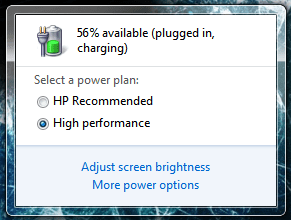
Well, I have drained and changed my battery ever since I had this computer... (July 17th 2010) If I sat on my computer all day..
Name:  1.PNG
Views: 140
Size:  48.9 KB
I think I could go about 6 charge cycles..
My System SpecsSystem Spec
02-09-2011   #8
NoN


Windows 7 Professional SP1 - x64


Quote   Quote: Originally Posted by 2010MegaScooter View Post
Well, I have drained and changed my battery ever since I had this computer... (July 17th 2010) If I sat on my computer all day..
Attachment 137517
I think I could go about 6 charge cycles..
Why no "Balanced" Power Plan settings for a laptop? High perf might kill your battery in a year!?!
My System SpecsSystem Spec
02-09-2011   #9


Windows 7 Ultimate X64 SP1


Personally, I keep the battery on my laptop fully charged, and in my laptop bag. WHen I am at home, i just plug straight into the mains, with no battery in at all.
My System SpecsSystem Spec
02-09-2011   #10


I've always followed the HP recommendations and conditioned my battery when I first got my laptop (about 1 1/2 years ago) and then drained the battery to 10% every 7 - 10 days. Didn't help --- the battery only lasted a little over a year (and of course --- it didn't die until it was just out of warranty ) and had to be replaced!
My System SpecsSystem Spec
Reply

 Batteries problems?


Thread Tools


Similar Threads for: Batteries
Thread Forum
Laptop batteries on Ebay... Hardware & Devices
AAA Rechargeable Batteries Chillout Room
Notebooks and their batteries Hardware & Devices
Question about laptop batteries... General Discussion
Batteries Hardware & Devices


All times are GMT -5. The time now is 01:11 AM.


Windows 7 Forums is an independent web site and has not been authorized,
sponsored, or otherwise approved by Microsoft Corporation.
"Windows 7" and related materials are trademarks of Microsoft Corp.
© Designer Media Ltd
  

1 2 3 4 5 6 7 8 9 10 11 12 13 14 15 16 17 18 19 20 21 22 23 24 25 26 27 28 29 30