| Windows 7: How to get rid of "Do you want to allow..."? |
25 Jun 2009
|
#1 | | |
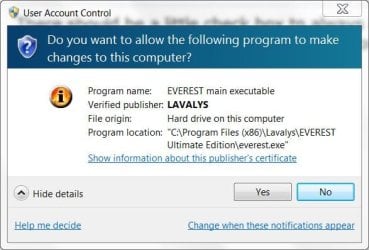
How to get rid of "Do you want to allow..."? Sorry if this problem has been asked to death, I just couldn't find any posts with a solution.
When I open certain programs, I get a pop-up window asking "Do you want to allow the following program to make changes to this computer?". How can I disable that on a per program basis?
I don't want to set the overall system "User Account Control Settings" to "Never Notify". | My System Specs |
| |
25 Jun 2009
|
#2 | | Windows 7 Ultimate Vista Ultimate x64 QLD, Cairns |
There should be a little check box to always allow this type of program when that message comes up and if you tick it then you wont get it any more. | My System Specs | | System Manufacturer/Model Number Home Brew OS Windows 7 Ultimate Vista Ultimate x64 CPU Core 2 Duo E8500 3.16Ghz @ 3.8Ghz Motherboard eVGA 750i FTW Memory 2x2Gigs Patriot PC2-6400 LL Graphics Card Inno3D GeForce GTX260 216 SP Monitor(s) Displays ASUS VW222U 22" 2ms Response time Screen Resolution 1680x1050 Keyboard Logitech G15 Gaming Keyboard Mouse Logitech G9 Gaming Mouse PSU HYTEC 600W & Thermaltake 650W Toughpower Power Exp Case Thermaltake Armor LCS (Liquid Cooling System) Cooling Liquid Cooling System Hard Drives SATA 150GB
SATA II 250GB
USB IDE 750GB Ext. |
25 Jun 2009
|
#3 | | |
Hi Mr. Grim,
there's no checkbox. Only Yes and No buttons and a link that says "Change when these notifications appear", which links to "User Account Control Settings". These settings seems to be system wide though. I want to change the setting per program. | My System Specs | | |
25 Jun 2009
|
#4 | | |
Do you mean these prompts?
Short answer= Without disabling UAC, You can't
It's the one thing that irks me about Seven. | My System Specs | | Computer type PC/Desktop System Manufacturer/Model Number SmartEyeball Custom Systems OS 8 Pro x64 CPU i7 3770K 4.6GHz Motherboard ASUS P8Z77 WS (great board good slot placement) Memory 16GB G.Skill Trident X 2400mhz Graphics Card 2x Gigabyte GTX 670 OC WindForce SLI Sound Card X-FI Forte 7.1 + ATH-AD900 Headphones Monitor(s) Displays x3 Dell U2410 / 58" Samsung / "40 Sony Screen Resolution 1920*1200 / 1920*1080 Keyboard Topre Realforce // Ducky Shine MX Black // Filco Ninja TKL Mouse Razer Imperator + Thermaltake Theron PSU Corsair AX1200W Case Thermaltake Level 10 GT Snow Edition Cooling Noctua NH-D14 Hard Drives 2x Intel 520 240GB (RAID 0) * 2x WD Caviar Blacks 2TB (RAID 0) * 2TB WD Caviar Black Antivirus MSE Browser Opera, Chrome, FF Other Info GT Extreme V2 Sim Racing Cockpit + 40" LCD and K/B Mouse stand ▼
Fanatec CSR Elite Wheel + Clubsport Pedals + CSR shifter/7GS ▼
Buttkicker v2 Seat Rumbler with Dedicated 5.1 and Sub Woofer attached to frame ▼
=
Bloody Big Grin |
25 Jun 2009
|
#5 | | |
Yes smarteyeball, that's the one. Sorry to hear that I can't disable it. It seems incredibly stupid if you can't deem an already installed program as safe and bypass this question?
Thanks, Don | My System Specs | | |
25 Jun 2009
|
#6 | | |
It's part of the 'revamped' UAC which provides better security. There's no 'whitelist' option to avoid malware/viruses from circumventing the UAC. ie adding themselves to an allowed program list and then running unhindered.
In reality though, it's a massive pita. | My System Specs | | Computer type PC/Desktop System Manufacturer/Model Number SmartEyeball Custom Systems OS 8 Pro x64 CPU i7 3770K 4.6GHz Motherboard ASUS P8Z77 WS (great board good slot placement) Memory 16GB G.Skill Trident X 2400mhz Graphics Card 2x Gigabyte GTX 670 OC WindForce SLI Sound Card X-FI Forte 7.1 + ATH-AD900 Headphones Monitor(s) Displays x3 Dell U2410 / 58" Samsung / "40 Sony Screen Resolution 1920*1200 / 1920*1080 Keyboard Topre Realforce // Ducky Shine MX Black // Filco Ninja TKL Mouse Razer Imperator + Thermaltake Theron PSU Corsair AX1200W Case Thermaltake Level 10 GT Snow Edition Cooling Noctua NH-D14 Hard Drives 2x Intel 520 240GB (RAID 0) * 2x WD Caviar Blacks 2TB (RAID 0) * 2TB WD Caviar Black Antivirus MSE Browser Opera, Chrome, FF Other Info GT Extreme V2 Sim Racing Cockpit + 40" LCD and K/B Mouse stand ▼
Fanatec CSR Elite Wheel + Clubsport Pedals + CSR shifter/7GS ▼
Buttkicker v2 Seat Rumbler with Dedicated 5.1 and Sub Woofer attached to frame ▼
=
Bloody Big Grin |
25 Jun 2009
|
#7 | | Windows 7 Ultimate x64, Mint 9 In the Crust |
If you really want to get rid of it, go into Control panel, and user Accounts. Select your account, and click on Turn Off UAC Prompts. Then restart.
THIS IS NOT RECOMMENDED, and most of us agree it is best to leave it on.
~Lordbob | My System Specs | | System Manufacturer/Model Number Hera OS Windows 7 Ultimate x64, Mint 9 CPU Intel i5-2500k Motherboard ASUS P8P67 Pro Memory 2x 4Gb Corsair VENGEANCE DDR3-1600 Graphics Card NVidia GeForce N260GTX Twin Frozr Sound Card Realtek HD OnBoard Audio Monitor(s) Displays ASUS 24" Monitor Screen Resolution 1920x1080 Keyboard Razer Tarantula Mouse Razer Lachesis PSU Cooler Master Real Power Pro 750W Case Cooler Master Haf 932 Cooling Fans Hard Drives G.SKILL Phoenix Series 60GB SATA II MLC Internal Solid State Drive (SSD)
SAMSUNG Spinpoint F3R 1TB 7200 RPM 32MB Cache SATA II Internet Speed not fast enough |
25 Jun 2009
|
#8 | | Win 7 RC 64bit b7229 Italy/Russia |

Quote: Originally Posted by Lordbob75 If you really want to get rid of it, go into Control panel, and user Accounts. Select your account, and click on Turn Off UAC Prompts. Then restart.
THIS IS NOT RECOMMENDED, and most of us agree it is best to leave it on.
~Lordbob Why not? I never used UAC since XP, just use a good antimalware suite in manual mode (that promts you for each action) and its the same as UAC even better. | My System Specs | | OS Win 7 RC 64bit b7229 CPU Intel Core 2 DUO E8400 3,0Ghz 6Mb STEP E0 Motherboard ASUS P5Q-E Memory TEAM GROUP ELITE DDR2 800 PC8500 (5-5-5-15) 2*2GB Graphics Card Club3D ATI HD4850 Acrtic Cooling Ed. 512Mb 256Bit GDDR-3 Sound Card Sound Blaster Audigy 2ZS Monitor(s) Displays LG 22" W2252TQ 2Ms 10000:1 DVI Screen Resolution 1680X1050 Keyboard Trust Slim Mouse Razer Copperhead 2000 DPI PSU Top Silent ATX 560W Case ThermalTake Tsunami Dream Cooling Zalman CNPS 9700 NT Hard Drives WD SATA2 400GB
Maxtor SATA2 500GB
Samsung SATA2 250GB Internet Speed 8mbps |
25 Jun 2009
|
#9 | | Windows 7 Ultimate x64, Mint 9 In the Crust |

Quote: Originally Posted by John Henry Why not? I never used UAC since XP, just use a good antimalware suite in manual mode (that promts you for each action) and its the same as UAC even better. Its really up to you. I have not had a problem with it, though I have gotten many less viruses since XP, but that could be because I have grown up since then..........
Anyways, M$ doesn't recommend turning it off, but its still your choice. It annoys me as well, but since it happens only a few times a day, I am ok with it for the peace of mind.
~Lordbob | My System Specs | | System Manufacturer/Model Number Hera OS Windows 7 Ultimate x64, Mint 9 CPU Intel i5-2500k Motherboard ASUS P8P67 Pro Memory 2x 4Gb Corsair VENGEANCE DDR3-1600 Graphics Card NVidia GeForce N260GTX Twin Frozr Sound Card Realtek HD OnBoard Audio Monitor(s) Displays ASUS 24" Monitor Screen Resolution 1920x1080 Keyboard Razer Tarantula Mouse Razer Lachesis PSU Cooler Master Real Power Pro 750W Case Cooler Master Haf 932 Cooling Fans Hard Drives G.SKILL Phoenix Series 60GB SATA II MLC Internal Solid State Drive (SSD)
SAMSUNG Spinpoint F3R 1TB 7200 RPM 32MB Cache SATA II Internet Speed not fast enough |
25 Jun 2009
|
#10 | | Win 7 RC 64bit b7229 Italy/Russia |

Quote: Originally Posted by Lordbob75 Its really up to you. I have not had a problem with it, though I have gotten many less viruses since XP, but that could be because I have grown up since then..........
Anyways, M$ doesn't recommend turning it off, but its still your choice. It annoys me as well, but since it happens only a few times a day, I am ok with it for the peace of mind.
~Lordbob I had programs like hwmonitor, coretemp and cpuz running each day more than once and i always got uac boring me. | My System Specs | | OS Win 7 RC 64bit b7229 CPU Intel Core 2 DUO E8400 3,0Ghz 6Mb STEP E0 Motherboard ASUS P5Q-E Memory TEAM GROUP ELITE DDR2 800 PC8500 (5-5-5-15) 2*2GB Graphics Card Club3D ATI HD4850 Acrtic Cooling Ed. 512Mb 256Bit GDDR-3 Sound Card Sound Blaster Audigy 2ZS Monitor(s) Displays LG 22" W2252TQ 2Ms 10000:1 DVI Screen Resolution 1680X1050 Keyboard Trust Slim Mouse Razer Copperhead 2000 DPI PSU Top Silent ATX 560W Case ThermalTake Tsunami Dream Cooling Zalman CNPS 9700 NT Hard Drives WD SATA2 400GB
Maxtor SATA2 500GB
Samsung SATA2 250GB Internet Speed 8mbps How to get rid of "Do you want to allow..."? problems? All times are GMT -5. The time now is 06:02 PM. | |