| Windows 7: Windows File Missing! Any Ideas? |
09 Feb 2011
|
#1 | | |
Windows File Missing! Any Ideas? I am getting an error on my reliability history that states my Wlanext.exe file is missing. Or shall I say I discovered that the file is missing. I have 2 computers that have the exact same Windows 7 Ult install. On one I have this file in my C/windows/system32/wlanext, on this computer it does not exist. My wireless seems to be working fine right now, but I don't like the fact I am generating so many problem reports. I have gotten 12 of them since this morning.
Is this a situation where I would use my install disc to have it do a repair? If so, can someone please step me thru this process as I have not had to do it before. Or is this a sfc/scanow process?
Sorry, for the questions, but I actually have not had too many problems with any of my Windows 7 OS's yet. Knock on wood!!!
__________________ | My System Specs |
| System Manufacturer/Model Number Panasonic Toughbook CF30 MK3 OS W7 ULT CPU Intel L9300 1.6Ghz W/VPro Motherboard America MegaTrends Memory 4G DDR2 Graphics Card Intel GMA4500 Sound Card SoundMax Monitor(s) Displays DFP W/CircularPolarization 1000 Nit Touch Screen Resolution 1280X920 Keyboard Emmissive Mouse Microsoft BT5000 PSU N/A Case Magnesium Cooling Passive Hard Drives Samsung 470 256GB SSD Internet Speed U-Verse Extreme 21MBPS, Verizon Pantech UML 290 4G LTE Other Info Mil Spec G rated
Hot Swappable HDD Caddy W/Heater
Heated Touch Display
100% Sealed
I have taken this up to Mt. Everest and back down, Unit Got Dirty Many Times. Submerged It Into Snow And Let It Clean Itself. You Can't Put A Price On That Stuff To Me. When I Need My Laptop To Work, It Has To Work. |
09 Feb 2011
|
#2 | | Win 8 Release candidate 8400 |

Quote: Originally Posted by toughbook I am getting an error on my reliability history that states my Wlanext.exe file is missing. Or shall I say I discovered that the file is missing. I have 2 computers that have the exact same Windows 7 Ult install. On one I have this file in my C/windows/system32/wlanext, on this computer it does not exist. My wireless seems to be working fine right now, but I don't like the fact I am generating so many problem reports. I have gotten 12 of them since this morning.
Is this a situation where I would use my install disc to have it do a repair? If so, can someone please step me thru this process as I have not had to do it before. Or is this a sfc/scanow process?
Sorry, for the questions, but I actually have not had too many problems with any of my Windows 7 OS's yet. Knock on wood!!!
__________________
SFC /SCANNOW first and if it doesnt work then a repair install.
for sfc go start>cmd>right click and run as admin>sfc /scannow
Ken J | My System Specs | | System Manufacturer/Model Number HP Pavillion dv-7 1005 Tx OS Win 8 Release candidate 8400 CPU 2@2.4 Memory 4 gigs Graphics Card Nvidia 9600M Sound Card HD built-in Monitor(s) Displays 17" Wxga Screen Resolution 1440x900 Cooling none Internet Speed 45Mb down 5Mb up |
09 Feb 2011
|
#3 | | |
Crazy things are happening! I ran the sfc scannow prompt and it did not find anything wrong. I rebooted, and the file is back in my system32 like it should be. However, I just looked at my reliability monitor and it shows the same trouble code at 8:30 when I rebooted! My wireless connects just fine though. I am stumped.... | My System Specs | | System Manufacturer/Model Number Panasonic Toughbook CF30 MK3 OS W7 ULT CPU Intel L9300 1.6Ghz W/VPro Motherboard America MegaTrends Memory 4G DDR2 Graphics Card Intel GMA4500 Sound Card SoundMax Monitor(s) Displays DFP W/CircularPolarization 1000 Nit Touch Screen Resolution 1280X920 Keyboard Emmissive Mouse Microsoft BT5000 PSU N/A Case Magnesium Cooling Passive Hard Drives Samsung 470 256GB SSD Internet Speed U-Verse Extreme 21MBPS, Verizon Pantech UML 290 4G LTE Other Info Mil Spec G rated
Hot Swappable HDD Caddy W/Heater
Heated Touch Display
100% Sealed
I have taken this up to Mt. Everest and back down, Unit Got Dirty Many Times. Submerged It Into Snow And Let It Clean Itself. You Can't Put A Price On That Stuff To Me. When I Need My Laptop To Work, It Has To Work. |
09 Feb 2011
|
#4 | | Win 7 Home Premium 64bit Ver 6.1.7600 Build 7601 - SP1 Central Pa. |
Can you post the trouble code or a screen shot of same? | My System Specs | | Computer type PC/Desktop System Manufacturer/Model Number Gateway DX4831e (Mid-Tower Desktop) OS Win 7 Home Premium 64bit Ver 6.1.7600 Build 7601 - SP1 CPU Intel i3 530 2.93GHz, 2933MHz 2 Cores 4 Logical Processors Motherboard Gateway H57M01 133 megahertz Memory 6GB of 1,333MHz DDR3 SDRAM Graphics Card 32MB Intel Graphics Media Accelerator HD IGChip Sound Card Realtek High Definition Audio Monitor(s) Displays Gateway HX2000 20inch TFT active matrix TN Screen Resolution 1600 x 900 x 59 hertz Keyboard MS 'Natural' Standard PS/2 Enhanced 101-102 Key Mouse Gateway USB wired optical PSU 300watts. Case Mid-Tower Desktop Cooling Stock from Gateway Hard Drives WDC WD10EADS-00M2B0 [HDD] (1000.20 GB) -- drive 0,
HL-DT-ST DVDRAM GH41N [CD-ROM dr]
HP Photosmart Plus B210a e_series AIO Printer
Four card readers, and Four USB 2.0 Internet Speed Verizon FIOS 24.57Mbps Down - 5.68Mbps up Antivirus MSE Browser IE9.0.8112.16421-Upd ver 9.0.13, FireFox 19.2, Opera 12.14 Other Info BIOS: American Megatrends Inc. P01-A0 11/17/2009
System Specs by Belarc.
Join Date March 27th 2010 at 10:44:15 AM. System Manufacturer/Model Number Panasonic Toughbook CF30 MK3 OS W7 ULT CPU Intel L9300 1.6Ghz W/VPro Motherboard America MegaTrends Memory 4G DDR2 Graphics Card Intel GMA4500 Sound Card SoundMax Monitor(s) Displays DFP W/CircularPolarization 1000 Nit Touch Screen Resolution 1280X920 Keyboard Emmissive Mouse Microsoft BT5000 PSU N/A Case Magnesium Cooling Passive Hard Drives Samsung 470 256GB SSD Internet Speed U-Verse Extreme 21MBPS, Verizon Pantech UML 290 4G LTE Other Info Mil Spec G rated
Hot Swappable HDD Caddy W/Heater
Heated Touch Display
100% Sealed
I have taken this up to Mt. Everest and back down, Unit Got Dirty Many Times. Submerged It Into Snow And Let It Clean Itself. You Can't Put A Price On That Stuff To Me. When I Need My Laptop To Work, It Has To Work. |
10 Feb 2011
|
#6 | | |
Here is another one of my reliability monitor.
I would do a system restore, but I don't have a RP before this started. | My System Specs | | System Manufacturer/Model Number Panasonic Toughbook CF30 MK3 OS W7 ULT CPU Intel L9300 1.6Ghz W/VPro Motherboard America MegaTrends Memory 4G DDR2 Graphics Card Intel GMA4500 Sound Card SoundMax Monitor(s) Displays DFP W/CircularPolarization 1000 Nit Touch Screen Resolution 1280X920 Keyboard Emmissive Mouse Microsoft BT5000 PSU N/A Case Magnesium Cooling Passive Hard Drives Samsung 470 256GB SSD Internet Speed U-Verse Extreme 21MBPS, Verizon Pantech UML 290 4G LTE Other Info Mil Spec G rated
Hot Swappable HDD Caddy W/Heater
Heated Touch Display
100% Sealed
I have taken this up to Mt. Everest and back down, Unit Got Dirty Many Times. Submerged It Into Snow And Let It Clean Itself. You Can't Put A Price On That Stuff To Me. When I Need My Laptop To Work, It Has To Work. |
10 Feb 2011
|
#7 | | Win 7 Home Premium 64bit Ver 6.1.7600 Build 7601 - SP1 Central Pa. |
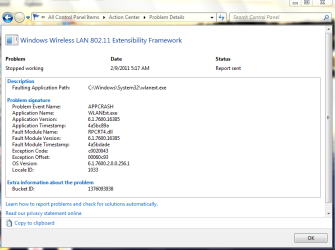
The exception code (c0020043) in the Wireless Lan Problem Report (post #5) points to a RPC_NT_INTERNAL_ERROR.
This is usually set by default, but check Remote Procedure Calls in Services:
Type services into the start menu search box and click on the one that has the gear type icon next to it.
Scroll down to Remote Procedure Call, the status should say started. The second, Remote Procedure Call Locator should say Manual.
You state: Quote: I have 2 computers that have the exact same Windows 7 Ult install. But, how similar are the two after that?
Do you have any third-party apps on this one that the other does not, if so, are they up to date?
Are they connected to the same router?
Are the hardware drivers used to gain access to the net up to date?
Can you tell if this one may have any factors that may cause interference to the router?
Are the Power Options the same or different?
Have you really been to Mt. Everest?
If nothing stands out, then I would go with your gut, and Ken's suggestion to do the repair install to see if the repair corrects the problem.
Steve | My System Specs | | Computer type PC/Desktop System Manufacturer/Model Number Gateway DX4831e (Mid-Tower Desktop) OS Win 7 Home Premium 64bit Ver 6.1.7600 Build 7601 - SP1 CPU Intel i3 530 2.93GHz, 2933MHz 2 Cores 4 Logical Processors Motherboard Gateway H57M01 133 megahertz Memory 6GB of 1,333MHz DDR3 SDRAM Graphics Card 32MB Intel Graphics Media Accelerator HD IGChip Sound Card Realtek High Definition Audio Monitor(s) Displays Gateway HX2000 20inch TFT active matrix TN Screen Resolution 1600 x 900 x 59 hertz Keyboard MS 'Natural' Standard PS/2 Enhanced 101-102 Key Mouse Gateway USB wired optical PSU 300watts. Case Mid-Tower Desktop Cooling Stock from Gateway Hard Drives WDC WD10EADS-00M2B0 [HDD] (1000.20 GB) -- drive 0,
HL-DT-ST DVDRAM GH41N [CD-ROM dr]
HP Photosmart Plus B210a e_series AIO Printer
Four card readers, and Four USB 2.0 Internet Speed Verizon FIOS 24.57Mbps Down - 5.68Mbps up Antivirus MSE Browser IE9.0.8112.16421-Upd ver 9.0.13, FireFox 19.2, Opera 12.14 Other Info BIOS: American Megatrends Inc. P01-A0 11/17/2009
System Specs by Belarc.
Join Date March 27th 2010 at 10:44:15 AM. |
10 Feb 2011
|
#8 | | |
ANAK.. The 2 Toughbooks are 95% the same hardware & software. The problem one has the Intel 5100AGN, the other has the 4965AGN.
I have started to track when the error occurs today. Everytime the computer comes out of sleep, restarts, connects to a new WAP, etc the code will show up.
Today I was at my house doing office work and both computers were using the same WAP, in the same room next to each other. Other computer didn't do it. It's index score is all the way at the top.
Yes, I have climbed the biggie. I just got back from Pikes Peak on my motorcycle, that was a blast. Put it this way, my Toughbook is always with me. In my mount in my vehicle, in my trunk on my Goldwing, etc. It's kinda like my security blanket
Thanks for any help you can and are providing. I have searched all over the web and MS for this problem. I will check your suggestions in just a few. | My System Specs | | System Manufacturer/Model Number Panasonic Toughbook CF30 MK3 OS W7 ULT CPU Intel L9300 1.6Ghz W/VPro Motherboard America MegaTrends Memory 4G DDR2 Graphics Card Intel GMA4500 Sound Card SoundMax Monitor(s) Displays DFP W/CircularPolarization 1000 Nit Touch Screen Resolution 1280X920 Keyboard Emmissive Mouse Microsoft BT5000 PSU N/A Case Magnesium Cooling Passive Hard Drives Samsung 470 256GB SSD Internet Speed U-Verse Extreme 21MBPS, Verizon Pantech UML 290 4G LTE Other Info Mil Spec G rated
Hot Swappable HDD Caddy W/Heater
Heated Touch Display
100% Sealed
I have taken this up to Mt. Everest and back down, Unit Got Dirty Many Times. Submerged It Into Snow And Let It Clean Itself. You Can't Put A Price On That Stuff To Me. When I Need My Laptop To Work, It Has To Work. |
11 Feb 2011
|
#9 | | Win 7 Home Premium 64bit Ver 6.1.7600 Build 7601 - SP1 Central Pa. |
You do not have the bit version of your OS listed (32 or 64). I think this link will have the latest driver versions (13.4.0.0) as of 11/29/2010: http://downloadcenter.intel.com/Sear...&FamilyId=1783 Some users were getting better results if they had the latest drivers. Do not use Device Manager to update if you have to.
There does not seem to be much affinity for that 5100AGN.
I was looking through this site: Intel 5100 AGN issues fixed yet? - Page 3 - Tech Support Forums - TechIMO.com, and came across this at post #27: Intel® WiFi Products — Power Save Polling (PSP) causes connection issues with some access points
From the Intel site: Quote: Symptom(s):
The following symptoms may be seen if a Wi-Fi access point (AP) or broadband Wi-Fi router does not properly support the Power Save Polling (PSP) feature: - Intermittent loss of Wi-Fi connection
- Inability to initiate a Wi-Fi connection
- Poor Wi-Fi connection data performance
It is kind of why I asked about your power options. | My System Specs | | Computer type PC/Desktop System Manufacturer/Model Number Gateway DX4831e (Mid-Tower Desktop) OS Win 7 Home Premium 64bit Ver 6.1.7600 Build 7601 - SP1 CPU Intel i3 530 2.93GHz, 2933MHz 2 Cores 4 Logical Processors Motherboard Gateway H57M01 133 megahertz Memory 6GB of 1,333MHz DDR3 SDRAM Graphics Card 32MB Intel Graphics Media Accelerator HD IGChip Sound Card Realtek High Definition Audio Monitor(s) Displays Gateway HX2000 20inch TFT active matrix TN Screen Resolution 1600 x 900 x 59 hertz Keyboard MS 'Natural' Standard PS/2 Enhanced 101-102 Key Mouse Gateway USB wired optical PSU 300watts. Case Mid-Tower Desktop Cooling Stock from Gateway Hard Drives WDC WD10EADS-00M2B0 [HDD] (1000.20 GB) -- drive 0,
HL-DT-ST DVDRAM GH41N [CD-ROM dr]
HP Photosmart Plus B210a e_series AIO Printer
Four card readers, and Four USB 2.0 Internet Speed Verizon FIOS 24.57Mbps Down - 5.68Mbps up Antivirus MSE Browser IE9.0.8112.16421-Upd ver 9.0.13, FireFox 19.2, Opera 12.14 Other Info BIOS: American Megatrends Inc. P01-A0 11/17/2009
System Specs by Belarc.
Join Date March 27th 2010 at 10:44:15 AM. |
11 Feb 2011
|
#10 | | |
Without a doubt, the 4965 is heads of shoulders better than the 5100. That freakin 4965 connects at a blink of an eye when I open my lid, say when it's coming out of sleep in the morning or such. Never a problem with it.
They are both 32 Bit machines. I am running the latest driver from Panasonic. There is one thing about these Toughbooks, they don't like Generic Drivers.
I just looked at my RM and my last fault was at 11:49 last night. I remember I had to do something real quick at that time before I went to bed. It came out of Resume this morning and there is no error code...Yet. I will watch it to see if it does pop a message.
Another wierd thing last night. I was plugged into my Ethernet last night for awhile and noticed that my white signal icons were misssing. As soon as I disconnected the Ethernet cord they would pop right back instantly??? | My System Specs | | System Manufacturer/Model Number Panasonic Toughbook CF30 MK3 OS W7 ULT CPU Intel L9300 1.6Ghz W/VPro Motherboard America MegaTrends Memory 4G DDR2 Graphics Card Intel GMA4500 Sound Card SoundMax Monitor(s) Displays DFP W/CircularPolarization 1000 Nit Touch Screen Resolution 1280X920 Keyboard Emmissive Mouse Microsoft BT5000 PSU N/A Case Magnesium Cooling Passive Hard Drives Samsung 470 256GB SSD Internet Speed U-Verse Extreme 21MBPS, Verizon Pantech UML 290 4G LTE Other Info Mil Spec G rated
Hot Swappable HDD Caddy W/Heater
Heated Touch Display
100% Sealed
I have taken this up to Mt. Everest and back down, Unit Got Dirty Many Times. Submerged It Into Snow And Let It Clean Itself. You Can't Put A Price On That Stuff To Me. When I Need My Laptop To Work, It Has To Work. Windows File Missing! Any Ideas? problems? All times are GMT -5. The time now is 06:07 PM. | |