| Windows 7: Reformat and secure data deletion |
17 Feb 2011
|
#1 | | Windows 7 Home Premium x64 SP 1 Florida |
Reformat and secure data deletion I erased the old Windows XP partition and created and formatted a new one, and reinstalled Windows XP. All this on a machine I want to sell. Does this securely erase data I previously had on the hard drive? Thanks. | My System Specs |
| Computer type PC/Desktop System Manufacturer/Model Number Dell Studio XPS 8100 OS Windows 7 Home Premium x64 SP 1 CPU Intel Core i7 860 @ 2.8 GHz Motherboard Dell 0T568R (CPU1) Memory 8.0 GB Dual Channel DDR3 @ 664 MHz (9-9-9-24) Graphics Card nVidia GeForce GTS 240 Sound Card M-Audio Delta Audiophile 2496 Monitor(s) Displays Dell 2407WFP Screen Resolution 1920x1200 Hard Drives 977 GB Western Digital WDC WD1001FAES-75W7A0 (SCSI) Antivirus MSE, MalwareBytes Anti-Malware Browser Firefox Other Info Microsoft Security Essentials, Mozilla Firefox, Mozilla Thunderbird. M-Audio Keystation 88es (keyboard controller), Western Digital Passport 250 GB external HD, Logitech Z2300 speaker system, two Mushkin Enhanced Mulholland 16GB USB flash drives, AKG K240 Studio headphones. |
17 Feb 2011
|
#2 | | 32bit: XP, Win7 H.P. / 64bit: 2008R2, Win7 Pro, Ultimate / Several flavors of Linux Denver, Colorado |

Quote: Originally Posted by gogreen I erased the old Windows XP partition and created and formatted a new one, and reinstalled Windows XP. All this on a machine I want to sell. Does this securely erase data I previously had on the hard drive? Thanks. No, you need a "wipe" utility to overwrite all free space.
Do a search as there are many free utilities to do this. (It helps to delete cache and temp directory files, empty trash, then defrag before running the wipe utility).
Regards,
GEWB | My System Specs | | System Manufacturer/Model Number (5 different computers booting up to 12 systems) OS 32bit: XP, Win7 H.P. / 64bit: 2008R2, Win7 Pro, Ultimate / Several flavors of Linux |
17 Feb 2011
|
#3 | | Windows 7 Home Premium x64 OEM --> RTM clean install The Mighty Maspujols, Spain |
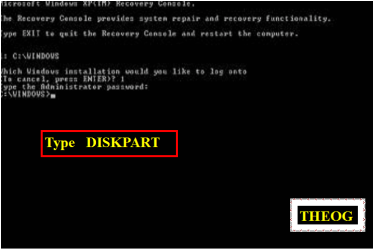
I don't think you need a 3rd party app. Following Bare Foot Kid's excellent tutorial using the diskpart command should sort you out.
Also see Microsoft's page for extra info. | My System Specs | | System Manufacturer/Model Number Toshiba Satellite L500 OS Windows 7 Home Premium x64 OEM --> RTM clean install CPU Intel T4400 Motherboard ? - laptop inbuilt ? Memory 4Gb Graphics Card ? - Mobile Intel(R) 4 Series Express Chipset Family ? Sound Card Realtek Monitor(s) Displays ? + extended to a 42" LG55PC plasma tele! Screen Resolution 1366 * 768 PSU ? Case ? Cooling ? Hard Drives 320Gb 5500rpm Internet Speed 3Meg, when it works. Other Info A LOWLY LAPTOP! |
17 Feb 2011
|
#4 | | 32bit: XP, Win7 H.P. / 64bit: 2008R2, Win7 Pro, Ultimate / Several flavors of Linux Denver, Colorado |

Quote: Originally Posted by allend66 I don't think you need a 3rd party app. Following Bare Foot Kid's excellent tutorial using the diskpart command should sort you out.
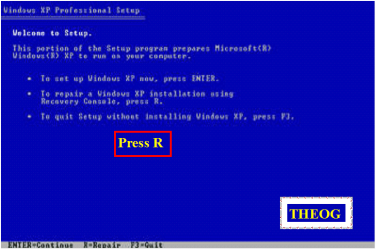
Also see Microsoft's page for extra info. Thanks for remembering that - old habits die slowly...but does the XP version have that switch?
Regards,
GEWB | My System Specs | | System Manufacturer/Model Number (5 different computers booting up to 12 systems) OS 32bit: XP, Win7 H.P. / 64bit: 2008R2, Win7 Pro, Ultimate / Several flavors of Linux |
17 Feb 2011
|
#5 | | Windows 7 Home Premium x64 OEM --> RTM clean install The Mighty Maspujols, Spain |

Quote: Originally Posted by GEWB Thanks for remembering that - old habits die slowly...but does the XP version have that switch?
Regards,
GEWB The link above seems to say so. | My System Specs | | System Manufacturer/Model Number Toshiba Satellite L500 OS Windows 7 Home Premium x64 OEM --> RTM clean install CPU Intel T4400 Motherboard ? - laptop inbuilt ? Memory 4Gb Graphics Card ? - Mobile Intel(R) 4 Series Express Chipset Family ? Sound Card Realtek Monitor(s) Displays ? + extended to a 42" LG55PC plasma tele! Screen Resolution 1366 * 768 PSU ? Case ? Cooling ? Hard Drives 320Gb 5500rpm Internet Speed 3Meg, when it works. Other Info A LOWLY LAPTOP! |
17 Feb 2011
|
#6 | | Windows 7 Home Premium x64 SP 1 Florida |
Hmmm. Would wiping the free space with CCleaner do it? | My System Specs | | Computer type PC/Desktop System Manufacturer/Model Number Dell Studio XPS 8100 OS Windows 7 Home Premium x64 SP 1 CPU Intel Core i7 860 @ 2.8 GHz Motherboard Dell 0T568R (CPU1) Memory 8.0 GB Dual Channel DDR3 @ 664 MHz (9-9-9-24) Graphics Card nVidia GeForce GTS 240 Sound Card M-Audio Delta Audiophile 2496 Monitor(s) Displays Dell 2407WFP Screen Resolution 1920x1200 Hard Drives 977 GB Western Digital WDC WD1001FAES-75W7A0 (SCSI) Antivirus MSE, MalwareBytes Anti-Malware Browser Firefox Other Info Microsoft Security Essentials, Mozilla Firefox, Mozilla Thunderbird. M-Audio Keystation 88es (keyboard controller), Western Digital Passport 250 GB external HD, Logitech Z2300 speaker system, two Mushkin Enhanced Mulholland 16GB USB flash drives, AKG K240 Studio headphones. |
17 Feb 2011
|
#7 | | Win7 x 6 PC's California, Florida, Boston |
Not CCleaner, use free Partition Wizard bootable CD if you need a GUI.
Otherwise boot the Windows 7 DVD or Repair CD, press Shift + F10 at first screen, type in Command Box:
DISKPART
LIST DISK
SELECT DISK # (use target HD #)
CLEAN ALL
EXIT
Takes about 1 hour per 300 gb to write zeroes to entire HD. | My System Specs | | |
18 Feb 2011
|
#8 | | Windows 7 Home Premium x64 SP 1 Florida |

Quote: Originally Posted by gregrocker Not CCleaner, use free Partition Wizard bootable CD if you need a GUI.
Otherwise boot the Windows 7 DVD or Repair CD, press Shift + F10 at first screen, type in Command Box:
DISKPART
LIST DISK
SELECT DISK # (use target HD #)
CLEAN ALL
EXIT
Takes about 1 hour per 300 gb to write zeroes to entire HD. Are these directions the same for an XP machine? | My System Specs | | Computer type PC/Desktop System Manufacturer/Model Number Dell Studio XPS 8100 OS Windows 7 Home Premium x64 SP 1 CPU Intel Core i7 860 @ 2.8 GHz Motherboard Dell 0T568R (CPU1) Memory 8.0 GB Dual Channel DDR3 @ 664 MHz (9-9-9-24) Graphics Card nVidia GeForce GTS 240 Sound Card M-Audio Delta Audiophile 2496 Monitor(s) Displays Dell 2407WFP Screen Resolution 1920x1200 Hard Drives 977 GB Western Digital WDC WD1001FAES-75W7A0 (SCSI) Antivirus MSE, MalwareBytes Anti-Malware Browser Firefox Other Info Microsoft Security Essentials, Mozilla Firefox, Mozilla Thunderbird. M-Audio Keystation 88es (keyboard controller), Western Digital Passport 250 GB external HD, Logitech Z2300 speaker system, two Mushkin Enhanced Mulholland 16GB USB flash drives, AKG K240 Studio headphones. |
18 Feb 2011
|
#10 | | Windows 7 Ultimate x64 SP1 Philadelphia, PA |
DISKPART will work, but if you want something else as an alternative, DBAN is a very small, but effective program that you download in the form of an .iso file. You'll get choices as to the level of over-writing/wiping you can achieve. http://www.dban.org/ | My System Specs | | OS Windows 7 Ultimate x64 SP1 CPU Intel Core i7-2600 Motherboard Gigabyte GA-P67A-UD3P-B3 Memory 12 GB Patriot Extreme DDR3-1333 Graphics Card Nvidia GTX 470 Monitor(s) Displays Dell UltraSharp 2209WA PSU OCZ ModStream 700W Case CoolerMaster HAF 912 Advanced Cooling CoolerMaster Hyper 212 Plus Hard Drives OCZ Agility3 240 GB, WD5001AALS, WD7501AALS Reformat and secure data deletion problems? All times are GMT -5. The time now is 04:51 AM. | |