
Hi guy this is my first post here! I have very unusual problem whit my computer name.
Last time I reinstall the computer, I left it to stand in the middle installation( I was on a party ).When I get back on my screen was a dialog box where I need to put the serial number. BUT before that I should enter my username right? But that never happened.
Windows put this username for me: "dfgfghjfguiyabfdytuy"
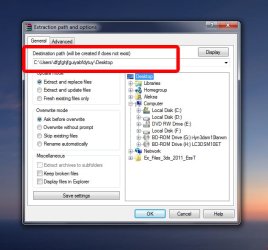
I tried everything but it just won't work.I changed computer name to ''Workstation'' but when I try to, for example, extract some file to my desktop in Winrar (and in every other program) it says : ''C:\Users\dfgfghjfguiyabfdytuy\Desktop'' for the destination folder.
So please if someone knows the solution to my problem I would be very grateful to him.(it won't work when I right click in my computer, go to properties and under tab ''computer name'' change settings). I will post screen shot to help you!
Thanks!!!!!!!
Last time I reinstall the computer, I left it to stand in the middle installation( I was on a party
).When I get back on my screen was a dialog box where I need to put the serial number. BUT before that I should enter my username right? But that never happened. Windows put this username for me: "dfgfghjfguiyabfdytuy"
I tried everything but it just won't work.I changed computer name to ''Workstation'' but when I try to, for example, extract some file to my desktop in Winrar (and in every other program) it says : ''C:\Users\dfgfghjfguiyabfdytuy\Desktop'' for the destination folder.
So please if someone knows the solution to my problem I would be very grateful to him.(it won't work when I right click in my computer, go to properties and under tab ''computer name'' change settings). I will post screen shot to help you!
Thanks!!!!!!!
Attachments
My Computer
At a glance
Windows 7 ultimate x64
- OS
- Windows 7 ultimate x64


