Windows 7 Forums Search
Welcome to Windows 7 Forums. Our forum is dedicated to helping you find solutions with any problems, errors or issues you are experiencing with Windows 7. The Windows 7 forum also covers news and updates and has an extensive Windows 7 tutorial section that covers a wide range of tips and tricks.


Windows 7 - window search not working

 
03-04-2011   #1


window 7 32bit


window search not working

as per above.

even after i enable all those option but still i cant find anything. i try rebuilding my index but is took 4 hrs and the number of indexed file remain 0. also in the search box no matter what is type, there would not be a "searching" as it should be.anyone know what happen and how to resolve it?


My System SpecsSystem Spec
03-04-2011   #2


Windows 7 Ultimate x64 Service Pack 1 (Build 6.1.7601)


Welcome to the forums, are you sure that the service is turned on?
My System SpecsSystem Spec
03-04-2011   #3


window 7 32bit


Quote   Quote: Originally Posted by Crispy View Post
Welcome to the forums, are you sure that the service is turned on?
ya.if it is not turn on, there wont be a search box there


My System SpecsSystem Spec
.


03-04-2011   #4


Windows 7 Ultimate x64 Service Pack 1 (Build 6.1.7601)


Us this tutorial and see if the service is running: Services - Start or Disable
My System SpecsSystem Spec
03-04-2011   #5


window 7 32bit


Quote   Quote: Originally Posted by Crispy View Post
Us this tutorial and see if the service is running: Services - Start or Disable
all those service and the related one are all started

My System SpecsSystem Spec
03-04-2011   #6


Questions that occur:

1) How long has this been happening? If not long, and you have restore points predating the issue, have you tried a System Restore?

2) Does Search work in other user accounts?

3) Are you getting any error message when trying to search (i.e., 'Internet Security settings prevented...')?

4) Have you changed permissions on your system?

5) Do specified locations to index appear in Control Panel/Indexing Options?


Check this recent thread where some viable solutions have worked:

Search box in start menu does not work

Be sure to let us know if your issue continues or is resolved.

A good Search configuration and use tutorial for when you get it working:

Windows Search - Configure and Use

James
My System SpecsSystem Spec
03-05-2011   #7


window 7 32bit


Quote   Quote: Originally Posted by James Colbert View Post
Questions that occur:

1) How long has this been happening? If not long, and you have restore points predating the issue, have you tried a System Restore?

2) Does Search work in other user accounts?

3) Are you getting any error message when trying to search (i.e., 'Internet Security settings prevented...')?

4) Have you changed permissions on your system?

5) Do specified locations to index appear in Control Panel/Indexing Options?


Check this recent thread where some viable solutions have worked:

Search box in start menu does not work

Be sure to let us know if your issue continues or is resolved.

A good Search configuration and use tutorial for when you get it working:

Windows Search - Configure and Use

James
1)ever since i took back my laptop from the repair, he search does not work anymore. but before that, it work.

2)search does not work in other account also.

3)no error message.in fact nothing come out at all

4)no permission were change at all

5)i try index but after many hrs, "0 item were indexed" were display
My System SpecsSystem Spec
03-06-2011   #8


shashimi,

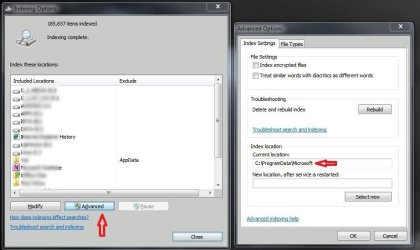
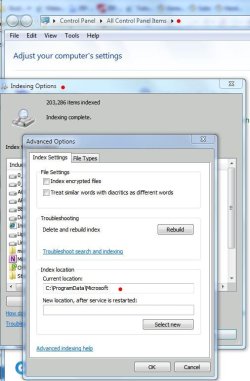
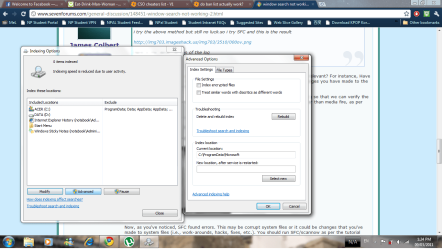
Have you attempted to move your indexing directory location, or is it in the default location (as in screenshot)?:

window search not working-index-location.jpg

If the index is in the default location, try the steps posted here:

Indexing failure

You will need to have hidden files showing:
Hidden Files and Folders - Show or Hide

You will also need to be logged in as an admin (if you're not already).

If you have attempted to move your indexing folder, try setting it to the default location.

Restart your machine in both cases, then check to see if the index is running (and actually indexing your files).

Post back to let us know.

James
My System SpecsSystem Spec
03-07-2011   #9


window 7 32bit


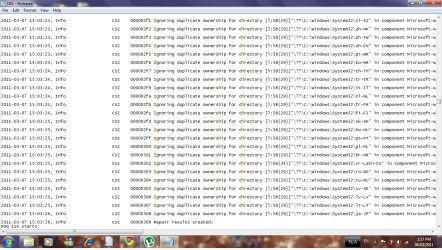
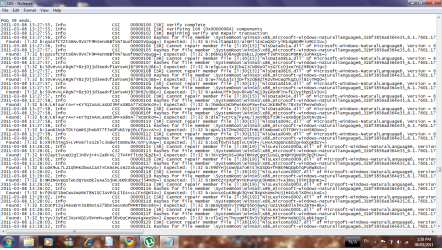
i try the above method but still no luck.so i try SFC and this is the result

http://img703.imageshack.us/img703/3510/000ov.png

here is the detail version of the log

CBS.log
My System SpecsSystem Spec
03-07-2011   #10


Operating System : Windows 7 Home Premium Edition 6.01.7600 SP1 (x64)


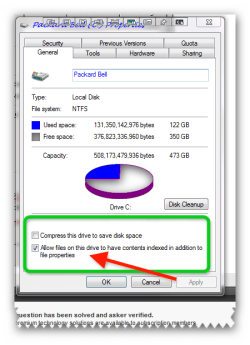
bit of a silly question but have you got indexing enabled on the drives?
Attached Thumbnails
window search not working-brys-snap-07-march-2011-08h41m24s.png  
My System SpecsSystem Spec
Reply

 window search not working problems?


Thread Tools


Similar Threads for: window search not working
Thread Forum
Adding 'open in new window' to search results, & opening in new window General Discussion
Is there a way to search within a window? General Discussion
Solved What is the secret way to FIND the IE search window? Browsers & Mail
window search, annoying, please help! General Discussion
Window Search Not Working General Discussion


All times are GMT -5. The time now is 01:25 AM.


Windows 7 Forums is an independent web site and has not been authorized,
sponsored, or otherwise approved by Microsoft Corporation.
"Windows 7" and related materials are trademarks of Microsoft Corp.
© Designer Media Ltd
  

1 2 3 4 5 6 7 8 9 10 11 12 13 14 15 16 17 18 19 20 21 22 23 24 25 26 27 28 29 30