
andykhatter
New member
- Local time
- 7:19 AM
- Messages
- 10
Hi
So my hard drive has 6 partitions ,one of them that is c: is primary partition(as i see it in the disk manager) my windows 7 is installed on G: and i dont see anything on the c: but it says it has 4 gb of data on it which is not visible to me ....i have change my OS 4 times since I bought my laptop and when I start my laptop it shows the options for all the windows but though i have deleted the other ones ...i dunno why does that happen. Ok so the question is what is the difference between the primary drive and logical drive? Since I have installed the windows on a logical drive what is the best solution ? Can I anyhow merge the primary and the logical drive where my windows is installed without effectinf my OS.Please help my partitions are so messed up!!!!
So my hard drive has 6 partitions ,one of them that is c: is primary partition(as i see it in the disk manager) my windows 7 is installed on G: and i dont see anything on the c: but it says it has 4 gb of data on it which is not visible to me ....i have change my OS 4 times since I bought my laptop and when I start my laptop it shows the options for all the windows but though i have deleted the other ones ...i dunno why does that happen. Ok so the question is what is the difference between the primary drive and logical drive? Since I have installed the windows on a logical drive what is the best solution ? Can I anyhow merge the primary and the logical drive where my windows is installed without effectinf my OS.Please help my partitions are so messed up!!!!
My Computer
At a glance
Windows 7 ultimate 32bit
- OS
- Windows 7 ultimate 32bit

 primary drive)? I want to extend my logical drive where the OS has been installed....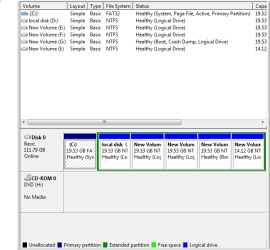
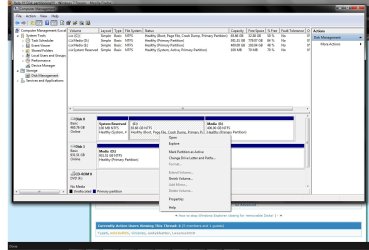


 can i reinstall it without the product key?? will it keep me registered?
