HELP! Windows wont open new window maximized

jimbanville

New member
When i open ie8, it is maximized. New windows I opened were also maximized, but all of the sudden, if I open a new window in ie8, its not maximized as it used to be. I've tried maximizing the new window, then closing the old maximized window using control+file/exit (also tried control+file/close tab), followed by closing the new window the same way, and nothing seems to work! Please help :)
 

My Computer

Computer Manufacturer/Model Number
Compaq
OS
7 64 bit
CPU
AMD Athlon II P320 2.1 Ghz
Memory
3 G
Graphics Card(s)
ATI Radeon HD 4250
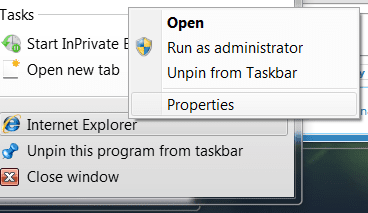
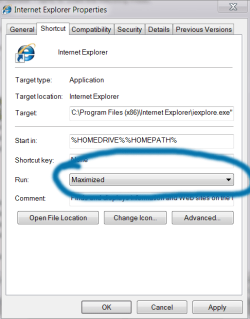
try right-clicking on the shortcut >> properties >> and change the 'run' drop down box to 'maximise'

if your shortcut is pinned to the taskbar, then you'll need to right-click on two places, first on the shortcut, then where it says 'internet explorer':

ieprop.png

iemax.png
 

My Computer

Computer Manufacturer/Model Number
mickey megabyte 1234
OS
ultimate 64 sp1
CPU
i5 2500K [email protected]
Motherboard
MSI P67A-GD53
Memory
8 gigs GSkill Ripjaws 1600
Graphics Card(s)
amd hd6950
Sound Card
creative x-fi gamer
Monitor(s) Displays
samsung 24"
Screen Resolution
1920x1080
Hard Drives
ocz vertex 2e 60 gig, samsung f3 1tb, buffalo 2tb ext
PSU
antec 550
Case
antec three hundred
Cooling
i'm a cooling fan
Keyboard
saitek eclipse ii
Mouse
logitech g3
Internet Speed
about 4 Mbps
Other Info
i love win7
I don't believe either of your solutions pertains to opening a "new" window when IE8 is already open. IE8 already opens maximized (run was already set to maximized). It's the subsequent "new" IE8 windows (right click>open link in new window) that open "normal"/smaller. That's what I'm trying to solve. Thanks!
 

My Computer

Computer Manufacturer/Model Number
Compaq
OS
7 64 bit
CPU
AMD Athlon II P320 2.1 Ghz
Memory
3 G
Graphics Card(s)
ATI Radeon HD 4250
I'm not sure this is an actual fix or not, but close everything out then open ie8. This should bring up a maximized window for it. Navigate somewhere and click a link to open in a new window. When that new window opens (most likely not maximized), grab each corner and stretch it to fit full screen. Now, close the original window, then close the window you just resized. Open ie8 again and open a link in a new window and see if it kept the full screen settings.
 

My Computer

OS
XP / Win7 x64 Pro
CPU
Intel Quad-Core Q9450 @ 3.2GHz
Motherboard
Asus P5-E
Memory
2x2GB GSkill DDR2
Graphics Card(s)
NVIDIA GeForce 8600 GTS (EVGA)
Monitor(s) Displays
Dell 2408WFP
Screen Resolution
1920x1200
Sometimes you need to program the window to hold it's desired size by clicking the maximize box in the top right center a few times. Do this after sizing the window where you want it to open.

But even then sometimes IE8 will not hold it's size no matter what, requiring a small program called AutoSizer to be kept in Systray.

BTW it's much more efficient with System Resources to open a new tab instead of a new Window, using the tab settings in Internet Options.
 
Back
Top