Windows 7 Forums


Navigation »Windows 7 Forums > Seven Forums > General Discussion » Taskbar color not changing


Welcome to Windows 7 Forums. Our forum is dedicated to helping you find solutions with any problems, errors or issues you are experiencing with Windows 7. The Windows 7 forum also covers news and updates and has an extensive Windows 7 tutorial section that covers a wide range of tips and tricks.

Taskbar color not changing

Reply
 
LinkBack Thread Tools Search this Thread Display Modes
Old 01-08-2009   #1 (permalink)
Junior Member


Join Date: Jan 2009
7000


Default Taskbar color not changing

has anyone seen this one before on 7000? I change the Windows 7 theme, but the 'color' always stays at custom and no transparency and no color intensity. no matter what i do, the taskbar will stay this gray color and not change to what i change it to when i click 'save changes'
My System SpecsSystem Spec
Old 01-08-2009   #2 (permalink)
Abhimanyu's Avatar
Senior Member


Join Date: Dec 2008
Windows 7 RC1
New Delhi,India


Default

It changes here in 6801. Btw i havnt seen the dave changes button anywhere when i change the theme. i just select it, and it changes.
My System SpecsSystem Spec
Old 01-08-2009   #3 (permalink)
garysgold's Avatar
Senior Member


Join Date: Oct 2008
Vista Ult 64 bit Seven RC 64 bit Server2008RC2
Maine, USA


Default

Hello dwd3885,

Welcome to the forums.

If you click on the 'My System Specs' link at the bottom left of one of your posts and fill in as much info as you can, that would help us answer questions for you without you having to tell us each time. This is usually caused by not having hardware capable of running Aero. I'm guessing that you have selected Personalize and then clicked on color and transparency is checked.

Abhimanyu, if you click on the color or desktop background buttons at the bottom there is a save changes button.

Gary
My System SpecsSystem Spec
Old 01-08-2009   #4 (permalink)
Abhimanyu's Avatar
Senior Member


Join Date: Dec 2008
Windows 7 RC1
New Delhi,India


Default

Wow! Gary that is quite a reply. I wouldnt have been able to reply that professionally to any post.

BTW, i still dont see the button! :S When i click on Desktop Background, It gives me a button "OK" and then the "Save Theme" kindof button.

Screeny maybe?
My System SpecsSystem Spec
Old 01-08-2009   #5 (permalink)
Junior Member


Join Date: Jan 2009
7000


Default

well the hardware was capable of running aero in Vista just fine. The taskbar will change at the bottom, but when I click 'save changes'.

When I click on a Windows Theme, it shows me the 1. desktop background, window color, sounds and screen saver. Not the Window Color for a moment goes to what it should be but then it changes to 'Custom' as does the theme. So no matter what theme I select, it's always custom, because the window color doesn't change
My System SpecsSystem Spec
Old 01-08-2009   #6 (permalink)
garysgold's Avatar
Senior Member


Join Date: Oct 2008
Vista Ult 64 bit Seven RC 64 bit Server2008RC2
Maine, USA


Default

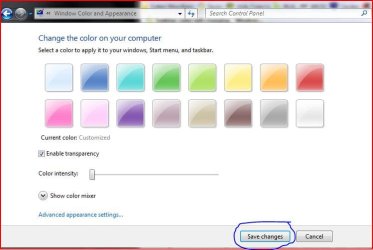
Here's the screenshot.

taskbar-color-not-changing-color.jpg

dwd,

The only theme that gives me a grey taskbar is the second ease of access theme. All of the windows themes give me transparency. Can't imagine what the problem is. Sorry.
Maybe someone else has run into this?

Gary
My System SpecsSystem Spec
Old 01-08-2009   #7 (permalink)
Junior Member


Join Date: Jan 2009
7000


Default

here are some screen shots.

Click the image to open in full size.

Click the image to open in full size.

the weird thing is that when i select Windows Basic theme, the taskbar changes colors correctly and sticks
My System SpecsSystem Spec
Old 01-08-2009   #8 (permalink)
Abhimanyu's Avatar
Senior Member


Join Date: Dec 2008
Windows 7 RC1
New Delhi,India


Default

Thats Weird! I just get the " OK " Button there. Even if i select different colors.
Attached Thumbnails
taskbar-color-not-changing-nosavechanges.jpg  
My System SpecsSystem Spec
Old 01-08-2009   #9 (permalink)
garysgold's Avatar
Senior Member


Join Date: Oct 2008
Vista Ult 64 bit Seven RC 64 bit Server2008RC2
Maine, USA


Default

dwd,

I noticed in your second pic that the enable transparency box is not checked.

In case you don't know, you cannot use custom colors with the aero themes.

Gary
My System SpecsSystem Spec
Old 01-08-2009   #10 (permalink)
Junior Member


Join Date: Jan 2009
7000


Default

Quote: Originally Posted by garysgold View Post
dwd,

I noticed in your second pic that the enable transparency box is not checked.

Gary
right. i'm showing you what it looks like when i first click on windows color on the bottom. it disregards the theme i chose and looks like that
My System SpecsSystem Spec
Reply

Thread Tools Search this Thread
Search this Thread:

Advanced Search
Display Modes


Similar Threads
Thread Thread Starter Forum Replies Last Post
Window Color and Appearance - Change Brink Tutorials 10 2 Weeks Ago 03:18 PM
Changing Welcome Screen Background MegaFixer Software 10 3 Weeks Ago 11:51 AM
Color Bit Depth - Display Settings Brink Tutorials 2 04-05-2009 01:13 PM
sticky notes color garysgold Software 13 12-01-2008 12:12 AM


All times are GMT -6. The time now is 08:57 PM.


Windows 7 Forums is an independent web site and has not been authorized,
sponsored, or otherwise approved by Microsoft Corporation.
"Windows 7", the Start Orb, and related materials are trademarks of Microsoft Corp.
© Designer Media Ltd