
Windows 7 Forums Search
Welcome to Windows 7 Forums. Our forum is dedicated to helping you find solutions with any problems, errors or issues you are experiencing with Windows 7. The Windows 7 forum also covers news and updates and has an extensive Windows 7 tutorial section that covers a wide range of tips and tricks.


Windows 7 - Autoplay on internal hard drive

 
03-15-2011   #1


Windows 7 Ultimate x64


Autoplay on internal hard drive

Hi,

on my Local Disk E I have Autoplay option. How I can remove it from context menu and command bar? On Local Disk C,D,F where is no Autoplay, only on E disk. All disks I can open with double click. Also I made search of autorun.inf file but where is no on any disk. Anybody has any ideas? Thanks
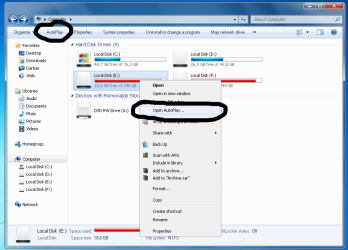
Autoplay on internal hard drive-autoplay.png

My System SpecsSystem Spec
03-15-2011   #2


XP / Win7 x64 Pro


Here's how to disable it for all drives:

http://www.sevenforums.com/tutorials...e-autorun.html
My System SpecsSystem Spec
03-15-2011   #3


Windows 7 Ultimate x64


I want to disable autoplay ONLY from INTERNAL hard drives + autoplay shouldn't be on internal hard drives.
My System SpecsSystem Spec
.


03-15-2011   #4


XP / Win7 x64 Pro


It shouldn't be enabled for any devices, actually, if you've kept up with some of the vulnerabilities that have come out involving it in the past 6 months. Like you said, you already can double-click to open any of the drives in there.

What type of disk is E: that makes it different than the others? Care to show us a screenshot of Device Manager showing your drives?
My System SpecsSystem Spec
03-15-2011   #5


XP / Win7 x64 Pro


Actually, what shows in Device Manager doesn't matter. Here's how to disable autoplay for specific drives:

How to Enable / Disable Autorun for a Drive (using Registry) (SamLogic CD-Menu Creator - Article)
Enabling and Disabling AutoRun
My System SpecsSystem Spec
03-15-2011   #6


Windows 7 Ultimate x64


Do I understand good?

Quote:
0x1 - Disables AutoPlay on drives of unknown type.

0x4 - Disables AutoPlay on removable drives.

0x8 - Disables AutoPlay on fixed drives.

0x10 - Disables AutoPlay on network drives.

0x20 - Disables AutoPlay on CD-ROM drives.

0x40 - Disables AutoPlay on RAM drives.

0x80 - Disables AutoPlay on drives of unknown type.

0xFF - Disables AutoPlay on all types of drives.

Default "HKEY_CURRENT_USER\Software\Microsoft\Windows\CurrentVersion\Policies\Explorer" NoDriveTypeAutoRun value is 0x91 (145) which means: 0x1 (unknown type), 0x80 (unknown type) and 0x10 (network drives) = 0x91

So if I want to add fixed drives: 0x91+0x8=0x99 and I have to enter registry in hexadecimal base 99 number?

Thanks for help
My System SpecsSystem Spec
03-15-2011   #7


Windows 7 Ultimate x64


YES 0x99 have removed autoplay from internal hard drives. Thanks FliGi7
My System SpecsSystem Spec
Reply

 Autoplay on internal hard drive problems?


Thread Tools


Similar Threads for: Autoplay on internal hard drive
Thread Forum
Internal Hard Drive acting like an External Hard Drive Hardware & Devices
External Hard Drive keeps on showing Autoplay prompt General Discussion
Internal Hard Drive Installation (Help) Hardware & Devices
new internal hard drive Installation & Setup
Hard Drive AutoPlay on Startup Hardware & Devices


All times are GMT -5. The time now is 01:29 AM.


Windows 7 Forums is an independent web site and has not been authorized,
sponsored, or otherwise approved by Microsoft Corporation.
"Windows 7" and related materials are trademarks of Microsoft Corp.
© Designer Media Ltd
  

1 2 3 4 5 6 7 8 9 10 11 12 13 14 15 16 17 18 19 20 21 22 23 24 25 26 27 28 29 30