Windows 7 Forums Search
Welcome to Windows 7 Forums. Our forum is dedicated to helping you find solutions with any problems, errors or issues you are experiencing with Windows 7. The Windows 7 forum also covers news and updates and has an extensive Windows 7 tutorial section that covers a wide range of tips and tricks.


Windows 7 - No Drives Displayed in "Computer"

 
07-03-2009   #1


Windows 7 RC1 64bit


No Drives Displayed in "Computer"

Hi all!

Just upgraded to Windows 7 today and have been totally loving it! Its so much faster than Vista.

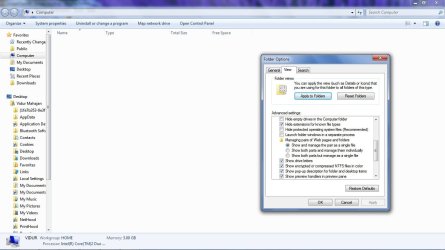
I just have one major problem that has been bothering me. I dont know whether its a bug or just a noob mistake on my part but I am unable to see any drives whatsoever in the "computer" folder. I have tried disabling/enabling the "Show empty drives" thing but to no avail.

It would be great if someone could help me out with this issue.

ThankS!!!

My System SpecsSystem Spec
07-03-2009   #2


Windows 7 RTM x64


Right click on Computer, then Manage, then Disk Management, then rightclick on a partition and you will find something like this: Add or Change drive letter. Use that for each partition you want to see in the computer folder.
My System SpecsSystem Spec
07-03-2009   #3


Windows 7 Enterprise x64 SP1 | Windows 8 build 7989


I never had to do that Robert - let's ascertain that the view isn't simply set to something else first....

Vidurn - can you post a screen shot of what your explorer window looks like in My Computer?
My System SpecsSystem Spec
.


07-03-2009   #4


Windows 7 RC1 64bit


Thanks!

Well, my partitions already have drive letters allocated to them.

I am posting a screenie below:

Have included my folder settings as well in the screen shot.

Thanks alot!!

My System SpecsSystem Spec
07-03-2009   #5


Windows 7 Enterprise x64 SP1 | Windows 8 build 7989


can you post the real image as opposed to the thumbnail? and try loading it here directly instead of using a third party hosting site....s
My System SpecsSystem Spec
07-03-2009   #6


Windows 7 Build 7600.16385 (Clean Install)


Is it your optical drives that are not showing. I remember there was a bug with iTunes that caused this. Have you got iTunes installed?
My System SpecsSystem Spec
07-03-2009   #7


Windows 7 RC1 64bit


@John: Sure thing. This is what you mean right?

@Hedrush: Yes, as a matter of fact, I do have itunes installed. But its not just my optical drives that are not showing, none of my HDD partitions are visible. They are accessible when I directly enter c: etc into the address bar but nothing is seen in the "Computer" folder.

Thanks!
Attached Thumbnails
No Drives Displayed in "Computer"-untitled.jpg  
My System SpecsSystem Spec
07-03-2009   #8


Windows 7 Build 7600.16385 (Clean Install)


Quote   Quote: Originally Posted by vidurm View Post
@John: Sure thing. This is what you mean right?

@Hedrush: Yes, as a matter of fact, I do have itunes installed. But its not just my optical drives that are not showing, none of my HDD partitions are visible. They are accessible when I directly enter c: etc into the address bar but nothing is seen in the "Computer" folder.

Thanks!
Make a reg backup first.

Try this open reg edit and goto ......

[HKEY_LOCAL_MACHINE\SYSTEM\CurrentControlSet\Contro l\Class\{4D36E965-E325-11CE-BFC1-08002BE10318}]
"UpperFilters"=-
"LowerFilters"=-

Delete upperfilters and lowerfilters. I didnt have lowerfilters on my machine, but deleting the upperfilters worked a treat. It brought back my optical drives anyway.
My System SpecsSystem Spec
07-03-2009   #9


Windows 7 Enterprise x64 SP1 | Windows 8 build 7989


Weird. I have to reboot - bbiab.
My System SpecsSystem Spec
07-03-2009   #10


Windows 7 Enterprise x64 SP1 | Windows 8 build 7989


OK, so you do not see any drives in the Computer view - and you say this was an upgrade - from what?

Also, have you checked permissions to make sure they were not messed up during the upgrade?

I did a quick check on my system and I cannot hide them completely - so a list of some apps (iTunes may in fact be causing this) would also help....
My System SpecsSystem Spec
Reply

 No Drives Displayed in "Computer" problems?


Thread Tools


Similar Threads for: No Drives Displayed in "Computer"
Thread Forum
"Return computer to factory condition" or "Use A System Image Crea..." Backup and Restore
Usb drives are not shown in "My Computer" Hardware & Devices
Error Message Displayed When Tyring To Open "msconfig" Crashes and Debugging
Custom HDD Volume Label Not Displayed in "My Computer" Hardware & Devices
3 hard drives, only 2 seen in "My computer" Hardware & Devices


All times are GMT -5. The time now is 01:35 AM.


Windows 7 Forums is an independent web site and has not been authorized,
sponsored, or otherwise approved by Microsoft Corporation.
"Windows 7" and related materials are trademarks of Microsoft Corp.
© Designer Media Ltd
  

1 2 3 4 5 6 7 8 9 10 11 12 13 14 15 16 17 18 19 20 21 22 23 24 25 26 27 28 29 30