
I've been having problems running Adobe Illustrator CS5 on my Windows 7 Pro 64 bit machine.
The problem is that Illustrator will not allow Photoshop files to be 'placed' into the Illustrator document. This was NEVER a problem with XP.
This seems to be a common problem with Illustrator CS5... and it seems that many people say the 'fix' is to 'right-click' on the Illustrator program in the start menu, and select 'Run as Administrator.'
This does seem to work, but people say it's a 'Permissions' issue.
I changed all my 'Permissions' to 'ALLOW' for this program.... and it seems like the program has gotten somewhat quirky....
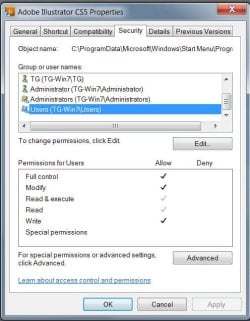
Is it a bad thing to select 'Allow' for each of the 'Group/User Names' in my Security tab for a given program???
Here's what I have done.... and imagine the 'check-marks' are on 'Allow' for each of the Group/User Names listed in the Security tab of the enclosed picture.
Oh... and why to I have 2 different TG (my initials) users and 2 different Administrator Groups... plus a 'System' group which you can't see in this pic???
The problem is that Illustrator will not allow Photoshop files to be 'placed' into the Illustrator document. This was NEVER a problem with XP.
This seems to be a common problem with Illustrator CS5... and it seems that many people say the 'fix' is to 'right-click' on the Illustrator program in the start menu, and select 'Run as Administrator.'
This does seem to work, but people say it's a 'Permissions' issue.
I changed all my 'Permissions' to 'ALLOW' for this program.... and it seems like the program has gotten somewhat quirky....
Is it a bad thing to select 'Allow' for each of the 'Group/User Names' in my Security tab for a given program???
Here's what I have done.... and imagine the 'check-marks' are on 'Allow' for each of the Group/User Names listed in the Security tab of the enclosed picture.
Oh... and why to I have 2 different TG (my initials) users and 2 different Administrator Groups... plus a 'System' group which you can't see in this pic???
Attachments
My Computer
At a glance
Windows 7 Professional 64 bitIntel i7 920OCZ PC3 12800 P/N OCZ3G1600LV6GK - 12 GB TOTA...Evga e-GeForce 8800 GTS
- Computer Manufacturer/Model Number
- Custom
- OS
- Windows 7 Professional 64 bit
- CPU
- Intel i7 920
- Motherboard
- Asus P6T Deluxe
- Memory
- OCZ PC3 12800 P/N OCZ3G1600LV6GK - 12 GB TOTAL (2x6 STICKS)
- Graphics Card(s)
- Evga e-GeForce 8800 GTS
- Sound Card
- SoundMax Integrated Digital HD Audio - On board
- Monitor(s) Displays
- Dell 2209 WA (Dual Monitors)
- Hard Drives
- Boot Drive: Fujitsu MBA3147RC scsi SAS drive - 15K rpm
Storage Drive 1: Samsung HD103UJATA (1 tb sata)
Storage Drive 2: WDC WD1001FALS-00J7B0 (1 tb sata)
External Storage: 2 external usb drives - Same as Storage Dr 1.
- PSU
- Corsair TX 850w
- Case
- CoolerMaster CM Storm
- Cooling
- CPU fan (std intel fan), Evercool heatsink fan, 4 large case


