Windows 7 Forums


Windows 7: Downgrade un-genuine version of Win7 Ultimate to valid Win7HomePremium

27 Mar 2011   #1

Windows 7 Ultimate x64
 
 
Downgrade un-genuine version of Win7 Ultimate to valid Win7HomePremium

Hiya,
I'm really new to this forum so I would love some help.
Recently ,I bought a copy of Windows 7 Ultimate off eBay. Thinking it was real, I installed it onto my laptop which had Windows 7 Home premium.
A message now comes up saying
'This version of windows is not valid, please insert valid key'
I put on my old Windows 7 Home Premium key but a message comes up saying
'The product key you entered will not work with this edition of Windows 7. You must either run Windows 7 setup or enter a Windows 7 Ultimate product key.'
I want to revert it back to Windows 7 Home Premium (which I have a valid product key for)without losing any data.
Thanks in advance,
tristancook


PLEASE HELP ME!!!


UPDATE 25/4/11
If I edit the registry keys and then repair install is it safe or not? Do I need to make a system restore? Or is there any way that microsoft can help me.
Thanks

Last edited by tristancook; 25 Apr 2011 at 02:18 AM.. Reason: Another question
My System SpecsSystem Spec

27 Mar 2011   #2

Several, including Windows 7 x64 Ultimate


See here;

Startup Repair

Buying stuff like that from "unknown" vendors is always a risk.

Regards....Mike Connor
My System SpecsSystem Spec
27 Mar 2011   #3

Windows 7 Ultimate x64
Minnesota


What did Ultimate provide for you that Home Premium didn't? (curious...)

You won't be able to downgrade, but instead try to do a system restore from a factory created partition, or discs you've hopefully created. Use the laptop manufacturers website and your laptop manual for details on the restore.
My System SpecsSystem Spec
.


27 Mar 2011   #4

Win7 x 6 PC's
California, Florida, Boston


Unfortunately, while we can easily UPgrade within Windows 7 versions using Anytime Upgrade, MS wants us to clean reinstall if we downgrade.

However there is a popular workaround by which many beta testers switched from Ultimate to their purchased version of Windows 7. It works by tricking the installer into thinking it is doing an always-allowed same version Repair Install when it is reallly changing the version while reinstalling the OS, as a Repair Install does while keeping all programs files and settings in place.

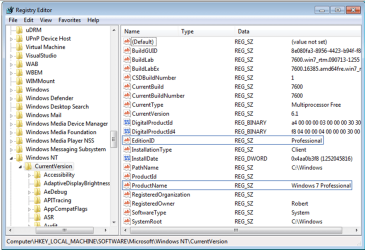
To do this, back up your files and a Windows 7 backup image if you want a path back if needed. Then set a System Restore Point - Create, run regedit as Admin to change the two keys shown below to exactly HOMEPREMIUM for the EditionID, and Windows 7 HOMEPREMIUM for the ProductName:

Downgrade un-genuine version of Win7 Ultimate to valid Win7HomePremium-regkeys.png

Now run the Windows 7 Home Premium DVD or extracted ISO files from the desktop as shown in the Repair Install tutorial. If you need to unlock all versions in your Ultimate installer, extract the ISO using ImgBurn, run the Ei.cfg Removal Utility to unlock all version, then burn to DVD or extract or mount the ISO to run Repair Install. Be sure to select Home Premium version. Activate with the key on COA sticker.
My System SpecsSystem Spec
27 Mar 2011   #5

Several, including Windows 7 x64 Ultimate


Quote   Quote: Originally Posted by Ageeb View Post
What did Ultimate provide for you that Home Premium didn't? (curious...)

You won't be able to downgrade, but instead try to do a system restore from a factory created partition, or discs you've hopefully created. Use the laptop manufacturers website and your laptop manual for details on the restore.
Windows 7 Pricing Buy Install Choose Edition Features Upgrades Offers

Regards....Mike Connor
My System SpecsSystem Spec
Reply

 Downgrade un-genuine version of Win7 Ultimate to valid Win7HomePremium problems?


Thread Tools


Similar help and support threads for: Downgrade un-genuine version of Win7 Ultimate to valid Win7HomePremium
Thread Forum
Had home version, friend updated to ultimate and its not genuine. Installation & Setup
Win7 ultimate installed, downgrade to Pro? Installation & Setup
Not genuine or valid? General Discussion


All times are GMT -5. The time now is 05:52 PM.


Seven Forums Android App Seven Forums IOS App Follow us on Facebook

Windows 7 Forums is an independent web site and has not been authorized,
sponsored, or otherwise approved by Microsoft Corporation.
"Windows 7" and related materials are trademarks of Microsoft Corp.
© Designer Media Ltd
  

1 2 3 4 5 6 7 8 9 10 11 12 13 14 15 16 17 18 19 20 21 22 23 24 25 26 27 28 29 30 31 32