- Local time
- 4:05 AM
- Messages
- 52
Hi,
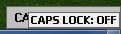
how to disable Caps lock, num lock, scroll lock screen messages?

I have desktop pc with two keyboards usb and bluetooth. Also TOSHIBA Bluetooth Stack software, but in device manager: keyboard > hid keyboard device both using microsoft drivers. And I dont have any software installed for keyboards. Also bluetooth has separate system tray indications (it is also disabled) so its not that. I made some googling and found other fix it with Hkey_Local_Machine\Software\Widcomm\BTConfig\General KeyIndication set to 0, but I dont have it in registry. Acualy I dont have anywhere in registry KeyIndication. So any ideas how to disable it? Thanks
how to disable Caps lock, num lock, scroll lock screen messages?
I have desktop pc with two keyboards usb and bluetooth. Also TOSHIBA Bluetooth Stack software, but in device manager: keyboard > hid keyboard device both using microsoft drivers. And I dont have any software installed for keyboards. Also bluetooth has separate system tray indications (it is also disabled) so its not that. I made some googling and found other fix it with Hkey_Local_Machine\Software\Widcomm\BTConfig\General KeyIndication set to 0, but I dont have it in registry. Acualy I dont have anywhere in registry KeyIndication. So any ideas how to disable it? Thanks
My Computer
At a glance
Windows 7 Ultimate x64
- OS
- Windows 7 Ultimate x64