
Windows 7 Forums


Windows 7: Windows explorer navigation pane

28 Mar 2011   #1

Windows 7 Professional x64
 
 
Windows explorer navigation pane

Hi!

I got a problem with the sidebar in windows explorer. Sometimes when i open it the only things that shows is the favorites, libraries and homegroup titles but non of the folders or links that are supposed to be there.
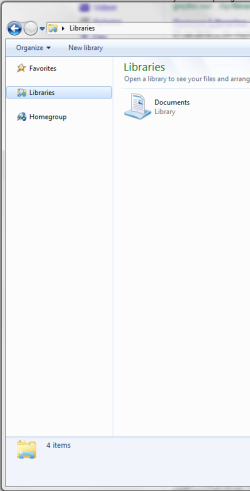
Windows explorer navigation pane-win7.png


It stays like that for a while and then its back to normal (but only if/when i open a new explorer window). Im able to access e.g. the libraries when its like this but it looks like its searching for them but cant find them.


Help is very much appriciated
Thanks
Sebbe138
My System SpecsSystem Spec

28 Mar 2011   #2

Several, including Windows 7 x64 Ultimate


It can take a while to load everything on various machines, depending on hardware and configuration.

If you don't want it to load all folders, ( which takes time);

Navigation Pane - Automatically expand to current folder[2]=File%20Folder%20Settings

there are other tutorials there on this and similar matters.

By the way, that window is known as the "Explorer Navigation Pane", "Sidebar" refers to something else.

Regards....Mike Connor
My System SpecsSystem Spec
Reply

 Windows explorer navigation pane problems?


Thread Tools


Similar help and support threads for: Windows explorer navigation pane
Thread Forum
Changing Windows Explorer's Navigation Pane General Discussion
The Navigation Pane on the left side of Windows Explorer General Discussion
Windows Explorer Navigation Pane Autoscroll General Discussion
Cleaning Up The Windows Explorer Navigation Pane Customization
Windows 7 Explorer Navigation pane Question Performance & Maintenance


All times are GMT -5. The time now is 02:39 AM.


Seven Forums Android App Seven Forums IOS App Follow us on Facebook

Windows 7 Forums is an independent web site and has not been authorized,
sponsored, or otherwise approved by Microsoft Corporation.
"Windows 7" and related materials are trademarks of Microsoft Corp.
© Designer Media Ltd
  

1 2 3 4 5 6 7 8 9 10 11 12 13 14 15 16 17 18 19 20 21 22 23 24 25 26 27 28 29 30 31 32