| Windows 7: Print Add/Remove? |
28 Mar 2011
|
#1 | | |
Print Add/Remove? I'd like to periodically print to pdf the contents of Add/Remove so I have a backup record of the applications installed. There is no Print under File or otherwise. A printscreen copy/paste to Paint is an unwelcome kludge. Is there a way to print the contents at one shot to pdf?
Mark | My System Specs |
| |
28 Mar 2011
|
#2 | | Windows 7 Home Premium 64bit California |
I use foxit reader(free) for that very purpose...Plus there is less bloatage in foxit reader. IMHO | My System Specs | | System Manufacturer/Model Number HP M9077c OS Windows 7 Home Premium 64bit CPU Intel(R)Core(TM)2 quad Q6600@2.4GHz 2.39GHz Motherboard ASUSeK Memory 6GB DDR2 6400 Graphics Card GeForce 8500/512MB Sound Card Realtek High Def Audio Monitor(s) Displays HP w2408 LCD 24" widescreen Screen Resolution 1920x1200 Keyboard MS wireless Inteli Mouse MS wireless Inteli Cooling 6 pack of Bud |
28 Mar 2011
|
#3 | | Windows 7 x64 Ultimate A Finnish immigrant in Leipzig, Germany |
Most of third party screen capture apps are able to capture a scrolling window, which is then possible to save as an image. Snip below for instance is made with FastStone Screen Capture, showing installed applications on this laptop: 
(Click to enlarge)
FastStone can save as an image or PDF.
Kari | My System Specs | | Computer type Laptop System Manufacturer/Model Number HP ENVY 17-1150eg OS Windows 7 x64 Ultimate CPU 1.6 GHz Intel Core i7-720QM Processor Memory 6 GB Graphics Card ATI Mobility Radeon HD 5850 Graphics Sound Card Beats sound system with integrated subwoofer Monitor(s) Displays 17" laptop display, 22" LCD and 32" Full HD TV through HDMI Screen Resolution 1600*900, 1680*1050 and 1920*1080 Keyboard Logitech diNovo Media Desktop Laser (bluetooth) Mouse Logitech MX1000 Laser (Bluetooth) Hard Drives Internal: 2 x 500 GB SATA Hard Disk Drive 7200 rpm
External: 2TB for backups, 3TB USB3 network drive for media Internet Speed 50/10 Mbps VDSL Antivirus MSE, Windows Defender Browser Maxthon 3.5.2. Other Info Windows 7 Ultimate Retail Full in English, additional Guest-user accounts in Finnish, German and Swedish (Working languages English & Swedish, Family language German, my own language, mother tongue, Finnish. I really need Ultimate to get to use Language Packs!) |
28 Mar 2011
|
#4 | | |
I don't get it. The problem is not the viewer (which I have too) but the ability to execute a print job? | My System Specs | | |
28 Mar 2011
|
#5 | | Windows 7 x64 Ultimate A Finnish immigrant in Leipzig, Germany |
Sorry to say but my solution as told above works perfectly.
Kari | My System Specs | | Computer type Laptop System Manufacturer/Model Number HP ENVY 17-1150eg OS Windows 7 x64 Ultimate CPU 1.6 GHz Intel Core i7-720QM Processor Memory 6 GB Graphics Card ATI Mobility Radeon HD 5850 Graphics Sound Card Beats sound system with integrated subwoofer Monitor(s) Displays 17" laptop display, 22" LCD and 32" Full HD TV through HDMI Screen Resolution 1600*900, 1680*1050 and 1920*1080 Keyboard Logitech diNovo Media Desktop Laser (bluetooth) Mouse Logitech MX1000 Laser (Bluetooth) Hard Drives Internal: 2 x 500 GB SATA Hard Disk Drive 7200 rpm
External: 2TB for backups, 3TB USB3 network drive for media Internet Speed 50/10 Mbps VDSL Antivirus MSE, Windows Defender Browser Maxthon 3.5.2. Other Info Windows 7 Ultimate Retail Full in English, additional Guest-user accounts in Finnish, German and Swedish (Working languages English & Swedish, Family language German, my own language, mother tongue, Finnish. I really need Ultimate to get to use Language Packs!) |
28 Mar 2011
|
#6 | | Windows 7 Home Premium 64bit California |
So does foxit reader if you save doc as pdf!
Best thing to do is try them both and see which one you like the best.... | My System Specs | | System Manufacturer/Model Number HP M9077c OS Windows 7 Home Premium 64bit CPU Intel(R)Core(TM)2 quad Q6600@2.4GHz 2.39GHz Motherboard ASUSeK Memory 6GB DDR2 6400 Graphics Card GeForce 8500/512MB Sound Card Realtek High Def Audio Monitor(s) Displays HP w2408 LCD 24" widescreen Screen Resolution 1920x1200 Keyboard MS wireless Inteli Mouse MS wireless Inteli Cooling 6 pack of Bud |
28 Mar 2011
|
#7 | | |
I'm sure it did for you but what you did not explain (and what I'm interested in) was how you created (instigated) the print job from the Add/Remove screen? | My System Specs | | |
28 Mar 2011
|
#8 | | Windows 7 x64 Ultimate A Finnish immigrant in Leipzig, Germany |
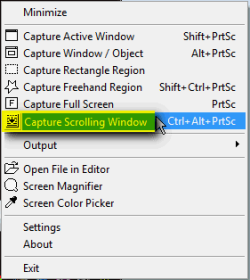
In FastStone, right click FastStone icon in notification area and select Capture Scrolling Window (or press CTRL+ALT+PrtSc), then simply click inside the scrolling list / window you need to capture, for instance inside programs list in Control Panel > Programs and Features.
Kari | My System Specs | | Computer type Laptop System Manufacturer/Model Number HP ENVY 17-1150eg OS Windows 7 x64 Ultimate CPU 1.6 GHz Intel Core i7-720QM Processor Memory 6 GB Graphics Card ATI Mobility Radeon HD 5850 Graphics Sound Card Beats sound system with integrated subwoofer Monitor(s) Displays 17" laptop display, 22" LCD and 32" Full HD TV through HDMI Screen Resolution 1600*900, 1680*1050 and 1920*1080 Keyboard Logitech diNovo Media Desktop Laser (bluetooth) Mouse Logitech MX1000 Laser (Bluetooth) Hard Drives Internal: 2 x 500 GB SATA Hard Disk Drive 7200 rpm
External: 2TB for backups, 3TB USB3 network drive for media Internet Speed 50/10 Mbps VDSL Antivirus MSE, Windows Defender Browser Maxthon 3.5.2. Other Info Windows 7 Ultimate Retail Full in English, additional Guest-user accounts in Finnish, German and Swedish (Working languages English & Swedish, Family language German, my own language, mother tongue, Finnish. I really need Ultimate to get to use Language Packs!) |
29 Mar 2011
|
#9 | | |
Okay, now I see how your're capturing the entire image. Is that scroll_capture feature only found in the shareware version--FastStone Capture?
I need this ability so infrequently I'm not wild about purchasing it. | My System Specs | | |
29 Mar 2011
|
#10 | | Windows 7 x64 Ultimate A Finnish immigrant in Leipzig, Germany |
Check here free older versions, I'm not sure if Capture Scrolling window feature is included in those.
Kari | My System Specs | | Computer type Laptop System Manufacturer/Model Number HP ENVY 17-1150eg OS Windows 7 x64 Ultimate CPU 1.6 GHz Intel Core i7-720QM Processor Memory 6 GB Graphics Card ATI Mobility Radeon HD 5850 Graphics Sound Card Beats sound system with integrated subwoofer Monitor(s) Displays 17" laptop display, 22" LCD and 32" Full HD TV through HDMI Screen Resolution 1600*900, 1680*1050 and 1920*1080 Keyboard Logitech diNovo Media Desktop Laser (bluetooth) Mouse Logitech MX1000 Laser (Bluetooth) Hard Drives Internal: 2 x 500 GB SATA Hard Disk Drive 7200 rpm
External: 2TB for backups, 3TB USB3 network drive for media Internet Speed 50/10 Mbps VDSL Antivirus MSE, Windows Defender Browser Maxthon 3.5.2. Other Info Windows 7 Ultimate Retail Full in English, additional Guest-user accounts in Finnish, German and Swedish (Working languages English & Swedish, Family language German, my own language, mother tongue, Finnish. I really need Ultimate to get to use Language Packs!) Print Add/Remove? problems? All times are GMT -5. The time now is 11:39 AM. | |