| Windows 7: How do you delete /OpenWithProgids |
02 Apr 2011
|
#51 | | |

Quote: Originally Posted by SIW2 HKEY_CURRENT_USER\Software\Microsoft\Windows\CurrentVersion\Explorer\FileExts\.wma
Delete the User Choice key. Hey again,
So as to follow your instruction with complete clarity, should I delete the subsection "UserChoice" or on of its contents? The contents show
Which to this uninitiated that it referring to Windows Media Player. Where as the other subsections have the IrfanView references.
Thanks for your patience
Glenn | My System Specs |
| System Manufacturer/Model Number Self-Built OS Windows 7 Ultimate CPU AMD Phenom-II X4 965 Motherboard Gigabyte GA-MA785GM-US2H Memory 8192 MB DDR2-SDRAM Graphics Card ATI Radeon HD 4200 Sound Card ATI Radeon HD 4200 High Definition Audo Monitor(s) Displays LG Electronics W1943 Screen Resolution 1360 X 768 Keyboard Acer Mouse Logitech PSU Ultra LSP 750 Case Ultra XBlaster Cooling 2 Fans, CPU Fan, PS Fan Hard Drives C: 500 GB Caviar Black SATA
E: 1 TB Caviar Green SATA Internet Speed 6 MB |
02 Apr 2011
|
#52 | | |
Progids should read like this:
[HKEY_CURRENT_USER\Software\Microsoft\Windows\CurrentVersion\Explorer\FileExts\.WMA\OpenWithProgids]
"WMP11.AssocFile.WMA"=hex(0):
You might find it easier to delete the whole .wma key (that is the thing that looks like a folder named .wma on the left in your screenie )
Then merge this wma.zip | My System Specs | | OS Vista x64 / 7 X64 CPU E8400 Motherboard ASRock 1333 GLAN R2.0 Memory 2x1 gb 800mhz Graphics Card 9500gt 1gb Case Coolermaster Cooling Winpower 500w Hard Drives Maxtor 160gb-2mb cache |
02 Apr 2011
|
#53 | | Win7 x 6 PC's California, Florida, Boston |
As suggested check that the Program File is deleted.
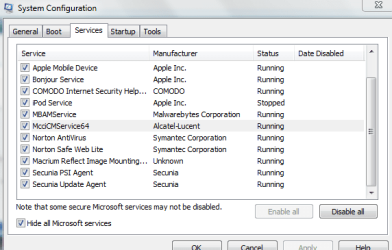
In msconfig>Startup tab uncheck everything besides AV and gadgets/stickies. Then in msconfig>Services, hide all MS services and see what is still running. Startup Programs - Change - Windows 7 Forums
Set a Restore Point, do a search in regedit for irfanview and progids then delete each key containing it. You can do this search with regedit, or RegSearch suggested by SIW2 which is better.
The reason CCleaner keeps finding the key is because it is an empty key from a deleted program, but it is repopulating itself so it needs to be tracked down and deleted.
Last edited by gregrocker; 02 Apr 2011 at 03:50 PM..
| My System Specs | | |
02 Apr 2011
|
#54 | | |

Quote: Originally Posted by SIW2 Progids should read like this:
[HKEY_CURRENT_USER\Software\Microsoft\Windows\CurrentVersion\Explorer\FileExts\.WMA\OpenWithProgids]
"WMP11.AssocFile.WMA"=hex(0):
You might find it easier to delete the whole .wma key (that is the thing that looks like a folder named .wma on the left in your screenie )
Then merge this Attachment 147004 SIW2,
Mille Grazie. Thanks in Italian. From this post, again I am assuming, that all the subsections in .wma are wrong. Most importantly the OpenWithProgids and it multiple entries. So removing just the entry that mentions IrfaView.AU is not sufficient to clear it out. Remember I have 5 such faults including the .wma. What will happen when the registry no longer has an entry for an extension like .wma, what will it do?
Secondly I appreciate the zip file you sent, but what specifically does that do?
Please type slowly, so I can comprehend. Your a good guy!
Glenn | My System Specs | | System Manufacturer/Model Number Self-Built OS Windows 7 Ultimate CPU AMD Phenom-II X4 965 Motherboard Gigabyte GA-MA785GM-US2H Memory 8192 MB DDR2-SDRAM Graphics Card ATI Radeon HD 4200 Sound Card ATI Radeon HD 4200 High Definition Audo Monitor(s) Displays LG Electronics W1943 Screen Resolution 1360 X 768 Keyboard Acer Mouse Logitech PSU Ultra LSP 750 Case Ultra XBlaster Cooling 2 Fans, CPU Fan, PS Fan Hard Drives C: 500 GB Caviar Black SATA
E: 1 TB Caviar Green SATA Internet Speed 6 MB |
02 Apr 2011
|
#55 | | |

Quote: Originally Posted by gregrocker As suggested check to that the Program File is deleted.
In msconfig>Startup tab uncheck everything besides AV and gadgets/stickies. Then in msconfig>Services, hide all MS services and see what is still running. Startup Programs - Change - Windows 7 Forums
Set a Restore Point, do a search in regedit for irfanview and progids then delete each key containing it. You can do this search with regedit, or RegSearch suggested by SIW2 which is better.
The reason CCleaner keeps finding the key is because it is and empty key from a deleted program, but it is repopulating itself so it needs to be tracked down and deleted. Hello gregrocker,
Thank you for joining the fray. Below is a snippet as you mentioned in the first part of your reply. I know, I am using stuff that is considered by the afficianado's to be memory hogs and unnecessary, Mea Culpa. In regards to the snippet the only thing I can't understand is the McciCMService64 process.
Not exactly understanding the second section's instructions completely, I will do my best guess of it. Hope to hear back from you. | My System Specs | | System Manufacturer/Model Number Self-Built OS Windows 7 Ultimate CPU AMD Phenom-II X4 965 Motherboard Gigabyte GA-MA785GM-US2H Memory 8192 MB DDR2-SDRAM Graphics Card ATI Radeon HD 4200 Sound Card ATI Radeon HD 4200 High Definition Audo Monitor(s) Displays LG Electronics W1943 Screen Resolution 1360 X 768 Keyboard Acer Mouse Logitech PSU Ultra LSP 750 Case Ultra XBlaster Cooling 2 Fans, CPU Fan, PS Fan Hard Drives C: 500 GB Caviar Black SATA
E: 1 TB Caviar Green SATA Internet Speed 6 MB |
02 Apr 2011
|
#56 | | |
Did the search so far just on Irfanview and found many more entries than CCleaner found and I previously reported. So I don't fudge things up, do I delete the exact found entry only? Or the whole subsection it is in, or the whole section. Thanks
Glenn | My System Specs | | System Manufacturer/Model Number Self-Built OS Windows 7 Ultimate CPU AMD Phenom-II X4 965 Motherboard Gigabyte GA-MA785GM-US2H Memory 8192 MB DDR2-SDRAM Graphics Card ATI Radeon HD 4200 Sound Card ATI Radeon HD 4200 High Definition Audo Monitor(s) Displays LG Electronics W1943 Screen Resolution 1360 X 768 Keyboard Acer Mouse Logitech PSU Ultra LSP 750 Case Ultra XBlaster Cooling 2 Fans, CPU Fan, PS Fan Hard Drives C: 500 GB Caviar Black SATA
E: 1 TB Caviar Green SATA Internet Speed 6 MB |
02 Apr 2011
|
#57 | | Win7 x 6 PC's California, Florida, Boston |
Delete the keys with that name in it, which will take any sub-sets.
Set a Restore Point.
Uncheck everything in msconfig>Services except Norton which I would immediately replace with MSE or Avast, but you already know that.
The Services which turn themselves back on and are not In Startup list need to have their Preferences changed to stop running without your permission, set to Manual in Services.msc, or uninstall them. Secunia PSI is a problem program I'd uninstall. | My System Specs | | |
02 Apr 2011
|
#58 | | |
Howdy gregrocker,
Did pretty much as you said about the Irfanview. Time will tell if they stay away.
Did you see anything in the running processes that look like they maybe restarting Irfanview.
Okay will try the second part. This is cool! I will be back!
Glenn | My System Specs | | System Manufacturer/Model Number Self-Built OS Windows 7 Ultimate CPU AMD Phenom-II X4 965 Motherboard Gigabyte GA-MA785GM-US2H Memory 8192 MB DDR2-SDRAM Graphics Card ATI Radeon HD 4200 Sound Card ATI Radeon HD 4200 High Definition Audo Monitor(s) Displays LG Electronics W1943 Screen Resolution 1360 X 768 Keyboard Acer Mouse Logitech PSU Ultra LSP 750 Case Ultra XBlaster Cooling 2 Fans, CPU Fan, PS Fan Hard Drives C: 500 GB Caviar Black SATA
E: 1 TB Caviar Green SATA Internet Speed 6 MB |
07 Apr 2011
|
#59 | | |

Quote: Originally Posted by SIW2 Progids should read like this:
[HKEY_CURRENT_USER\Software\Microsoft\Windows\CurrentVersion\Explorer\FileExts\.WMA\OpenWithProgids]
"WMP11.AssocFile.WMA"=hex(0):
You might find it easier to delete the whole .wma key (that is the thing that looks like a folder named .wma on the left in your screenie )
Then merge this Attachment 147004 Hello SIW2,
Waited a while to see if it stuck. Well it seems to have solved the .wma issue, now I just have the .mov one. Thanks a bunch, worked great.
Glenn | My System Specs | | System Manufacturer/Model Number Self-Built OS Windows 7 Ultimate CPU AMD Phenom-II X4 965 Motherboard Gigabyte GA-MA785GM-US2H Memory 8192 MB DDR2-SDRAM Graphics Card ATI Radeon HD 4200 Sound Card ATI Radeon HD 4200 High Definition Audo Monitor(s) Displays LG Electronics W1943 Screen Resolution 1360 X 768 Keyboard Acer Mouse Logitech PSU Ultra LSP 750 Case Ultra XBlaster Cooling 2 Fans, CPU Fan, PS Fan Hard Drives C: 500 GB Caviar Black SATA
E: 1 TB Caviar Green SATA Internet Speed 6 MB |
07 Apr 2011
|
#60 | | |

Quote: Originally Posted by gregrocker Delete the keys with that name in it, which will take any sub-sets.
Set a Restore Point.
Uncheck everything in msconfig>Services except Norton which I would immediately replace with MSE or Avast, but you already know that.
The Services which turn themselves back on and are not In Startup list need to have their Preferences changed to stop running without your permission, set to Manual in Services.msc, or uninstall them. Secunia PSI is a problem program I'd uninstall. Howdy gregrocker,
I thank you for your map to eliminate my issues. Lacking as my character is, I did not do it as I didn't have the time or just too lazy. Facts is facts. It is a character fault which I hope you will not hold against me. Looking for the quick fix I used SIW2's .wma corrected registry entry and have not in this time seen the problem return. I appreciate as always your assistance and advice, even if I'm not smart enough to follow it. 
Glenn | My System Specs | | System Manufacturer/Model Number Self-Built OS Windows 7 Ultimate CPU AMD Phenom-II X4 965 Motherboard Gigabyte GA-MA785GM-US2H Memory 8192 MB DDR2-SDRAM Graphics Card ATI Radeon HD 4200 Sound Card ATI Radeon HD 4200 High Definition Audo Monitor(s) Displays LG Electronics W1943 Screen Resolution 1360 X 768 Keyboard Acer Mouse Logitech PSU Ultra LSP 750 Case Ultra XBlaster Cooling 2 Fans, CPU Fan, PS Fan Hard Drives C: 500 GB Caviar Black SATA
E: 1 TB Caviar Green SATA Internet Speed 6 MB How do you delete /OpenWithProgids problems? All times are GMT -5. The time now is 11:23 AM. | |