
Windows 7 Forums Search
Welcome to Windows 7 Forums. Our forum is dedicated to helping you find solutions with any problems, errors or issues you are experiencing with Windows 7. The Windows 7 forum also covers news and updates and has an extensive Windows 7 tutorial section that covers a wide range of tips and tricks.


Windows 7 - Why does it take so long to open a folder?

 
04-03-2011   #1


Why does it take so long to open a folder?

Why does it take so long to open a folder the first time after a boot? For instance, D:\Temp which is my generic work area only has 25 items in it yet after booting, it takes 10 to 15 seconds to open in Windows Explorer. 2nd and all subsequent times it opens almost instantly.

The same is true of Toolbars I've added to the Taskbar. I have System Tools there and the first time I hover over any of the sub folders, it takes the same 10 to 15 seconds before I see what is in those folders.
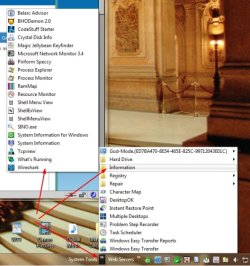
Why does it take so long to open a folder?-systemtools.jpg

I've tried deleting Iconcache.db in various places but that did not make any difference. This is where I've found them:

Why does it take so long to open a folder?-iconcache.jpg

My System SpecsSystem Spec
04-03-2011   #2


Several, including Windows 7 x64 Ultimate


Because all the icons and information are loaded the first time the program runs after a boot. On subsequent runs they are already loaded.

On large directories with lots of header information checked this can take quite a long time. Even on small directories in other drives the time lag is noticeable.

If you have set explorer to display thumbnails it takes even longer.

This also depends to some extent on other system settings, and if you have used cleaners etc to delete various things. If you delete the page file on shutdown, ( invariably a bad idea, but it seems various programs reset this now and then), then it will take ages to shut the machine down, and also longer to boot.

Regards....Mike Connor
My System SpecsSystem Spec
04-04-2011   #3


Mike, the folder I mentioned has 25 items in it. I have the view set to Details. I run CCleaner every night before I shutdown and I never delete the page file. I just booted a few minutes ago and when I opened D:\temp, the folder with 25 files in it, it took 11 seconds after the Explorer window opened before the files were listed. During that time the green bar crawled across the address bar as if it was looking for something.

This slowness was not the case for the first year or more, only the last 6 months or so has it become slow like this.

I've installed lot of software over that time and uninstalled a lot as well. I'm wondering if any of that is causing this.

For instance, I have a program called Everything installed which gives me instant access when I want to know where a file or files containing certain characters, are located. It has to generate and maintain an Index, but I think this slowness was happening before I installed everything.

I also have Acronis TI Home 2010 running but that has also been true since I installed Pro X64.

When you say Icons and Info are loaded the first time, I don't understand. Is this data cached in RAM? I don't delete Iconcache.db so it doesn't have to be rebuilt.

If you look at my specs you'll see this is not a slow computer and it has plenty of RAM.

There has to be something else going on here but I don't know how to figure out what it is. I don't have the knowledge to use a Kernel debugger and I don't know of any other way to figure this out. I'm hoping one of the wizards here has some ideas.

This is just an annoyance, not a real problem.
My System SpecsSystem Spec
.


04-04-2011   #4


Several, including Windows 7 x64 Ultimate


There is always some delay when loading directories you open for the first time. The larger the directory, and the more information that has to be loaded, the longer it takes. I have a directory with a few thousand PDF's in it, and when I load it, or switch views to thumbnails for instance, it can take quite a while for everything to load.

I also routinely operate with up to twenty or more Explorer folders open at start, and it takes a moment for them all to load. Once loaded, I can switch back and forth between them about as fast as I can click.

I also run Everything, and I used to let it run at boot, but now I only start it when I need it. I have also reduced the number of items in my startup very considerably because it makes the machine sluggish. I also check immediately if I notice my machine slowing down appreciably on various tasks. There is always some reason for it.

If you want to see what is happening when you start, then load "Process Explorer" to start and run in an open window at startup.

Process Explorer

One other point I almost forgot. If you set explorer to default settings in all folders etc, then it loads a lot faster even on more or less "empty" directories.

Get this, ( I only use it for this sort of demo because I have the functionality built in to my explorer) "Get Folder Size" and see how long it takes to retrieve the information. Explorer has to do this every time it starts. The more directories and files you have, and the more information you are trying to retrieve, ( Header info, thumbnails etc),the longer it takes.

Even on "empty" directories, because it loads all the information concerning those directories, not just the contents.

Keeping the number of directories etc on your system drive to a minimum also speeds everything up considerably. Most of my stuff is on a separate drive. If it was all in the system drive, ( or even any appreciable portion of it), the system slows to a crawl when loading directories.

Regards....Mike Connor

Last edited by Mike Connor; 04-04-2011 at 11:24 AM..
My System SpecsSystem Spec
Reply

 Why does it take so long to open a folder? problems?


Thread Tools


Similar Threads for: Why does it take so long to open a folder?
Thread Forum
My drop-down menus will not stay open long enough to make a selection, General Discussion
Solved Slow startup, Windows Explorer takes long time to open General Discussion
Cannot open folder or continue task because file or folder is open? General Discussion
Windows 7 Takes Long time to Run Programs or Open Files, Plz Help Me Performance & Maintenance
Notifications - Change How Long to Stay Open Tutorials


All times are GMT -5. The time now is 01:40 AM.


Windows 7 Forums is an independent web site and has not been authorized,
sponsored, or otherwise approved by Microsoft Corporation.
"Windows 7" and related materials are trademarks of Microsoft Corp.
© Designer Media Ltd
  

1 2 3 4 5 6 7 8 9 10 11 12 13 14 15 16 17 18 19 20 21 22 23 24 25 26 27 28 29 30