Windows 7 Forums Search
Welcome to Windows 7 Forums. Our forum is dedicated to helping you find solutions with any problems, errors or issues you are experiencing with Windows 7. The Windows 7 forum also covers news and updates and has an extensive Windows 7 tutorial section that covers a wide range of tips and tricks.


Windows 7 - Win 7 Hibernate


03-23-2009   #11


Windows Se7en Beta 7000


Goto Control Panal and Power Options
then press on Change Power Plan On right side and press on Change Advanced Power Settings and then change Power Buttons and lid To Hibernate and apply or ok

Power Plan Settings - Change

then when u press on the power button on the case
the windows will goto hibernate

My System SpecsSystem Spec
05-24-2009   #12


windows 7


Quote   Quote: Originally Posted by mixxster View Post
I discovered that disabling "Hybrid sleep" on advanced power options will add hibernation to the shutdown menu.

On a side note: My computer can only hibernate once, after that, if it has already hibernated once before during the session, it goes into a strange state where the power is never turned off, but I can't return to windows.
How do I find "advanced power options" on Windows 7? I searched Control Panel and couldn't find them. Thanks.
My System SpecsSystem Spec
05-24-2009   #13


Windows 7 32bit RTM


click the start orb type advanced power option and click the first icon that appears
My System SpecsSystem Spec
.


05-24-2009   #14


windows 7


I enabled Hibernate on Windows 7. It works ... for a few seconds. When I hibernate the machine using either the menu or the power button it takes about 30 seconds to turn off, which is fine. Then after about another minute it turns back on and prompts for a login. And after that it stays on.

Has anyone else seen this? Any ideas how to fix it? Thanks.
My System SpecsSystem Spec
05-24-2009   #15


windows 7


Quote   Quote: Originally Posted by Mercurial View Post
click the start orb type advanced power option and click the first icon that appears
Doing that I found

Configure advanced user profile properties
View advanced system settings
Manage advanced sharing settings

But not power settings.
My System SpecsSystem Spec
05-24-2009   #16


Windows 7 Ultimate Vista Ultimate x64


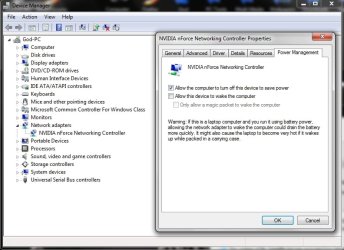
Have you gone to device manager and selected properties for your network adapter and set the power options not to wake with this device?

Win 7 Hibernate-2009-05-24_220916.jpg
My System SpecsSystem Spec
05-24-2009   #17


windows 7


Quote   Quote: Originally Posted by Mr GRiM View Post
Have you gone to device manager and selected properties for your network adapter and set the power options not to wake with this device?
Thanks, that seems to have worked. (I had a different network adapter.)
My System SpecsSystem Spec
10-14-2009   #18


Windows 7 x64


Hibernate - start up - hibernate again - no power off

Hi

On a side note: My computer can only hibernate once, after that, if it has already hibernated once before during the session, it goes into a strange state where the power is never turned off, but I can't return to windows.

This question/remark isn't answered and I have this issue. I have the hibernate button and the computer does never go automaticaly to hibernate state.
Powersettings network card are off:


My first hibernate shuts down fast, starts up after first hibernate is fast en everything works ok. Then I do a next hibernate and the computer does not shut down any more. I have to reset the computer and windows comes with the Safe Mode startup screen, where I select "Startup windows normaly", after that everything is working ok again.

What can I do, so I can do multiple hibernate's after each other, without a reboot?
Does anybody has a sollution for this? Thanks in advance.

Chillie

Last edited by webchillie; 10-14-2009 at 01:59 PM.. Reason: errors in text
My System SpecsSystem Spec
12-04-2009   #19


Windows 7 86x


Quote   Quote: Originally Posted by mixxster View Post
I discovered that disabling "Hybrid sleep" on advanced power options will add hibernation to the shutdown menu.

On a side note: My computer can only hibernate once, after that, if it has already hibernated once before during the session, it goes into a strange state where the power is never turned off, but I can't return to windows.
thanks!that did my work!
My System SpecsSystem Spec
12-04-2009   #20


Windows 7 Ultimate


Quote   Quote: Originally Posted by webchillie View Post
Hi

On a side note: My computer can only hibernate once, after that, if it has already hibernated once before during the session, it goes into a strange state where the power is never turned off, but I can't return to windows.

This question/remark isn't answered and I have this issue. I have the hibernate button and the computer does never go automaticaly to hibernate state.
Powersettings network card are off:


My first hibernate shuts down fast, starts up after first hibernate is fast en everything works ok. Then I do a next hibernate and the computer does not shut down any more. I have to reset the computer and windows comes with the Safe Mode startup screen, where I select "Startup windows normaly", after that everything is working ok again.

What can I do, so I can do multiple hibernate's after each other, without a reboot?
Does anybody has a sollution for this? Thanks in advance.

Chillie
Hibernate doesnt work if your C drive is with less space. I believe close 700MB or 1GB space is required for hibernate to work.
I have RC, and all the time use only the hibernate option. Every 2-3 days are whenever my lappy is slow in responding, wil restart it. Other than which, only hibernate. Also the hibernate is real quick in shuttin down and bootin up.
My System SpecsSystem Spec
Reply

Win 7 Hibernate problems?


Thread Tools


Similar Threads for: Win 7 Hibernate
Thread Forum
Add Hibernate Performance & Maintenance
never seems to hibernate General Discussion
Hibernate or NOT TO Hibernate that is the question General Discussion
About hibernate General Discussion
Hibernate startup fails after second hibernate General Discussion


All times are GMT -5. The time now is 09:07 PM.


Windows 7 Forums is an independent web site and has not been authorized,
sponsored, or otherwise approved by Microsoft Corporation.
"Windows 7" and related materials are trademarks of Microsoft Corp.
© Designer Media Ltd
  

1 2 3 4 5 6 7 8 9 10 11 12 13 14 15 16 17 18 19 20 21 22 23 24 25 26 27 28 29 30