
You are using an out of date browser. It may not display this or other websites correctly.
You should upgrade or use an alternative browser.
You should upgrade or use an alternative browser.
Taskbar went from clear to a light blue and...
- Thread starter Aphileon
- Start date
SavageNoble
New member
- Local time
- 4:28 AM
- Messages
- 3
Windows Aero is disabled.does not display previews of the open programs when I mouse over them. Any ideas on how to change it back?
Right click on an empty space on your desktop > click Personalize > Select a theme under "Aero Themes".
Hope that helps, but if it doesn't, let us know. There are quite a few reasons why Windows Aero would be disabled and this won't fix all of them.
My Computer
At a glance
Windows 7 Ultimate SP1 64-bit
- OS
- Windows 7 Ultimate SP1 64-bit

Right, what Savage said. There are also registry hacks to reenable Aero if you have some strange problem, like a video card Win7 doesn't recognize as being WDDM/DirectX compliant, etc.
Let us know.
Let us know.
My Computer
At a glance
Win7 Ultimate x64, Server 2008 R2AMD Phenom II X6 1055T Thuban 2.8GHz8GB G.SKILL Ripjaws Series DDR3 1600 (PC3 12800)2x HIS/Sapphire ATI Radeon HD 5830 in CrossfireX
- Computer Manufacturer/Model Number
- Myself
- OS
- Win7 Ultimate x64, Server 2008 R2
- CPU
- AMD Phenom II X6 1055T Thuban 2.8GHz
- Motherboard
- GIGABYTE GA-890FXA-UD5
- Memory
- 8GB G.SKILL Ripjaws Series DDR3 1600 (PC3 12800)
- Graphics Card(s)
- 2x HIS/Sapphire ATI Radeon HD 5830 in CrossfireX
- Sound Card
- Sound Blaster X-Fi Xtreme
- Monitor(s) Displays
- Dell 2407WFP 24", Dell 22"
- Screen Resolution
- 1920x1200
- Hard Drives
- Patriot Torqx 128GB SSD
3TB other HD
- PSU
- CORSAIR HX Series CMPSU-750HX 750W
- Case
- Antec Nine Hundred
- Cooling
- Cooler Master Hyper 212 Plus CPU cooler
- Keyboard
- SteelSeries MercStealth
- Mouse
- Razer Lachesis
- Internet Speed
- HAHA NO MOAR COMCAST. Now, FiOS :D
- Other Info
- I am a virtualization enthusiast. I like Hyper-V. It's free.
I'm a Windows 7 fangirl. I will teach a class for you or write a custom course for you RIGHT NOW.
I love EVE Online. I'm Sayra Sainer. I play Starcraft II. My gamertag is Tal0nn. I'm trying not to play Minecraft.
I also like coffee. I'll take a basic triple grande extra-hot breve stirred ristretto caramel machiatto.

Aero Peek?
Make sure you have "Use Aero Peek to preview the desktop" enabled.
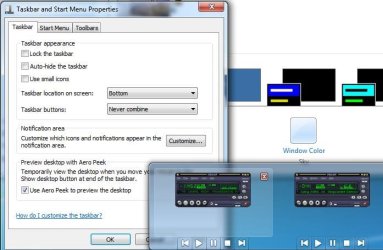
Make sure you have "Use Aero Peek to preview the desktop" enabled.
My Computer
At a glance
Windows 7 Home Premium 64 bitIntel Core i7-4790G.SKILL 8GB (2 x 4GB) DDR3 F3-10666CL9D-8GBNTAMD Radeon R7 250
- Computer type
- PC/Desktop
- Computer Manufacturer/Model Number
- Custom Build
- OS
- Windows 7 Home Premium 64 bit
- CPU
- Intel Core i7-4790
- Motherboard
- GA-Z87X-D3H
- Memory
- G.SKILL 8GB (2 x 4GB) DDR3 F3-10666CL9D-8GBNT
- Graphics Card(s)
- AMD Radeon R7 250
- Sound Card
- Realtek ALC892
- Monitor(s) Displays
- Samsung UN32EH5000, Dell 1703FPT
- Screen Resolution
- 1920 x 1080, 1280 x 1024
- Hard Drives
- WD5003AZEX
WD10EZEX
Samsung HD103SJ
Samsung 128 GB 840 PRO
- PSU
- SeaSonic M12II SS-500GM
- Case
- Fractal Design Define R4
- Cooling
- Zalman CNPS9900ALED
- Keyboard
- Logitech K800
- Mouse
- Logitech M705
- Internet Speed
- 16 Mbps
- Antivirus
- Avast
- Browser
- Firefox
- Other Info
- Bose Companion 2 Multimedia Speakers
Give your built-in Windows Troubleshooting a try.
Go to the Start Menu, and in the Search box type "fix problems with transparency"
Run that troubleshooter and see what happens. Make sure you click the Advanced link and uncheck the box that says "Apply repairs automatically".
Go to the Start Menu, and in the Search box type "fix problems with transparency"
Run that troubleshooter and see what happens. Make sure you click the Advanced link and uncheck the box that says "Apply repairs automatically".
My Computer
At a glance
Win7 Ultimate x64, Server 2008 R2AMD Phenom II X6 1055T Thuban 2.8GHz8GB G.SKILL Ripjaws Series DDR3 1600 (PC3 12800)2x HIS/Sapphire ATI Radeon HD 5830 in CrossfireX
- Computer Manufacturer/Model Number
- Myself
- OS
- Win7 Ultimate x64, Server 2008 R2
- CPU
- AMD Phenom II X6 1055T Thuban 2.8GHz
- Motherboard
- GIGABYTE GA-890FXA-UD5
- Memory
- 8GB G.SKILL Ripjaws Series DDR3 1600 (PC3 12800)
- Graphics Card(s)
- 2x HIS/Sapphire ATI Radeon HD 5830 in CrossfireX
- Sound Card
- Sound Blaster X-Fi Xtreme
- Monitor(s) Displays
- Dell 2407WFP 24", Dell 22"
- Screen Resolution
- 1920x1200
- Hard Drives
- Patriot Torqx 128GB SSD
3TB other HD
- PSU
- CORSAIR HX Series CMPSU-750HX 750W
- Case
- Antec Nine Hundred
- Cooling
- Cooler Master Hyper 212 Plus CPU cooler
- Keyboard
- SteelSeries MercStealth
- Mouse
- Razer Lachesis
- Internet Speed
- HAHA NO MOAR COMCAST. Now, FiOS :D
- Other Info
- I am a virtualization enthusiast. I like Hyper-V. It's free.
I'm a Windows 7 fangirl. I will teach a class for you or write a custom course for you RIGHT NOW.
I love EVE Online. I'm Sayra Sainer. I play Starcraft II. My gamertag is Tal0nn. I'm trying not to play Minecraft.
I also like coffee. I'll take a basic triple grande extra-hot breve stirred ristretto caramel machiatto.
Also, this might be a silly question, but you are running Win7 locally, not remotely or in a VM, correct? If you are running it remotely or in a VM, some Aero effects can be disabled, such as Live Preview (hover over taskbar icons & see previews)
My Computer
At a glance
Win7 Ultimate x64, Server 2008 R2AMD Phenom II X6 1055T Thuban 2.8GHz8GB G.SKILL Ripjaws Series DDR3 1600 (PC3 12800)2x HIS/Sapphire ATI Radeon HD 5830 in CrossfireX
- Computer Manufacturer/Model Number
- Myself
- OS
- Win7 Ultimate x64, Server 2008 R2
- CPU
- AMD Phenom II X6 1055T Thuban 2.8GHz
- Motherboard
- GIGABYTE GA-890FXA-UD5
- Memory
- 8GB G.SKILL Ripjaws Series DDR3 1600 (PC3 12800)
- Graphics Card(s)
- 2x HIS/Sapphire ATI Radeon HD 5830 in CrossfireX
- Sound Card
- Sound Blaster X-Fi Xtreme
- Monitor(s) Displays
- Dell 2407WFP 24", Dell 22"
- Screen Resolution
- 1920x1200
- Hard Drives
- Patriot Torqx 128GB SSD
3TB other HD
- PSU
- CORSAIR HX Series CMPSU-750HX 750W
- Case
- Antec Nine Hundred
- Cooling
- Cooler Master Hyper 212 Plus CPU cooler
- Keyboard
- SteelSeries MercStealth
- Mouse
- Razer Lachesis
- Internet Speed
- HAHA NO MOAR COMCAST. Now, FiOS :D
- Other Info
- I am a virtualization enthusiast. I like Hyper-V. It's free.
I'm a Windows 7 fangirl. I will teach a class for you or write a custom course for you RIGHT NOW.
I love EVE Online. I'm Sayra Sainer. I play Starcraft II. My gamertag is Tal0nn. I'm trying not to play Minecraft.
I also like coffee. I'll take a basic triple grande extra-hot breve stirred ristretto caramel machiatto.
Aero Peek?
Make sure you have "Use Aero Peek to preview the desktop" enabled.
View attachment 148833
That did it. Thank you all so much for the help. It was driving me crazy.
My Computer
At a glance
Windows 7 Home Premium
- OS
- Windows 7 Home Premium
Awesome. Glad to be of service 
gg p5bdkw
gg p5bdkw
My Computer
At a glance
Win7 Ultimate x64, Server 2008 R2AMD Phenom II X6 1055T Thuban 2.8GHz8GB G.SKILL Ripjaws Series DDR3 1600 (PC3 12800)2x HIS/Sapphire ATI Radeon HD 5830 in CrossfireX
- Computer Manufacturer/Model Number
- Myself
- OS
- Win7 Ultimate x64, Server 2008 R2
- CPU
- AMD Phenom II X6 1055T Thuban 2.8GHz
- Motherboard
- GIGABYTE GA-890FXA-UD5
- Memory
- 8GB G.SKILL Ripjaws Series DDR3 1600 (PC3 12800)
- Graphics Card(s)
- 2x HIS/Sapphire ATI Radeon HD 5830 in CrossfireX
- Sound Card
- Sound Blaster X-Fi Xtreme
- Monitor(s) Displays
- Dell 2407WFP 24", Dell 22"
- Screen Resolution
- 1920x1200
- Hard Drives
- Patriot Torqx 128GB SSD
3TB other HD
- PSU
- CORSAIR HX Series CMPSU-750HX 750W
- Case
- Antec Nine Hundred
- Cooling
- Cooler Master Hyper 212 Plus CPU cooler
- Keyboard
- SteelSeries MercStealth
- Mouse
- Razer Lachesis
- Internet Speed
- HAHA NO MOAR COMCAST. Now, FiOS :D
- Other Info
- I am a virtualization enthusiast. I like Hyper-V. It's free.
I'm a Windows 7 fangirl. I will teach a class for you or write a custom course for you RIGHT NOW.
I love EVE Online. I'm Sayra Sainer. I play Starcraft II. My gamertag is Tal0nn. I'm trying not to play Minecraft.
I also like coffee. I'll take a basic triple grande extra-hot breve stirred ristretto caramel machiatto.
Glad to be of assistance!!
My Computer
At a glance
Windows 7 Home Premium 64 bitIntel Core i7-4790G.SKILL 8GB (2 x 4GB) DDR3 F3-10666CL9D-8GBNTAMD Radeon R7 250
- Computer type
- PC/Desktop
- Computer Manufacturer/Model Number
- Custom Build
- OS
- Windows 7 Home Premium 64 bit
- CPU
- Intel Core i7-4790
- Motherboard
- GA-Z87X-D3H
- Memory
- G.SKILL 8GB (2 x 4GB) DDR3 F3-10666CL9D-8GBNT
- Graphics Card(s)
- AMD Radeon R7 250
- Sound Card
- Realtek ALC892
- Monitor(s) Displays
- Samsung UN32EH5000, Dell 1703FPT
- Screen Resolution
- 1920 x 1080, 1280 x 1024
- Hard Drives
- WD5003AZEX
WD10EZEX
Samsung HD103SJ
Samsung 128 GB 840 PRO
- PSU
- SeaSonic M12II SS-500GM
- Case
- Fractal Design Define R4
- Cooling
- Zalman CNPS9900ALED
- Keyboard
- Logitech K800
- Mouse
- Logitech M705
- Internet Speed
- 16 Mbps
- Antivirus
- Avast
- Browser
- Firefox
- Other Info
- Bose Companion 2 Multimedia Speakers
Note
It may also be worth noting that some software, mainly Video editing/DVD Creation, can cause a momentary lapse into basic mode while encoding is in progress. It should return to normal once a) the encoding finishes or b) the program exits.
My Computer
At a glance
Windows 7 Ultimate x64AMD Sempron Dual Core3GBNVIDIA GeForce 6150SE nForce 430
- Computer Manufacturer/Model Number
- Compaq Desktop
- OS
- Windows 7 Ultimate x64
- CPU
- AMD Sempron Dual Core
- Memory
- 3GB
- Graphics Card(s)
- NVIDIA GeForce 6150SE nForce 430
- Screen Resolution
- 1024x768
- Hard Drives
- 150GB Sata
Similar threads
- Replies
- 1
- Views
- 629


- Sticky
- Replies
- 4
- Views
- 32K

- Replies
- 6
- Views
- 5K
