Windows 7 Forums


Windows 7: How to change tooltip text font and color

21 Apr 2011   #1

Windows 7 Home Premium 64
 
 
How to change tooltip text font and color

How can I change tooltip text without using something like WSB (Windows Style Builder)? I have looked at Shellstyle.dll but cannot pick out the right setting.

My System SpecsSystem Spec

21 Apr 2011   #2

64-bit Windows 7 Ultimate SP1 & Windows 8 Enterprise
Texas


Hello Rdwray,

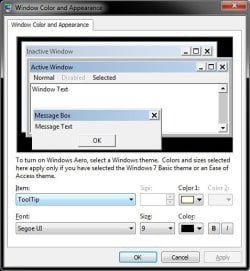
You can change the font and more for the ToolTip item in Advanced Appearance Settings.

How to change tooltip text font and color-tooltip.jpg

Hope this helps,
Shawn
My System SpecsSystem Spec
21 Apr 2011   #3

Windows 7 Home Premium 64


Quote   Quote: Originally Posted by Brink View Post
Hello Rdwray,

You can change the font and more for the ToolTip item in Advanced Appearance Settings.

Attachment 150390

Hope this helps,
Shawn
Hi Shawn, I guess I should have said Aero and Basic. The "Advanced" only works in Classic.
My System SpecsSystem Spec
.


21 Apr 2011   #4

64-bit Windows 7 Ultimate SP1 & Windows 8 Enterprise
Texas


Yeah, that's only good for the fonts and not color. Hopefully someone may know of a way using Resource Hacker for you.
My System SpecsSystem Spec
21 Apr 2011   #5

Windows 7 Home Premium 64


Quote   Quote: Originally Posted by Brink View Post
Yeah, that's only good for the fonts and not color. Hopefully someone may know of a way using Resource Hacker for you.
You can't even change the color. This Windows 7 theme stuff is a huge pain.
My System SpecsSystem Spec
21 Apr 2011   #6

Win 7 Pro x64
Council Bluffs, Iowa


That Text and font Is in the aero.msstyle in C/Windows/Resources/Themes I have WSB and I can tell you the text and font tooltips on the taskbar can be changed, the tooltips when you hover over a file or folder in Windows Explorer the text color can be changed and if you want the font changed there it will change the font in Windows Explorer and in the start menu to.
If you are using the default aero theme I can change that for you.
If you are using a custom theme you will need to ask the
theme maker. It's not cool to change someone else work.
&
You will need to do 1 of these 2 ways of Enabling custom themes for it to work.
Enabling Custom Themes - Windows 7
Or
Theme - How to Apply Custom Themes
Let me know.
Jerry
My System SpecsSystem Spec
21 Apr 2011   #7

Windows 7 Home Premium 64


Hey Jerry, Yea I am aware I can make changes in WSB, but I was wondering if it can be done without WSB. I have UxStyle Core Beta and it works great.
My System SpecsSystem Spec
21 Apr 2011   #8

Win 7 Pro x64
Council Bluffs, Iowa


Quote   Quote: Originally Posted by rdwray View Post
Hey Jerry, Yea I am aware I can make changes in WSB, but I was wondering if it can be done without WSB. I have UxStyle Core Beta and it works great.
I know some people use this Restorator - Bome Software - Restorator - the resource editor for customization, localization, and translation. but it's not free but they do have a trial and I do not know how to use it.
Jerry
My System SpecsSystem Spec
21 Apr 2011   #9

Windows 7 Home Premium 64


I have looked at Shellstyle.dll, but cannot find the settings I need to change.
My System SpecsSystem Spec
21 Apr 2011   #10

Win 7 Pro x64
Council Bluffs, Iowa


Quote   Quote: Originally Posted by rdwray View Post
I have looked at Shellstyle.dll, but cannot find the settings I need to change.
I'm sorry I don't know the settings in the shellstyle
I have only changed it with WSB and it was in aero.msstyle in C/Windows/Resources/Themes
Jerry
My System SpecsSystem Spec
Reply

 How to change tooltip text font and color problems?


Thread Tools


Similar help and support threads for: How to change tooltip text font and color
Thread Forum
Change Icon font color Customization
How to set font, font size and text color Microsoft Office
Change font color Customization
how to change task bar font color Customization


All times are GMT -5. The time now is 04:05 AM.


Seven Forums Android App Seven Forums IOS App Follow us on Facebook

Windows 7 Forums is an independent web site and has not been authorized,
sponsored, or otherwise approved by Microsoft Corporation.
"Windows 7" and related materials are trademarks of Microsoft Corp.
© Designer Media Ltd
  

1 2 3 4 5 6 7 8 9 10 11 12 13 14 15 16 17 18 19 20 21 22 23 24 25 26 27 28 29 30 31 32