
shashank646
New member
- Local time
- 12:52 PM
- Messages
- 8
Hi,
I have windows 7 operating system running on my laptop. I am planning to install windows vista as second operating system in different drive.
I have 2 drives C: (279 GB) and D: ( 10GB). If I need to install windows vista in D: drive, I need to increase its capacity to atleast 20 GB. C:drive has empty space of 119GB. My questions are
1) The maximum shrink volume for C:drive is 5 gb. Why doesn't it allow me to shrink more than 5gb when I have enough empty space in C:drive. Please let me know of any instructions to shrink it to more volume.
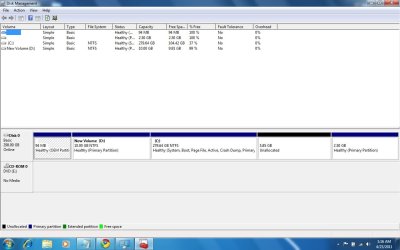
2)If you see the attachment of JPEG image, on left i have D: drive which volume has to increase.C: drive is on right.When I shrink C: the volume of unallocated space is shifted to right. How to merge D:drive volume with the unallocated space volume.
If I ca shrink c: drive to more than 5 volume the i can delete D: drive by which my problem ca be resolved. Incase if I cannot shrink C: to more than 5gb I need to find a way to merge D: drive volume with the unallocated space volume.
Please do give a clear instructions on how to proceed and do't forgot to see the attachment which helps in showing the drive locations.
I have windows 7 operating system running on my laptop. I am planning to install windows vista as second operating system in different drive.
I have 2 drives C: (279 GB) and D: ( 10GB). If I need to install windows vista in D: drive, I need to increase its capacity to atleast 20 GB. C:drive has empty space of 119GB. My questions are
1) The maximum shrink volume for C:drive is 5 gb. Why doesn't it allow me to shrink more than 5gb when I have enough empty space in C:drive. Please let me know of any instructions to shrink it to more volume.
2)If you see the attachment of JPEG image, on left i have D: drive which volume has to increase.C: drive is on right.When I shrink C: the volume of unallocated space is shifted to right. How to merge D:drive volume with the unallocated space volume.
If I ca shrink c: drive to more than 5 volume the i can delete D: drive by which my problem ca be resolved. Incase if I cannot shrink C: to more than 5gb I need to find a way to merge D: drive volume with the unallocated space volume.
Please do give a clear instructions on how to proceed and do't forgot to see the attachment which helps in showing the drive locations.
Attachments
My Computer
At a glance
Widows 7 64 bit
- OS
- Widows 7 64 bit


