Windows 7 Forums Search
Welcome to Windows 7 Forums. Our forum is dedicated to helping you find solutions with any problems, errors or issues you are experiencing with Windows 7. The Windows 7 forum also covers news and updates and has an extensive Windows 7 tutorial section that covers a wide range of tips and tricks.


Windows 7 - What command line I use to add a shortcut to the list of recent files?

 
04-29-2011   #1


Win 7


What command line I use to add a shortcut to the list of recent files?

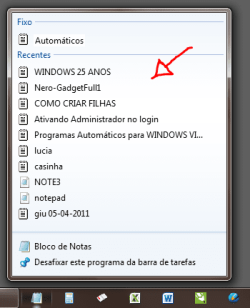
I'd like to add files to list of recent files opened using line command to make an bat file. Can you relp me? I'd like to add in the list below.

What command line I use to add a shortcut to the list of recent files?-capture.png

My System SpecsSystem Spec
04-29-2011   #2


Several, including Windows 7 x64 Ultimate


You can not do that simply by using a command line. Recent items are added automatically when you open and close them.

The data is contained in :

C:\Users\yourname\AppData\Roaming\Microsoft\Windows\Recent


Regards....Mike Connor
My System SpecsSystem Spec
04-29-2011   #3


Vista x64 / 7 X64


I don't know what you are asking, but here is a shorcut and the path if it's any use:

Recent.zip

%USERPROFILE%\AppData\Roaming\Microsoft\Windows\Recent
My System SpecsSystem Spec
.


04-29-2011   #4


XP / Win7 x64 Pro


It's possible, but what are you trying to accomplish by adding it from the command line?
My System SpecsSystem Spec
04-29-2011   #5


Windows 7 Ultimate x86


I assume he wants certain entries be present in the list at all times
even if they haven't been opened for some time
I would just use an alternative editor like Uedit (or so) that have a longer list of recent items but even then those entries disappear over time.

My System SpecsSystem Spec
04-29-2011   #6


win7 home premium-64bit-SP1-IE9RTM


You can open the program and then close-it.
In the start menu locate the shortcut and right-click then select PIN TO START Menu.
That way you have your program at the top list forever.
Good Luck
My System SpecsSystem Spec
05-02-2011   #7


Win 7


Quote   Quote: Originally Posted by FliGi7 View Post
It's possible, but what are you trying to accomplish by adding it from the command line?
I thank everyone for the responses. But the problem is that I use a software called "Directory Opus" which replaces the Windows Explorer with more functions. Every time I open a text file through it this file is not added in the recent list. So I asked if he could do this through a command line so I add this command line in the "double click" event of Directory Opus to add the txt file that I open to recent files.
My System SpecsSystem Spec
05-02-2011   #8


Windows 7 Ultimate x86


It might be a longshot, but if you use that software on a regular base, you could try and send them a feature request (since Directory Opus doesn't add opened files to the jump list)

GPSoft.com.au/Support
My System SpecsSystem Spec
05-04-2011   #9


Win 7


Quote   Quote: Originally Posted by SledgeDG View Post
It might be a longshot, but if you use that software on a regular base, you could try and send them a feature request (since Directory Opus doesn't add opened files to the jump list)

GPSoft.com.au/Support
Thanks for all
My System SpecsSystem Spec
Reply

 What command line I use to add a shortcut to the list of recent files? problems?


Thread Tools


Similar Threads for: What command line I use to add a shortcut to the list of recent files?
Thread Forum
"Mail to" shortcut in Send To context menu fails command line argument Browsers & Mail
Solved Command Line Prompt - How To Export List of Files to Text File General Discussion
Common Dialog Boxes - Enable or Disable Dropdown List of Recent Files Tutorials
Common Dialog Boxes - Clear Dropdown List of Recent Files History Tutorials
Hide files action button/shortcut/command ? General Discussion


All times are GMT -5. The time now is 11:44 PM.


Windows 7 Forums is an independent web site and has not been authorized,
sponsored, or otherwise approved by Microsoft Corporation.
"Windows 7" and related materials are trademarks of Microsoft Corp.
© Designer Media Ltd
  

1 2 3 4 5 6 7 8 9 10 11 12 13 14 15 16 17 18 19 20 21 22 23 24 25 26 27 28 29 30