Windows 7 Forums Search
Welcome to Windows 7 Forums. Our forum is dedicated to helping you find solutions with any problems, errors or issues you are experiencing with Windows 7. The Windows 7 forum also covers news and updates and has an extensive Windows 7 tutorial section that covers a wide range of tips and tricks.


Windows 7 - Cannot format DVD - R (want to create boot disc)

 
04-30-2011   #1


Windows 7 Ultimate 32Bit


Cannot format DVD - R (want to create boot disc)

I want to create a boot disc for Windows 7, I copied all the contents of original Windows 7 CD to my recently brought clean DVD-R disc with NERO. It just worked once on my friends computer and when I tried it second time, it failed to boot from DVD-R. I had set the BIOS settings correctly in boot menu. It tried to boot from DVD but it didn't find any boot info.
(When I insert original windows 7 CD it boots correctly)

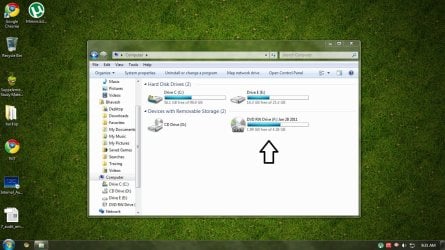
Then I deleted all the folders in DVD and thought I would paste them again later, all the folders got deleted leaving behind used space. When I open it, it shows the DVD empty but almost 1/2 of the space is used up and I cannot paste my Windows 7 setup in it again.

I tried formatting it again and again but it still shows 50-60% used space.

Is there some way to completely erase my DVD-R?

Attached Thumbnails
Cannot format DVD - R (want to create boot disc)-32472.jpg  
My System SpecsSystem Spec
05-01-2011   #2


Windows 7 Ultimate 32bit


Welcome to Seven Forums.

DVD-R discs are write-once only.

Even if you had used packet-writing, deleting files and folders does not recover the space occupied by these. These are simply marked as deleted.

You are entitled to make one copy of your genuine Windows 7 Media as a back-up.

Create an ISO image of your original DVD media using Windows 7 native image burner and then write it to a DVD-R media using the same native image burner.

If you are new to CD/DVD writing, I recommend that you use a DVD-RW first and try. Once you have done the project successfully, you may then use a DVD-R to make your copy of Windows 7 Media.

You may then erase your DVD-RW and use it for any other temporary storage purposes.
My System SpecsSystem Spec
05-01-2011   #3


Windows 7 Ultimate 32Bit


Thanks for help
So I should create and .iso image of my windows 7 setup files and burn it on DVD?
(And would it be possible to use the same .iso image on my pen drive?)
My System SpecsSystem Spec
.


05-01-2011   #4


Windows 7 Ultimate 32bit


To create a bootable pendrive have a look at my post windows 7 installation can not find DVD

Time to hit the sack now (for me). So keep reading.
My System SpecsSystem Spec
05-01-2011   #5


Windows 7 Ultimate RTM (Technet)


Quote   Quote: Originally Posted by bhaveshnande View Post
I want to create a boot disc for Windows 7, I copied all the contents of original Windows 7 CD to my recently brought clean DVD-R disc with NERO. It just worked once on my friends computer and when I tried it second time, it failed to boot from DVD-R. I had set the BIOS settings correctly in boot menu. It tried to boot from DVD but it didn't find any boot info.
(When I insert original windows 7 CD it boots correctly)

Then I deleted all the folders in DVD and thought I would paste them again later, all the folders got deleted leaving behind used space. When I open it, it shows the DVD empty but almost 1/2 of the space is used up and I cannot paste my Windows 7 setup in it again.

I tried formatting it again and again but it still shows 50-60% used space.

Is there some way to completely erase my DVD-R?
I don't understand what you are trying to do. A Windows 7 disc is bootable. Why do you need to create another?
My System SpecsSystem Spec
05-01-2011   #6


win 7 64-bit


It is your right and a very good practice to make a copy of a disc that cost so much. But put it in a different safe location.
My System SpecsSystem Spec
05-01-2011   #7


Windows 7 Ultimate AMD64


The Windows 7 USB DVD download tool can make a bootable USB Thumbdrive or DVD from an ISO file for you. It can be picky about the ISO file though, so depending on where you got it or how you created it it might reject it.
Microsoft Store Online
My System SpecsSystem Spec
05-01-2011   #8


Windows 7 Ultimate 32Bit


Ok thank you people!
My System SpecsSystem Spec
05-01-2011   #9


Windows 7 Ultimate RTM (Technet)


Quote   Quote: Originally Posted by Lactobeezor View Post
It is your right and a very good practice to make a copy of a disc that cost so much. But put it in a different safe location.
The OP has never once indicated that they were making a copy of a Windows 7 disc. It says they are trying to "create a boot disc for windows 7" which tells us nothing. A boot disc has nothing to do with an installation disc. I asked the OP to clarify and got no response.
My System SpecsSystem Spec
05-01-2011   #10


win7 home premium-64bit-SP1-IE9RTM


Macgyvr
Maybe they are working on a slipstreemed version of Windows 7?
My System SpecsSystem Spec
Reply

 Cannot format DVD - R (want to create boot disc) problems?


Thread Tools


Similar Threads for: Cannot format DVD - R (want to create boot disc)
Thread Forum
Boot Manager missing when no disc in disc drive General Discussion
Not sure how to create Windows 7 Boot Disc? Installation & Setup
Full Format Hard Drive with Windows 7 Boot Disc Performance & Maintenance
How to Format PC Using F-Disc General Discussion
How to create a USB multi boot repair disc? Performance & Maintenance


All times are GMT -5. The time now is 11:45 PM.


Windows 7 Forums is an independent web site and has not been authorized,
sponsored, or otherwise approved by Microsoft Corporation.
"Windows 7" and related materials are trademarks of Microsoft Corp.
© Designer Media Ltd
  

1 2 3 4 5 6 7 8 9 10 11 12 13 14 15 16 17 18 19 20 21 22 23 24 25 26 27 28 29 30