| Windows 7: Right Click Context Menu |
04 May 2011
|
#1 | | Windows 7 Home Premium 64 Bit |
Right Click Context Menu Ok, I've got 2 machines both with Windows 7 Home Premium 64bit on them. One machine fresh out the box today. The other a few months, anyway. On both of them I install programs that I know add additional menus to to the right click context menu. Example WinRar would be one program, 7zip another, VLC, a File Shredder Program and a few others. This is the first time I've come across this issue (between both machines), and I gotta say its annoying as hell, on my laptop it was one thing I made by, but my central system, the desktop I am currently installing everything on new to replace my old desktop is a different story. I rely heavy on those menus and not having them well its bothersome. So I am wondering if there is some special setting somewhere on Home Premium alone that I don't know about, that I can't seem to find information on this anywhere else. Or did for some reason Microsoft in all it's finest of Glory just Omit that option from the OS entirely just in Home Premium.. I have 7 Pro on another machine and this problem doesn't exist there.
So all in all losing my mind want to know one way or another. And need an answer. So if anyone knows how to resolve this that would be cool. Thanks | My System Specs |
| OS Windows 7 Home Premium 64 Bit |
04 May 2011
|
#2 | | |
I think you will find that it is the programs - 7-zip. winrar, etc which will give you the option of adding context menu items.
Not the operating system. | My System Specs | | OS Vista x64 / 7 X64 CPU E8400 Motherboard ASRock 1333 GLAN R2.0 Memory 2x1 gb 800mhz Graphics Card 9500gt 1gb Case Coolermaster Cooling Winpower 500w Hard Drives Maxtor 160gb-2mb cache |
04 May 2011
|
#3 | | Win7 Ultimate x64, Server 2008 R2 Oregon |
I have to say, odd that it didn't automatically add context menus. All my programs add them.
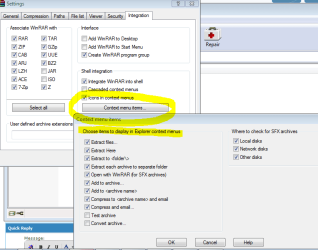
To fix, for example, WinRAR, see attached screenshot.
Not sure otherwise. We'll get you an answer, though, I hope. | My System Specs | | System Manufacturer/Model Number Myself OS Win7 Ultimate x64, Server 2008 R2 CPU AMD Phenom II X6 1055T Thuban 2.8GHz Motherboard GIGABYTE GA-890FXA-UD5 Memory 8GB G.SKILL Ripjaws Series DDR3 1600 (PC3 12800) Graphics Card 2x HIS/Sapphire ATI Radeon HD 5830 in CrossfireX Sound Card Sound Blaster X-Fi Xtreme Monitor(s) Displays Dell 2407WFP 24", Dell 22" Screen Resolution 1920x1200 Keyboard SteelSeries MercStealth Mouse Razer Lachesis PSU CORSAIR HX Series CMPSU-750HX 750W Case Antec Nine Hundred Cooling Cooler Master Hyper 212 Plus CPU cooler Hard Drives Patriot Torqx 128GB SSD
3TB other HD Internet Speed HAHA NO MOAR COMCAST. Now, FiOS :D Other Info I am a virtualization enthusiast. I like Hyper-V. It's free.
I'm a Windows 7 fangirl. I will teach a class for you or write a custom course for you RIGHT NOW.
I love EVE Online. I'm Sayra Sainer. I play Starcraft II. My gamertag is Tal0nn. I'm trying not to play Minecraft.
I also like coffee. I'll take a basic triple grande extra-hot breve stirred ristretto caramel machiatto. |
04 May 2011
|
#4 | | |
You should be able to add them from the program itself e.g. 7-zip click Tools>Options | My System Specs | | OS Vista x64 / 7 X64 CPU E8400 Motherboard ASRock 1333 GLAN R2.0 Memory 2x1 gb 800mhz Graphics Card 9500gt 1gb Case Coolermaster Cooling Winpower 500w Hard Drives Maxtor 160gb-2mb cache |
04 May 2011
|
#5 | | Windows 7 Home Premium 64 Bit |
I know they offer the options and I check them.. and recheck them.. and nothing.. (also I hit apply, ok, close...) If it we're that simple in my case, I'd of never came here in the first place. I have a program Windows 7 Manager (YamiSoft) as well, it shows me things in the context menu's the entries are there but marked as "invalid" for what reason they are invalid I havent the slightest clue. | My System Specs | | OS Windows 7 Home Premium 64 Bit |
04 May 2011
|
#6 | | Win7 Ultimate x64, Server 2008 R2 Oregon |
All right, let's see. Are you installing the programs using an administrator account? Something isn't right. | My System Specs | | System Manufacturer/Model Number Myself OS Win7 Ultimate x64, Server 2008 R2 CPU AMD Phenom II X6 1055T Thuban 2.8GHz Motherboard GIGABYTE GA-890FXA-UD5 Memory 8GB G.SKILL Ripjaws Series DDR3 1600 (PC3 12800) Graphics Card 2x HIS/Sapphire ATI Radeon HD 5830 in CrossfireX Sound Card Sound Blaster X-Fi Xtreme Monitor(s) Displays Dell 2407WFP 24", Dell 22" Screen Resolution 1920x1200 Keyboard SteelSeries MercStealth Mouse Razer Lachesis PSU CORSAIR HX Series CMPSU-750HX 750W Case Antec Nine Hundred Cooling Cooler Master Hyper 212 Plus CPU cooler Hard Drives Patriot Torqx 128GB SSD
3TB other HD Internet Speed HAHA NO MOAR COMCAST. Now, FiOS :D Other Info I am a virtualization enthusiast. I like Hyper-V. It's free.
I'm a Windows 7 fangirl. I will teach a class for you or write a custom course for you RIGHT NOW.
I love EVE Online. I'm Sayra Sainer. I play Starcraft II. My gamertag is Tal0nn. I'm trying not to play Minecraft.
I also like coffee. I'll take a basic triple grande extra-hot breve stirred ristretto caramel machiatto. |
04 May 2011
|
#7 | | Win7 Ultimate x64, Server 2008 R2 Oregon |
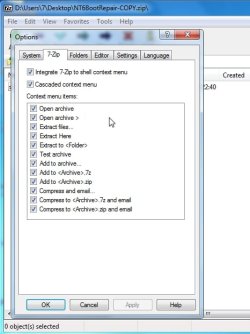
You should get all your context menus. Here's an example of mine (attached). Microsoft didn't get rid of them, thankfully. | My System Specs | | System Manufacturer/Model Number Myself OS Win7 Ultimate x64, Server 2008 R2 CPU AMD Phenom II X6 1055T Thuban 2.8GHz Motherboard GIGABYTE GA-890FXA-UD5 Memory 8GB G.SKILL Ripjaws Series DDR3 1600 (PC3 12800) Graphics Card 2x HIS/Sapphire ATI Radeon HD 5830 in CrossfireX Sound Card Sound Blaster X-Fi Xtreme Monitor(s) Displays Dell 2407WFP 24", Dell 22" Screen Resolution 1920x1200 Keyboard SteelSeries MercStealth Mouse Razer Lachesis PSU CORSAIR HX Series CMPSU-750HX 750W Case Antec Nine Hundred Cooling Cooler Master Hyper 212 Plus CPU cooler Hard Drives Patriot Torqx 128GB SSD
3TB other HD Internet Speed HAHA NO MOAR COMCAST. Now, FiOS :D Other Info I am a virtualization enthusiast. I like Hyper-V. It's free.
I'm a Windows 7 fangirl. I will teach a class for you or write a custom course for you RIGHT NOW.
I love EVE Online. I'm Sayra Sainer. I play Starcraft II. My gamertag is Tal0nn. I'm trying not to play Minecraft.
I also like coffee. I'll take a basic triple grande extra-hot breve stirred ristretto caramel machiatto. |
04 May 2011
|
#8 | | |
Try nir's little app - shell menu view get the right bit version - it's only tiny and doesn't need installing. ShellMenuView - Disable/enable context menu items of Explorer | My System Specs | | OS Vista x64 / 7 X64 CPU E8400 Motherboard ASRock 1333 GLAN R2.0 Memory 2x1 gb 800mhz Graphics Card 9500gt 1gb Case Coolermaster Cooling Winpower 500w Hard Drives Maxtor 160gb-2mb cache |
05 May 2011
|
#9 | | Windows 7 Ultimate SP1 (64 bit), Windows XP SP3, Linux Mint 14 MATE (64 bit) Adelaide |
Windows 7 Compatible? Some programs may not be as compatible as they claim
OR
Windows blocks some programs from adding context menu entries.
In Windows 7, most of my programs can add entries but some won't.
They all can in XP and you can easily make your own.
Why did MS remove that feature?
For example, Glary Utilities entries don't appear in my context menu.
Whereas AVG, ASC4, IZArc, Notepad++ and Winamp all successfully add entries. | My System Specs | | System Manufacturer/Model Number n/a OS Windows 7 Ultimate SP1 (64 bit), Windows XP SP3, Linux Mint 14 MATE (64 bit) CPU AMD Phenom II x6 1055T, 2.8 GHz Motherboard ASRock 880GMH-LE/USB3 Memory 8GB DDR3 1333 G-Skill Ares F3-1333C9D-8GAO (4GB x 2) Graphics Card ATI Radeon HD6450 Sound Card Realtek? Monitor(s) Displays Samsung S23B350 Screen Resolution 1920x1080 Mouse Wired Optical Case Tower Hard Drives Western Digital 1 TB (SATA), Western Digital 1.5 TB (SATA), Western Digital 2 TB (SATA) Internet Speed DSL Other Info Ubuntu 10.04 (64 bit) replaced with Linux Mint 14 MATE (64 bit) - 2013-01-14
RAM & Graphics Card Upgraded - 2013-01-13
Monitor Upgraded - 2012-04-20
System Upgraded - 2011-05-21, 2010-07-14
HDD Upgraded - 2010-08-11, 2011-08-24 |
05 May 2011
|
#10 | | Vista 64 bit and 32 bit (SP2) Los Angeles, California + Milwaukee, Wis |
Here's some help that may solve your problem: Customize the Right Click Menu in Windows 7 - Make Tech Easier Edit Context Menu Items In Windows 7 & Vista FileMenu Tools Also, here's another approach. You might have better control of your Context Menu if you first take ownership of it. Take a look at these tutorials: Take Ownership of file How to Allow or Prevent Users and Groups to Take Ownership
And you could even add a Take Ownership shortcut to your Context Menu and use it on the Context Menu itself to take ownership and add/delete items to your Context Menu: Take Ownership Shortcut Add ‘Take ownership’ Option to Context Menu | My System Specs | | System Manufacturer/Model Number HP Pavillion dv5t (generation 1) OS Vista 64 bit and 32 bit (SP2) CPU Intel(R) Core(TM)2 Duo Processor T9400 (2.53 GHz Memory 4GB DDR2 System Memory (2 Dimm) Graphics Card 512 MB NVIDIA GeForce 9600M GT Monitor(s) Displays 15.4" diagonal WSXGA+ High-Definition HP BrightView Widescre Screen Resolution 1680 x 1050 Keyboard Built-in HP Mouse Built in - Synaptics TouchPad V6.5 on PS/2 Port Hard Drives 320GB 5400RPM SATA Hard Drive with HP ProtectSmart Hard Drive Protection Internet Speed Max Other Info ~ Intel Next-Gen Wireless-N Mini-card w/Bluetooth ~ Blu-Ray ROM DVD+/-R/RW ~ Integ. HDTV Hybrid Tuner ~ 12 Cell Battery ~ MS Office (Home Premium) 2007 ~ Right Click Context Menu problems? All times are GMT -5. The time now is 11:19 PM. | |