How can I make this readable?

ZingFreelancer

New member
Local time
12:04 AM
Messages
33
Hello forum.

I have a problem, got a program I wish to install, but I cant read the text. I got windows 7 x64bit in English Language.
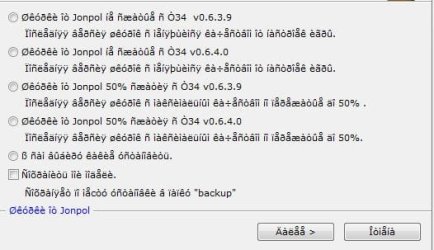
install.JPG

Please note:
I know its Russian.
I can read Russian.
The text displayed in that picture is nothing but gibberish.
I do not wish to change my OS language to Russian, am perfectly fine having it in English. All I want is for that text to become understandable.

How can I make that readable? Do I have to download a Language Interface Pack for Russian?
Where from?
 

My Computer My Computer

At a glance

Windows 7 Pro 64bitCore 2 Duo E34008GB DDR2XFX Radeon 5970 Black Edition
Computer Manufacturer/Model Number
Selvbuild
OS
Windows 7 Pro 64bit
CPU
Core 2 Duo E3400
Motherboard
Asus P5E-Deluxe
Memory
8GB DDR2
Graphics Card(s)
XFX Radeon 5970 Black Edition
Sound Card
Creative X-FI Soundblaster xTremeGamer
Hard Drives
4 hard drives
1 500gb OS (separeted in 2 partitions, system and personal files)
1 500gb for games
1 500gb for downloads
1 1tb for anime storage
PSU
650W
Case
Antec something
Cooling
Asus SilentKnight 2
Open Windows Update, click on the link for "Optional Updates". You will find the Russian Language Pack there.
 

My Computer My Computer

At a glance

Windows 7 Ultimate 64 bit
Computer Manufacturer/Model Number
Dell Studio 15
OS
Windows 7 Ultimate 64 bit
Open Windows Update, click on the link for "Optional Updates". You will find the Russian Language Pack there.
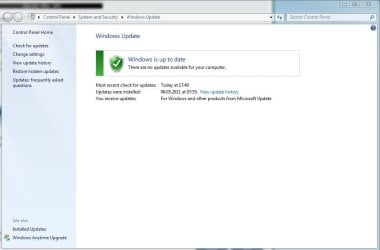
Hi, thanks for the reply. I read several times over while googling tip similar to yours. But I cant find the Optional Updates section :(

updates.JPG

This is how it looks on my side.
 

My Computer My Computer

At a glance

Windows 7 Pro 64bitCore 2 Duo E34008GB DDR2XFX Radeon 5970 Black Edition
Computer Manufacturer/Model Number
Selvbuild
OS
Windows 7 Pro 64bit
CPU
Core 2 Duo E3400
Motherboard
Asus P5E-Deluxe
Memory
8GB DDR2
Graphics Card(s)
XFX Radeon 5970 Black Edition
Sound Card
Creative X-FI Soundblaster xTremeGamer
Hard Drives
4 hard drives
1 500gb OS (separeted in 2 partitions, system and personal files)
1 500gb for games
1 500gb for downloads
1 1tb for anime storage
PSU
650W
Case
Antec something
Cooling
Asus SilentKnight 2
Try clicking on "Restore Hidden Updates"
If that does not make the Optional Updates available, click on "Change Settings"

Here are my settings:
 

Attachments

  • winupdates settings.JPG
    winupdates settings.JPG
    66.5 KB · Views: 84

My Computer My Computer

At a glance

Windows 7 Ultimate 64 bit
Computer Manufacturer/Model Number
Dell Studio 15
OS
Windows 7 Ultimate 64 bit
I've got no items in hidden updates, so there is nothing to restore.
My Update settings look exactly like yours, yet I fail to find any optional updates...

Running Windows 7 x64 Professional, although I got my key from my school...
There is no way to manually download LIP?
 

My Computer My Computer

At a glance

Windows 7 Pro 64bitCore 2 Duo E34008GB DDR2XFX Radeon 5970 Black Edition
Computer Manufacturer/Model Number
Selvbuild
OS
Windows 7 Pro 64bit
CPU
Core 2 Duo E3400
Motherboard
Asus P5E-Deluxe
Memory
8GB DDR2
Graphics Card(s)
XFX Radeon 5970 Black Edition
Sound Card
Creative X-FI Soundblaster xTremeGamer
Hard Drives
4 hard drives
1 500gb OS (separeted in 2 partitions, system and personal files)
1 500gb for games
1 500gb for downloads
1 1tb for anime storage
PSU
650W
Case
Antec something
Cooling
Asus SilentKnight 2
Language Pack see Jacee post
Jerry
 

Attachments

  • arrowdown.png
    arrowdown.png
    625 bytes · Views: 758
Last edited:

My Computer My Computer

At a glance

Win 7 Pro x64 / Win 10 ProIntel(R) Core(TM) i7-3630QM CPU @ 2.40GHz12 GB(1) Intel(R) HD Graphics 4000 (2) NVIDIA GeFo...
Computer type
Laptop
Computer Manufacturer/Model Number
Sager NP9170
OS
Win 7 Pro x64 / Win 10 Pro
CPU
Intel(R) Core(TM) i7-3630QM CPU @ 2.40GHz
Motherboard
CLEVO P170EM
Memory
12 GB
Graphics Card(s)
(1) Intel(R) HD Graphics 4000 (2) NVIDIA GeForce GTX 675M
Sound Card
(1) Realtek High Definition Audio (2) Intel(R) Display Aud
Monitor(s) Displays
17.3
Screen Resolution
1920x1080
Hard Drives
(1) Samsung 860 EVO 500GB(OS) (1) Samsung 860 EVO 500GB(Data)
Keyboard
Backlite
Antivirus
MSE, Malwarebytes Pro
Browser
Firefox
Other Info
DESKTOP: Custom-built.
OS: Win 10 Pro x64.
CASE: Rosewill R5.
CPU: Intel I5 4670K CPU @ 3.40GHz.
CPU COOLER: Cool Master Hyper 212 EVO.
MOTHERBOARD: Asus Z87-A.
MEMORY: Kingston HyperX 2x4 GB.
GPU: Nvidia Geforce 650 TI.
PSU: Corsair TX750.
DRIVES: (1) Samsung 840 120 GB SSD (2) Western Digital blue 500 GB 7200 RPM.

My Computer My Computer

At a glance

Windows 7 Ultimate 32bit SP1Intel(R) Core(TM)2 Quad CPU @ 2.40GHz, 2400 MHz4 GBATI Radeon HD 2600 Pro
Computer type
PC/Desktop
Computer Manufacturer/Model Number
Bruce ... somewhere in his 40's
OS
Windows 7 Ultimate 32bit SP1
CPU
Intel(R) Core(TM)2 Quad CPU @ 2.40GHz, 2400 MHz
Motherboard
INTEL/D975XBX2
Memory
4 GB
Graphics Card(s)
ATI Radeon HD 2600 Pro
Monitor(s) Displays
Samsung SyncMaster 914v
Screen Resolution
1280 x 1024
Hard Drives
2/500GB each ... ST3500630AS ATA Device.
One is not connected
PSU
Rocketfish 700 W
Case
G.Skill Gigabyte Chassis
Keyboard
Standard PS/2 Keyboard
Mouse
Microsoft PS/2 Mouse
Internet Speed
DSL
Antivirus
Avira Internet Security
Browser
IE 11
Other Info
ATI HDMI Audio
I've tried it. Had to use Vistalizator to make it work.
Could change my whole interface to Russian, but it didnt affect that installation program. Dunno why.
Perhaps I should have re-downloaded after I changed interface language. But it should not have been a problem...

Kinda odd and pissing me off to no end. When you browsing internet and you come across a Russian website. You can read it without problems (assuming you speak Russian). But in windows if you come across a program who's installation wizard is written in Russian. Its all gibberish.... Sigh
 

My Computer My Computer

At a glance

Windows 7 Pro 64bitCore 2 Duo E34008GB DDR2XFX Radeon 5970 Black Edition
Computer Manufacturer/Model Number
Selvbuild
OS
Windows 7 Pro 64bit
CPU
Core 2 Duo E3400
Motherboard
Asus P5E-Deluxe
Memory
8GB DDR2
Graphics Card(s)
XFX Radeon 5970 Black Edition
Sound Card
Creative X-FI Soundblaster xTremeGamer
Hard Drives
4 hard drives
1 500gb OS (separeted in 2 partitions, system and personal files)
1 500gb for games
1 500gb for downloads
1 1tb for anime storage
PSU
650W
Case
Antec something
Cooling
Asus SilentKnight 2
Do you have a crylic / russian font installed? (dunno if this is what the language pack is...)
 

My Computer My Computer

At a glance

Windows 7 SP1 x64AMD Phenom II X4 965Corsair Budget DDR3 8GB 1333Asus Radeon HD5850
OS
Windows 7 SP1 x64
CPU
AMD Phenom II X4 965
Motherboard
Gigabyte GA-MA790FXT-UD5P
Memory
Corsair Budget DDR3 8GB 1333
Graphics Card(s)
Asus Radeon HD5850
Sound Card
On board 5.1
Monitor(s) Displays
22" LG TFT
Screen Resolution
1680x1050
Hard Drives
2x 1TB Raptor Raid-0 (OS and programs)
2x 2TB Seagate 7200 (storage)
PSU
1000W Modular (cant remember brand)
Case
Antec Big bugger
Cooling
Air
Keyboard
Microsoft ergo
Mouse
Logitec Laser
Internet Speed
50Mb
Do you have a crylic / russian font installed? (dunno if this is what the language pack is...)
No I dont have that one, at least I dont think so.
 

My Computer My Computer

At a glance

Windows 7 Pro 64bitCore 2 Duo E34008GB DDR2XFX Radeon 5970 Black Edition
Computer Manufacturer/Model Number
Selvbuild
OS
Windows 7 Pro 64bit
CPU
Core 2 Duo E3400
Motherboard
Asus P5E-Deluxe
Memory
8GB DDR2
Graphics Card(s)
XFX Radeon 5970 Black Edition
Sound Card
Creative X-FI Soundblaster xTremeGamer
Hard Drives
4 hard drives
1 500gb OS (separeted in 2 partitions, system and personal files)
1 500gb for games
1 500gb for downloads
1 1tb for anime storage
PSU
650W
Case
Antec something
Cooling
Asus SilentKnight 2
correct me if i am wrong, if the installer is in russian language will it be also be installed in russian? so if you want it to be in english language you should apply english language patch after installing it?
 

My Computer My Computer

At a glance

MS Windows 8Intel Core i5 @ 2.27GHz Arrandale 32nm Techno...8.0GB Dual-Channel DDR3 @ 532MHz (7-7-7-20)ATI Mobility Radeon HD 4300 Series (Dell)
Computer type
PC/Desktop
Computer Manufacturer/Model Number
Dell inspiron 1564
OS
MS Windows 8
CPU
Intel Core i5 @ 2.27GHz Arrandale 32nm Technology
Motherboard
Dell Inc. 0M9XW4 (U2E1)
Memory
8.0GB Dual-Channel DDR3 @ 532MHz (7-7-7-20)
Graphics Card(s)
ATI Mobility Radeon HD 4300 Series (Dell)
Sound Card
Realtek High Definition Audio
Monitor(s) Displays
Generic PnP Monitor on ATI Mobility Radeon HD 4330
Screen Resolution
1366x768 pixels
Hard Drives
1 tb TOSHIBA (SATA)
PSU
built-in
Case
Dell Laptop
Cooling
built-in
Keyboard
built-in
Mouse
Dell Touchpad/Microsoft Arc Mouse
Other Info
Snake Laptop Skin, Detachable Alfa USB wifi with custom 15dbi antenna (for better signal range)
correct me if i am wrong, if the installer is in russian language will it be also be installed in russian? so if you want it to be in english language you should apply english language patch after installing it?
The content of installer does not matter.
 

My Computer My Computer

At a glance

Windows 7 Pro 64bitCore 2 Duo E34008GB DDR2XFX Radeon 5970 Black Edition
Computer Manufacturer/Model Number
Selvbuild
OS
Windows 7 Pro 64bit
CPU
Core 2 Duo E3400
Motherboard
Asus P5E-Deluxe
Memory
8GB DDR2
Graphics Card(s)
XFX Radeon 5970 Black Edition
Sound Card
Creative X-FI Soundblaster xTremeGamer
Hard Drives
4 hard drives
1 500gb OS (separeted in 2 partitions, system and personal files)
1 500gb for games
1 500gb for downloads
1 1tb for anime storage
PSU
650W
Case
Antec something
Cooling
Asus SilentKnight 2
the only way you can install it is either you know how to to read it or let some one who can. i have installers which is not in english, but i installed it by trial and error i just have to remember which option i choose. then after installing i apply the english patch which comes with it. if you can higlight it and copy then paste in google translate that would be your next option.
 

My Computer My Computer

At a glance

MS Windows 8Intel Core i5 @ 2.27GHz Arrandale 32nm Techno...8.0GB Dual-Channel DDR3 @ 532MHz (7-7-7-20)ATI Mobility Radeon HD 4300 Series (Dell)
Computer type
PC/Desktop
Computer Manufacturer/Model Number
Dell inspiron 1564
OS
MS Windows 8
CPU
Intel Core i5 @ 2.27GHz Arrandale 32nm Technology
Motherboard
Dell Inc. 0M9XW4 (U2E1)
Memory
8.0GB Dual-Channel DDR3 @ 532MHz (7-7-7-20)
Graphics Card(s)
ATI Mobility Radeon HD 4300 Series (Dell)
Sound Card
Realtek High Definition Audio
Monitor(s) Displays
Generic PnP Monitor on ATI Mobility Radeon HD 4330
Screen Resolution
1366x768 pixels
Hard Drives
1 tb TOSHIBA (SATA)
PSU
built-in
Case
Dell Laptop
Cooling
built-in
Keyboard
built-in
Mouse
Dell Touchpad/Microsoft Arc Mouse
Other Info
Snake Laptop Skin, Detachable Alfa USB wifi with custom 15dbi antenna (for better signal range)
I thought that if the Application itself did not contain the Language files, that it doesn't matter. The Application will need to be translated and a translation pack created for that specific Application.
Doesn't matter what language files you have installed for Windows.
 

My Computer My Computer

At a glance

Win 7 Ultimate 32bitC2D E6600 2.4Ghz4G Kingston KHX5400D2EVGA GTX 570 HD SC (012-P3-1573-KR)
Computer Manufacturer/Model Number
Self Built
OS
Win 7 Ultimate 32bit
CPU
C2D E6600 2.4Ghz
Motherboard
Intel D965WH
Memory
4G Kingston KHX5400D2
Graphics Card(s)
EVGA GTX 570 HD SC (012-P3-1573-KR)
Sound Card
On-Board
Monitor(s) Displays
Samsung 226BW
Screen Resolution
1680 x 1050
Hard Drives
2 x 250 Seagate Barracuda
2 x 500 Seagate Barracuda (Raid1)
PSU
Corsair TX750W
Case
In-Win C589
Cooling
Stock Intel Cooling
Back
Top