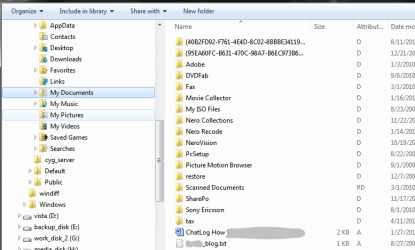
I noticed this morning a small file had appeared on my main drive. I have took a snip and attached it this message. I know its small and when I go to delete it, it requires an administrator to do this. The file isn't hidden anywhere. All I did was click on computer - C Drive and it was sitting beneath the folders. Now I could easily click yes on the permissions box to delete but I don't want to just yet incase it's of some importance.
Any help would be appreciated.
Any help would be appreciated.
Attachments

My Computer
At a glance
Windows 7 Ultimate x64i7 CORE 2 QUAD 920 (2.66GHZ, 8MB L2 CACHE, 10...3 x CORSAIR 2GB PC12800 DDR3 1600MHZ RAMXFX NVIDIA GTS 250 512MB PCI-E GRAPHICS CARD
- OS
- Windows 7 Ultimate x64
- CPU
- i7 CORE 2 QUAD 920 (2.66GHZ, 8MB L2 CACHE, 1066MHZ FSB)
- Motherboard
- GIGABYTE GA-EX58-UD3R MOTHERBOARD
- Memory
- 3 x CORSAIR 2GB PC12800 DDR3 1600MHZ RAM
- Graphics Card(s)
- XFX NVIDIA GTS 250 512MB PCI-E GRAPHICS CARD
- Sound Card
- X-Fi Titanium Fatal1ty Pro 7.1 Soundcard - PCI-Express
- Monitor(s) Displays
- Samsung SM2343BW 23"
- Screen Resolution
- 2048x1152
- Hard Drives
- 2 x 500GB S-ATA 7200RPM Hard Drive
- PSU
- NorthQ 850W Dual Rail PSU
- Case
- Coolermaster Elite 330
- Cooling
- Noctua CPU Heatsink and Cooler
- Keyboard
- Microsoft Wireless Laser Keyboard 5000
- Mouse
- Microsoft Wireless Laser Mouse 5000