
 |
Welcome to Windows 7 Forums. Our forum is dedicated to helping you find solutions with any problems, errors or issues you are experiencing with Windows 7. The Windows 7 forum also covers news and updates and has an extensive Windows 7 tutorial section that covers a wide range of tips and tricks.
Windows 7 - How to Stop defragment ??? |
05-11-2011
|
#1 | | |
How to Stop defragment ??? Hello Everybody. I have a problem with my pc.
Every time I leave it in idle mode it starts defragment. I understand this, because i see the red button of hard disk being red and comes noise from my HDD. When I move my mouse then stops this.
How can I turn aytomatic defragment off ...?
Thanks for your help in advance | My System Specs | | OS Windows 32 bit CPU AMD Athlon X3 4GHz Motherboard Gigabyte Memory Kingston Graphics Card On board Monitor(s) Displays LG Screen Resolution 1920X800 Keyboard Microsoft Mouse Microsoft PSU Lamtech Case Lamtech Cooling Water Hard Drives Samsung Internet Speed 24/1 Mbps Other Info Nothing more |
05-11-2011
|
#2 | | |
Check this tut : Disk Defragmenter Schedule- Turn On or Off
Are you sure it's the defragger and not the indexing service that keeps your HDD busy?
The defragger is set by default to defragment every wednesday. just check the task scheduler like explained in the tut and adjust to your liking
-DG | My System Specs | | System Manufacturer/Model Number HP m8000n OS Windows 7 Ultimate x86 CPU DualCore AMD Athlon 64 X2, 2600 MHz 5200+ Motherboard Asus M2N68-LA (Narra) Memory Samsung 2GB DDR2 Graphics Card Onboard NVIDIA GeForce 6150SE nForce 430 Sound Card Onboard nVIDIA nForce 6100-430 (MCP61P) Monitor(s) Displays Westinghouse 19" LED Screen Resolution 1280x1024 Keyboard Logitech Classic KB 200 Mouse Standard HP opticle USB mouse PSU Stock (HP) Case Stock (HP) Cooling Stock Hard Drives SATA II Seagate Barracuda 500GB
USB II WD Elements 500GB
USB II WD My Book 1TB
USB II WD My Book 2TB |
05-11-2011
|
#3 | | Windows 7 Ultimate X64 SP1 |
Could also be Superfetch.
Superfetch grabs frequently used programs from the HDD and puts them into your free memory, so they start quicker, I've had a bit of play with Superfetch, and it seems that it will only grab when the computer isn't really doing anything. It's possible to turn this off, but I really wouldn't recommend it. | My System Specs | | OS Windows 7 Ultimate X64 SP1 CPU Intel(R) Core(TM) i5-2500K CPU @ 3.30GHz Motherboard Intel(R) Core(TM) i5-2500K CPU @ 3.30GHz Memory 8GB 1333Mhz DDR3 Graphics Card NVIDIA GeForce GTX 460 Sound Card Realtek Monitor(s) Displays Acer Al1980, Screen Resolution 1360*768 Keyboard Alba USB Mouse IT Works Wireless USB PSU 750W Novatech Case Novatech ATX Case Cooling Cooler Master Hyper TX3 Hard Drives 500GB SATA WBC
1TB WD Caviar Green
80GB IDE Samsung Internet Speed 20Mb/s Down 1.2 Mb/s Up |
05-11-2011
|
#4 | | 32bit: XP, Win7 H.P. / 64bit: 2008R2, Win7 Pro, Ultimate / Several flavors of Linux |
To turn off defrag:
Control Panel > All Control Panel Items
Performance Information and Tools > Advanced tools
Open Disk Defragmenter > Configure schedule...
Deselect (uncheck) Run on a schedule (recommended)
Click OK.
Click Close.
Regards,
GEWB
Last edited by GEWB; 05-11-2011 at 09:30 PM..
| My System Specs | | System Manufacturer/Model Number (5 different computers booting up to 12 systems) OS 32bit: XP, Win7 H.P. / 64bit: 2008R2, Win7 Pro, Ultimate / Several flavors of Linux |
05-11-2011
|
#5 | | |
I asked and in another forum, 3 months ago and they told me that difragment is causing the noise in idle mode.
I did exactly what tutorial says. I hope, not listen noise from my ΗDD again.
Thanks a lot for your help. 
Quote: Originally Posted by severedsolo Could also be Superfetch.
Superfetch grabs frequently used programs from the HDD and puts them into your free memory, so they start quicker, I've had a bit of play with Superfetch, and it seems that it will only grab when the computer isn't really doing anything. It's possible to turn this off, but I really wouldn't recommend it. Hm, i haven't seen this in my pc ever. 
Quote: Originally Posted by GEWB To turn off defrag:
Control Panel > All Control Panel Items
Performance Information and Tools > Advanced tools
Open Disk Defragmenter > Configure schedule...
Deselect (uncheck) Run on a schedule (recommended)
Click OK.
Clcik Close.
Regards,
GEWB also thanx | My System Specs | | OS Windows 32 bit CPU AMD Athlon X3 4GHz Motherboard Gigabyte Memory Kingston Graphics Card On board Monitor(s) Displays LG Screen Resolution 1920X800 Keyboard Microsoft Mouse Microsoft PSU Lamtech Case Lamtech Cooling Water Hard Drives Samsung Internet Speed 24/1 Mbps Other Info Nothing more |
05-11-2011
|
#6 | | Windows 7 Ultimate X64 SP1 |

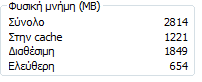
Quote: Originally Posted by George Hm, i haven't seen this in my pc ever.  That means it's doing it's job properly then  most of the time you will be completely unaware of it. You can see how much it's holding in Superfetch by opening Task Manager and going to the Performance Tab, the amount under "Cached" is how much is being held by Superfetch | My System Specs | | OS Windows 7 Ultimate X64 SP1 CPU Intel(R) Core(TM) i5-2500K CPU @ 3.30GHz Motherboard Intel(R) Core(TM) i5-2500K CPU @ 3.30GHz Memory 8GB 1333Mhz DDR3 Graphics Card NVIDIA GeForce GTX 460 Sound Card Realtek Monitor(s) Displays Acer Al1980, Screen Resolution 1360*768 Keyboard Alba USB Mouse IT Works Wireless USB PSU 750W Novatech Case Novatech ATX Case Cooling Cooler Master Hyper TX3 Hard Drives 500GB SATA WBC
1TB WD Caviar Green
80GB IDE Samsung Internet Speed 20Mb/s Down 1.2 Mb/s Up |
05-11-2011
|
#7 | | |
You meen that...? I have a greek copy of Windows 7 | My System Specs | | OS Windows 32 bit CPU AMD Athlon X3 4GHz Motherboard Gigabyte Memory Kingston Graphics Card On board Monitor(s) Displays LG Screen Resolution 1920X800 Keyboard Microsoft Mouse Microsoft PSU Lamtech Case Lamtech Cooling Water Hard Drives Samsung Internet Speed 24/1 Mbps Other Info Nothing more |
05-11-2011
|
#8 | | Windows 7 Ultimate X64 SP1 |
Yep that's it, the one with "cache" in the name (don't have greek characters on my keyboard, so can't type it as it's written) is how much superfetch is holding in memory for you.
An easy way to tell if it's superfetch is to just watch that screen while the HDD is busy, if that number increases then it's superfetch, if not, then it's probably indexing, or defrag as you said. | My System Specs | | OS Windows 7 Ultimate X64 SP1 CPU Intel(R) Core(TM) i5-2500K CPU @ 3.30GHz Motherboard Intel(R) Core(TM) i5-2500K CPU @ 3.30GHz Memory 8GB 1333Mhz DDR3 Graphics Card NVIDIA GeForce GTX 460 Sound Card Realtek Monitor(s) Displays Acer Al1980, Screen Resolution 1360*768 Keyboard Alba USB Mouse IT Works Wireless USB PSU 750W Novatech Case Novatech ATX Case Cooling Cooler Master Hyper TX3 Hard Drives 500GB SATA WBC
1TB WD Caviar Green
80GB IDE Samsung Internet Speed 20Mb/s Down 1.2 Mb/s Up |
05-11-2011
|
#9 | | |
Another question,
How can i disable, indexing, and superfetch...? Is that necessary in order not to hear again noise? | My System Specs | | OS Windows 32 bit CPU AMD Athlon X3 4GHz Motherboard Gigabyte Memory Kingston Graphics Card On board Monitor(s) Displays LG Screen Resolution 1920X800 Keyboard Microsoft Mouse Microsoft PSU Lamtech Case Lamtech Cooling Water Hard Drives Samsung Internet Speed 24/1 Mbps Other Info Nothing more |
05-11-2011
|
#10 | | Windows 7 Ultimate RTM (Technet) |

Quote: Originally Posted by George Another question,
How can i disable, indexing, and superfetch...? Is that necessary in order not to hear again noise?
So you want to disable three of the most important services that keep your PC running fast because you don't like the NOISE??? You need to rethink. | My System Specs | | System Manufacturer/Model Number Custom OS Windows 7 Ultimate RTM (Technet) CPU 3.00 gigahertz Intel Core2 Duo E8400 Motherboard ASUSTeK Computer INC. P5K/EPU Rev 1.xx Memory 4GB Graphics Card ATI Radeon X1950 Pro Sound Card Built in HD Audio Monitor(s) Displays 22" Gateway LCD Screen Resolution 1920 x 1200 Keyboard Logitech G11 Mouse Microsoft Wireless Laser Mouse 5000 Hard Drives ST3160023A [Hard drive] (160.04 GB) -- drive 0, rev 8.01, ST3500630AS [Hard drive] (500.11 GB) -- drive 2, rev 3.AAK
ST3500630AS [Hard drive] (500.11 GB) -- drive 1, rev 3.AAK Internet Speed 13.44 Mbps How to Stop defragment ??? problems? All times are GMT -5. The time now is 11:55 PM. |  |