New stuff not showing up in right-click menu

Ekenryd

New member
Hello, I have a problem.

Winrar show up with its right click menu items (like extract and stuff).

Xnview and Winmount (which are both win7 compatible) dont show up. Now I know this might be a problem related to the programs and not win7, but I still find it odd that both apps dont work. Is there any "area" in windows where one can check how custom right click menues work, something like maybe "make sure that registry key xxx is set to 1"?

Allthough, like I said, as winrar is working it is probably related to the apps, but I just wanted to get any ideas thrown at me here of what the problem could be.

Thanks for answers.
 

My Computer

OS
Win7
CPU
2600k
Motherboard
Asus p67 pro
Memory
8gb corsair 1333mhz
Graphics Card(s)
HIS radeon 5750
Sound Card
integrated
Monitor(s) Displays
Eizo 2333w
Screen Resolution
1920
Hard Drives
intel 320 series 120gb
samsung f3 500gb
western digital 250gb
PSU
cooler master pro 500w
Case
Antec sonata III
Cooling
noctua c12
some context-menu entries only show up if you right-click on certain types of files.

for xnview, did you also download and install the 'shell extension setup'?

i think the shell extension is the right-click menu (properly called the context-menu) bit.
 

My Computer

Computer Manufacturer/Model Number
mickey megabyte 1234
OS
ultimate 64 sp1
CPU
i5 2500K [email protected]
Motherboard
MSI P67A-GD53
Memory
8 gigs GSkill Ripjaws 1600
Graphics Card(s)
amd hd6950
Sound Card
creative x-fi gamer
Monitor(s) Displays
samsung 24"
Screen Resolution
1920x1080
Hard Drives
ocz vertex 2e 60 gig, samsung f3 1tb, buffalo 2tb ext
PSU
antec 550
Case
antec three hundred
Cooling
i'm a cooling fan
Keyboard
saitek eclipse ii
Mouse
logitech g3
Internet Speed
about 4 Mbps
Other Info
i love win7
Yes, I already have it, and winmount is supposed to show up when right-clicking an iso, but it don´t. Have no idea of what the problem can be, as I´ve done all necessary steps in the applications to get right click menus.
 

My Computer

OS
Win7
CPU
2600k
Motherboard
Asus p67 pro
Memory
8gb corsair 1333mhz
Graphics Card(s)
HIS radeon 5750
Sound Card
integrated
Monitor(s) Displays
Eizo 2333w
Screen Resolution
1920
Hard Drives
intel 320 series 120gb
samsung f3 500gb
western digital 250gb
PSU
cooler master pro 500w
Case
Antec sonata III
Cooling
noctua c12
ok, you wanted us to throw ideas at you:

did you install the programs 'as administrator'?
 

My Computer

Computer Manufacturer/Model Number
mickey megabyte 1234
OS
ultimate 64 sp1
CPU
i5 2500K [email protected]
Motherboard
MSI P67A-GD53
Memory
8 gigs GSkill Ripjaws 1600
Graphics Card(s)
amd hd6950
Sound Card
creative x-fi gamer
Monitor(s) Displays
samsung 24"
Screen Resolution
1920x1080
Hard Drives
ocz vertex 2e 60 gig, samsung f3 1tb, buffalo 2tb ext
PSU
antec 550
Case
antec three hundred
Cooling
i'm a cooling fan
Keyboard
saitek eclipse ii
Mouse
logitech g3
Internet Speed
about 4 Mbps
Other Info
i love win7
Winmount dont show up.
Did you install the 32-bit version of WinMount on your 64-bit Win7?

I just installed the 64-bit version of WinMount on my 64-bit Win7, and there isn't even an installation option to "install shell extension". It's just there.

And when I right-click on an ISO file it works perfectly:

winmount.jpg


But I specifically installed the 64-bit version of the program, in my 64-bit Win7.
 

My Computer

Computer type
PC/Desktop
Computer Manufacturer/Model Number
Home-built, two systems (1) and (2)
OS
Windows 7 Pro x64 (1), Win7 Pro X64 (2)
CPU
i5-3350p 3.1Ghz/6MB-cache (1); E8400 3.0Ghz/6MB-cache (2)
Motherboard
ASUS P8Z77-V Pro (1); ASUS P5Q3 (2)
Memory
8GB PC3-12800 DDR3 (1); 4GB PC3-10600 DDR3 (2)
Graphics Card(s)
ATI HD7750 (1), (see TV cards); ATI R7 250 (2)
Sound Card
Realtek ALC892 HD Audio (1); Realtek ALC1200 HD Audio (2)
Monitor(s) Displays
Eizo HD2441W LCD, Eizo S2433W (1); Eizo 24" S2433W (2)
Screen Resolution
1920x1200, 1920x1200 (1); 1920x1200 (2)
Hard Drives
(1) 1TB SATA-II (7200RPM), 2x2TB SATA-III (7200RPM), 250GB SATA-III (10000RPM) for OS; 2x2TB external USB 3.0

(2) 320GB SATA-II (7200RPM), 750GB SATA-II (7200RPM), 150GB SATA-II (10000RPM) for OS; 2TB external USB 3.0
PSU
Nesteq ECS-6001 600W (1); Nesteq ECS-5001 500W (2)
Case
Acousti-Case 360 (1) and (2)
Cooling
Noctua NH-U12P SE2 for CPU, 2x120mm case fans (1) and (2)
Keyboard
IBM PS/2 (1) and (2)
Mouse
Logitech MX Revolution wireless (1); Microsoft wired (2)
Internet Speed
100mbps down / 10mbps up
Antivirus
Microsoft Security Essentials; Malwarebyte Anti-Malware Pro
Browser
Firefox
Other Info
Ceton InfiniTV 4-tuner cablecard-enabled TV card as well as Hauppauge HVR-2250 OTA/ATSC 2-tuner TV card in (1), running under Win7 WMC
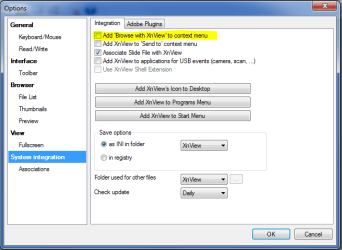
With XnView, under Tools > Options, have you checked "Add browse with XnView context menu"?

Capture.PNG
 

My Computer

OS
windows 7 ultimate
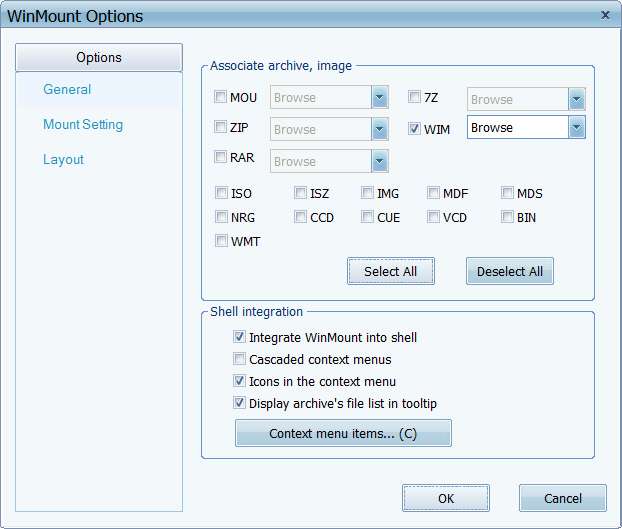
Just noticed that WinMount DOES actually have an "integrate WinMount into shell" checkbox in its "Options":

winmountoptions.jpg


Did you accidentally un-check that item??
 

My Computer

Computer type
PC/Desktop
Computer Manufacturer/Model Number
Home-built, two systems (1) and (2)
OS
Windows 7 Pro x64 (1), Win7 Pro X64 (2)
CPU
i5-3350p 3.1Ghz/6MB-cache (1); E8400 3.0Ghz/6MB-cache (2)
Motherboard
ASUS P8Z77-V Pro (1); ASUS P5Q3 (2)
Memory
8GB PC3-12800 DDR3 (1); 4GB PC3-10600 DDR3 (2)
Graphics Card(s)
ATI HD7750 (1), (see TV cards); ATI R7 250 (2)
Sound Card
Realtek ALC892 HD Audio (1); Realtek ALC1200 HD Audio (2)
Monitor(s) Displays
Eizo HD2441W LCD, Eizo S2433W (1); Eizo 24" S2433W (2)
Screen Resolution
1920x1200, 1920x1200 (1); 1920x1200 (2)
Hard Drives
(1) 1TB SATA-II (7200RPM), 2x2TB SATA-III (7200RPM), 250GB SATA-III (10000RPM) for OS; 2x2TB external USB 3.0

(2) 320GB SATA-II (7200RPM), 750GB SATA-II (7200RPM), 150GB SATA-II (10000RPM) for OS; 2TB external USB 3.0
PSU
Nesteq ECS-6001 600W (1); Nesteq ECS-5001 500W (2)
Case
Acousti-Case 360 (1) and (2)
Cooling
Noctua NH-U12P SE2 for CPU, 2x120mm case fans (1) and (2)
Keyboard
IBM PS/2 (1) and (2)
Mouse
Logitech MX Revolution wireless (1); Microsoft wired (2)
Internet Speed
100mbps down / 10mbps up
Antivirus
Microsoft Security Essentials; Malwarebyte Anti-Malware Pro
Browser
Firefox
Other Info
Ceton InfiniTV 4-tuner cablecard-enabled TV card as well as Hauppauge HVR-2250 OTA/ATSC 2-tuner TV card in (1), running under Win7 WMC
UAC is turned off, so run as admin shouldnt be needed, right?

Xnview has "Add browse with XnView context menu" checked.

winmount is installed with 64-bit on my 64-bit win. Integrate into shell is checked. However, I just notced that I don´t even have a "mount"-tab when opening winmount. This is really weird, have to look into that.

edit: ooh, you had to right click ON folders to get the xnview extension, I thought it was enough to just right click IN a folder. And I guess I can use another mounter like daemon tools instead of winmount.

Thanks for the many and quick answers :)
 

My Computer

OS
Win7
CPU
2600k
Motherboard
Asus p67 pro
Memory
8gb corsair 1333mhz
Graphics Card(s)
HIS radeon 5750
Sound Card
integrated
Monitor(s) Displays
Eizo 2333w
Screen Resolution
1920
Hard Drives
intel 320 series 120gb
samsung f3 500gb
western digital 250gb
PSU
cooler master pro 500w
Case
Antec sonata III
Cooling
noctua c12
UAC is turned off, so run as admin shouldnt be needed, right?
Correct. I have it turned off as well.


winmount is installed with 64-bit on my 64-bit win. Integrate into shell is checked.
Well that's good.


However, I just noticed that I don´t even have a "mount"-tab when opening winmount.
Well that's not right. Have you paid for a license for WinMount? Is this in a trial period? Has your trial period expired?

As you can see from my screenshot above, I absolutely DO show a "mount" tab... from this brand new freshly installed program.

It does seem very plausible (and suspicious) that you have no critical piece of the program's GUI, and at the same time show no shell extension signs.
 

My Computer

Computer type
PC/Desktop
Computer Manufacturer/Model Number
Home-built, two systems (1) and (2)
OS
Windows 7 Pro x64 (1), Win7 Pro X64 (2)
CPU
i5-3350p 3.1Ghz/6MB-cache (1); E8400 3.0Ghz/6MB-cache (2)
Motherboard
ASUS P8Z77-V Pro (1); ASUS P5Q3 (2)
Memory
8GB PC3-12800 DDR3 (1); 4GB PC3-10600 DDR3 (2)
Graphics Card(s)
ATI HD7750 (1), (see TV cards); ATI R7 250 (2)
Sound Card
Realtek ALC892 HD Audio (1); Realtek ALC1200 HD Audio (2)
Monitor(s) Displays
Eizo HD2441W LCD, Eizo S2433W (1); Eizo 24" S2433W (2)
Screen Resolution
1920x1200, 1920x1200 (1); 1920x1200 (2)
Hard Drives
(1) 1TB SATA-II (7200RPM), 2x2TB SATA-III (7200RPM), 250GB SATA-III (10000RPM) for OS; 2x2TB external USB 3.0

(2) 320GB SATA-II (7200RPM), 750GB SATA-II (7200RPM), 150GB SATA-II (10000RPM) for OS; 2TB external USB 3.0
PSU
Nesteq ECS-6001 600W (1); Nesteq ECS-5001 500W (2)
Case
Acousti-Case 360 (1) and (2)
Cooling
Noctua NH-U12P SE2 for CPU, 2x120mm case fans (1) and (2)
Keyboard
IBM PS/2 (1) and (2)
Mouse
Logitech MX Revolution wireless (1); Microsoft wired (2)
Internet Speed
100mbps down / 10mbps up
Antivirus
Microsoft Security Essentials; Malwarebyte Anti-Malware Pro
Browser
Firefox
Other Info
Ceton InfiniTV 4-tuner cablecard-enabled TV card as well as Hauppauge HVR-2250 OTA/ATSC 2-tuner TV card in (1), running under Win7 WMC
And I guess I can use another mounter like daemon tools instead of winmount.
Be careful with DT. It uses a driver, sptd.sys, that is notorious for causing BSOD's.

If you just want a virtual drive for mounting/playing iso files, I use DVDFab. Takes up less than a mb of space.
 

My Computer

OS
windows 7 ultimate
Shame you're having trouble with WinMount.

I used it a few months back (in trial mode, I confess, never actually purchasing it) to expand the INSTALL.WIM file inside a Win7 32-bit installation DVD ISO file. I needed to get the 32-bit version of some Canon and HP print driver files, in order to "install additional print driver X86" onto a 64-bit Win7 system that already had the x64 versions installed.

In the case of Canon, these drivers are not provided on their web site... since they insist that MS supports their Canon printers "out of the box". True, when you install a printer on that Win7 system by plugging in the USB cable. But if you want to install the "additional print driver" for the 32/64 environment, you can't get it anywhere except on the actual Win7 installation DVD of that flavor.

And WinMount served my need here, extracting what I needed from an expansion of INSTALL.WIM from within a mount of the installation DVD ISO.
 

My Computer

Computer type
PC/Desktop
Computer Manufacturer/Model Number
Home-built, two systems (1) and (2)
OS
Windows 7 Pro x64 (1), Win7 Pro X64 (2)
CPU
i5-3350p 3.1Ghz/6MB-cache (1); E8400 3.0Ghz/6MB-cache (2)
Motherboard
ASUS P8Z77-V Pro (1); ASUS P5Q3 (2)
Memory
8GB PC3-12800 DDR3 (1); 4GB PC3-10600 DDR3 (2)
Graphics Card(s)
ATI HD7750 (1), (see TV cards); ATI R7 250 (2)
Sound Card
Realtek ALC892 HD Audio (1); Realtek ALC1200 HD Audio (2)
Monitor(s) Displays
Eizo HD2441W LCD, Eizo S2433W (1); Eizo 24" S2433W (2)
Screen Resolution
1920x1200, 1920x1200 (1); 1920x1200 (2)
Hard Drives
(1) 1TB SATA-II (7200RPM), 2x2TB SATA-III (7200RPM), 250GB SATA-III (10000RPM) for OS; 2x2TB external USB 3.0

(2) 320GB SATA-II (7200RPM), 750GB SATA-II (7200RPM), 150GB SATA-II (10000RPM) for OS; 2TB external USB 3.0
PSU
Nesteq ECS-6001 600W (1); Nesteq ECS-5001 500W (2)
Case
Acousti-Case 360 (1) and (2)
Cooling
Noctua NH-U12P SE2 for CPU, 2x120mm case fans (1) and (2)
Keyboard
IBM PS/2 (1) and (2)
Mouse
Logitech MX Revolution wireless (1); Microsoft wired (2)
Internet Speed
100mbps down / 10mbps up
Antivirus
Microsoft Security Essentials; Malwarebyte Anti-Malware Pro
Browser
Firefox
Other Info
Ceton InfiniTV 4-tuner cablecard-enabled TV card as well as Hauppauge HVR-2250 OTA/ATSC 2-tuner TV card in (1), running under Win7 WMC
It is winmount free edition, downloaded from their website. No mount-tab visible. Maybe I should contact them?

DVDfab, I will check it out, thanks.

edit: DVDFab is quite expencive, I rarely use mounting software so it´s not something I put money on when there are free version. Guess I´ll try my chances with daemon :)
 

My Computer

OS
Win7
CPU
2600k
Motherboard
Asus p67 pro
Memory
8gb corsair 1333mhz
Graphics Card(s)
HIS radeon 5750
Sound Card
integrated
Monitor(s) Displays
Eizo 2333w
Screen Resolution
1920
Hard Drives
intel 320 series 120gb
samsung f3 500gb
western digital 250gb
PSU
cooler master pro 500w
Case
Antec sonata III
Cooling
noctua c12
It is winmount free edition, downloaded from their website. No mount-tab visible. Maybe I should contact them?
THAT IS EXACTLY WHY I COULD NOT USE THE FREE EDITION!! I quickly discovered this very issue... that MOUNT is NOT in the free version, or maybe there is some size limit on the ISO file you are trying to get inside of, or perhaps a size limit on the WIM file (i.e. INSTALL.WIM) I really wanted to expand.

That is exactly why I downloaded the non-free version... 30-day free trial... used it to accomplish my goal, and never purchased it (red-faced, of course, because I normally would always support software authors of wonderful products that I actually use).

That Win7 installation DVD is very large, as is INSTALL.WIM. Only the non-free version would suffice... and I used it in 30-day trial mode.

If I actually had any other real use for it, I would have purchased it. But since I already have WinRAR which supports ISO among many other formats, I really didn't need WinMount for ISO. However I did need WinMount for WIM... which is not supported by WinRar.

If you really do need just ISO, I'd suggest WinRAR.
 

My Computer

Computer type
PC/Desktop
Computer Manufacturer/Model Number
Home-built, two systems (1) and (2)
OS
Windows 7 Pro x64 (1), Win7 Pro X64 (2)
CPU
i5-3350p 3.1Ghz/6MB-cache (1); E8400 3.0Ghz/6MB-cache (2)
Motherboard
ASUS P8Z77-V Pro (1); ASUS P5Q3 (2)
Memory
8GB PC3-12800 DDR3 (1); 4GB PC3-10600 DDR3 (2)
Graphics Card(s)
ATI HD7750 (1), (see TV cards); ATI R7 250 (2)
Sound Card
Realtek ALC892 HD Audio (1); Realtek ALC1200 HD Audio (2)
Monitor(s) Displays
Eizo HD2441W LCD, Eizo S2433W (1); Eizo 24" S2433W (2)
Screen Resolution
1920x1200, 1920x1200 (1); 1920x1200 (2)
Hard Drives
(1) 1TB SATA-II (7200RPM), 2x2TB SATA-III (7200RPM), 250GB SATA-III (10000RPM) for OS; 2x2TB external USB 3.0

(2) 320GB SATA-II (7200RPM), 750GB SATA-II (7200RPM), 150GB SATA-II (10000RPM) for OS; 2TB external USB 3.0
PSU
Nesteq ECS-6001 600W (1); Nesteq ECS-5001 500W (2)
Case
Acousti-Case 360 (1) and (2)
Cooling
Noctua NH-U12P SE2 for CPU, 2x120mm case fans (1) and (2)
Keyboard
IBM PS/2 (1) and (2)
Mouse
Logitech MX Revolution wireless (1); Microsoft wired (2)
Internet Speed
100mbps down / 10mbps up
Antivirus
Microsoft Security Essentials; Malwarebyte Anti-Malware Pro
Browser
Firefox
Other Info
Ceton InfiniTV 4-tuner cablecard-enabled TV card as well as Hauppauge HVR-2250 OTA/ATSC 2-tuner TV card in (1), running under Win7 WMC
$dsperber Oh, guess that´s why winmount didn´t work then :)

and thanks for the link to the DVDfab free version, I will check it out.
 

My Computer

OS
Win7
CPU
2600k
Motherboard
Asus p67 pro
Memory
8gb corsair 1333mhz
Graphics Card(s)
HIS radeon 5750
Sound Card
integrated
Monitor(s) Displays
Eizo 2333w
Screen Resolution
1920
Hard Drives
intel 320 series 120gb
samsung f3 500gb
western digital 250gb
PSU
cooler master pro 500w
Case
Antec sonata III
Cooling
noctua c12
Back
Top