| Windows 7: 64 bit restrictions? |
20 May 2011
|
#1 | | |
64 bit restrictions? A friend purchased a new computer with the 64 bit OS. I remember there used to be big driver compatibility problems with a 64 vs. 32 bit OS. Is this still the case or has the OS been out long enough to resolve the problem?
Also, it is my understanding that any program that runs on 32 bit will run on 64 bit, just not the reverse?
Lastly, are there any other considerations to keep in mind?
Thanks,
Mark | My System Specs |
| |
20 May 2011
|
#2 | | |
Actually, it's not a problem with the 64bit OS, it is a problem with 3rd party dev's, not the OS.
Yes, 32bit apps will run on 64bit, but it all depends on if they were coded properly, not all of them will, But this is not an OS issue normally, most of the time (majority really) it is the app coding.
64bit apps that are 64bit apps will not run on 32bit.
No, 64bit is great, but it all depends on what apps you wich to run, Yes, 3rd party dev's are catching up to 64bit and they better, I for one am hoping that Win8 will be 64bit only. Time to force the 64bit issue on 3rd party dev's.
To put this in perspective, I have win95 apps that will run on 64bit, and I have new apps that will not run on 64bit. Those dev's blame windows, but they have an upgraded app that does run on 64bit, so I honestly believe they are lying about it being a windows issue and not theirs, just too lazy to code properly, and they don't see the point in fixing the old software. Would rather you upgrade, there is more money in it, which is understandable, but own up to the fact that your orginal software was not coded for 64bit and stop blaming the OS.
Now, that is not to say there may not be some minor bugs in windows that could prevent a particular app from being coded to run properly, or cause problems, but truly, those are extremely few and far between. | My System Specs | | System Manufacturer/Model Number Self Built OS Win 7 Ultimate 32bit CPU C2D E6600 2.4Ghz Motherboard Intel D965WH Memory 4G Kingston KHX5400D2 Graphics Card EVGA GTX 570 HD SC (012-P3-1573-KR) Sound Card On-Board Monitor(s) Displays Samsung 226BW Screen Resolution 1680 x 1050 PSU Corsair TX750W Case In-Win C589 Cooling Stock Intel Cooling Hard Drives 2 x 250 Seagate Barracuda
2 x 500 Seagate Barracuda (Raid1) |
20 May 2011
|
#3 | | Windows 7 Ultimate SP1 64-Bit Peterborough, England |
I bought a new computer with Windows 7 64-bit in February, wiped the hard drive to get rid of HP's bloatware and carried out a clean install.
Device manager was fully populated other than the HD TV tuner, but that was resolved with a driver download from HP.
All my older programs such as Nero 8 and Visual Studio 2008 run perfectly and the 64-bit version of Office 2010 performs very well as does the 64-bit version of Photoshop CS5.
Suffice to say, I haven't encountered any problems with the 64-bit platform that can't be resolved quickly.
The major benefit of course, is that my system can fully utilise the 8GB of RAM, unlike the limitation imposed by using the 32-bit version. | My System Specs | | System Manufacturer/Model Number HP Pavilion Elite 495UK OS Windows 7 Ultimate SP1 64-Bit CPU Intel Core i7 870 @ 2.93GHz Motherboard MSI 2A9C (CPU1) Memory 8Gb Dual-Channel DDR3 @ 664MHz Graphics Card nVidia GeForce GTX 460 1024MB dedicated RAM Sound Card Realtek HD Audio Monitor(s) Displays HP2310i Screen Resolution 1920 x 1080 Keyboard Logitech K750 solar-powered keyboard Mouse Logitech Wireless M180 mouse PSU 460W Case HP Elite Cooling Air cooled Hard Drives 1x1954GB Hitachi HDS22020ALA 330 (RAID), 1x1954GB Hitachi External for backup and storage Internet Speed 2Mb Other Info Pure Avanti Flow Internet Radio with iPod Dock, 64Gb iPod, HP USB Speakers, Sony MDR-V500 Headphones, Sony Vaio F-Series Laptop |
20 May 2011
|
#4 | | Windows7 Pro 64bit SP-1; Windows XP Pro 32bit Grafton,IL |
+1 Tepid
A lot of old software is never updated to work on Vista64 or Windows 7 32 or 64bit. Buy their new and improved software. Also a lot of older programs will run in Compatibility mode. You can read up on that here. Compatibility Mode
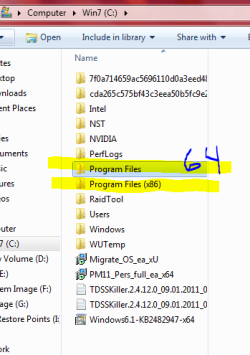
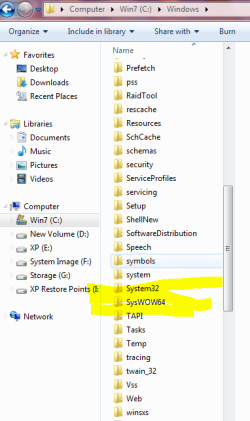
Win 7 64bit isn't just 64bit. Windows 7 is 64bit and 32bit or x86. Where the Win 7x86 is only 32bit.
I took the Snips to show you they are both on my Windows 7 64bit. | My System Specs | | System Manufacturer/Model Number Hopalong/ Godzilla OS Windows7 Pro 64bit SP-1; Windows XP Pro 32bit CPU Intel Core i7-870 Lynnfield 2.93GHz LGA 1156 95W Quad-Core Motherboard ASUS P7P55D-E PRO Memory 8GB@1400MHz Crucial Ballistix DDR3-1600 4x2GB Graphics Card ASUS ENGTX460 DirectCU/2DI/1GD5 1GB 256-bit GDDR5 Sound Card VIA Onboard Monitor(s) Displays Asus VS248H-P 24"; Samsung SyncMaster 941BW 19"ws Screen Resolution 1920x1080; 1440x900 Keyboard Logitech K-320 Mouse Kensington PSU COOLER MASTER Silent Pro RS850-AMBAJ3-US 850W Modular Case COOLER MASTER HAF 932 RC-932-KKN5-GP Black Cooling Scythe "Mugen-2 Rev.B" (2 ScytheKaze-Jyuni PWM fans) Hard Drives Samsung 830 120GB SSD
Intel 320 120GB SSD
Western Digital Caviar Black WD7501AALS 750GB 7200 RPM SATA 3.0Gb/s
Western Digital Caviar Black WD6401AALS 640GB 7200 RPM SATA 3.0Gb/s Antivirus Avast Inernet Suite Browser IE 9 ; Chrome |
20 May 2011
|
#5 | | |
One last thing, make sure that there are 64bit drivers for your PC, you can try the 32bit drivers, they might work, but there might also be problems at some point. You would have to then trial and error it. If there are no 64bit drivers for your system, I recommend sticking with 32bit. | My System Specs | | System Manufacturer/Model Number Self Built OS Win 7 Ultimate 32bit CPU C2D E6600 2.4Ghz Motherboard Intel D965WH Memory 4G Kingston KHX5400D2 Graphics Card EVGA GTX 570 HD SC (012-P3-1573-KR) Sound Card On-Board Monitor(s) Displays Samsung 226BW Screen Resolution 1680 x 1050 PSU Corsair TX750W Case In-Win C589 Cooling Stock Intel Cooling Hard Drives 2 x 250 Seagate Barracuda
2 x 500 Seagate Barracuda (Raid1) |
21 May 2011
|
#6 | | W7 X-64 RTM,SUSE 11.1, XP PRO SP3 as a VM, VMware ESXi Hafnarfjörður IS |
Hi there
My take on this is a bit different
I'd install the 64 bit OS and keep an XP Virtual machine.
That way you could run approx 85% of your apps (seems about the % of popular apps that work on 64 bit Windows 7 is around 85% of the most popular apps) and keep an XP Virtual Machine to run those apps that only work on 32 bit.
You'd only need to power on the VM when you want to run the 32 bit app. A small XP VM won't consume a lot of resources.
Go for something like vmware player (free) to create your VM.
Cheers
jimbo | My System Specs | | System Manufacturer/Model Number Custom built OS W7 X-64 RTM,SUSE 11.1, XP PRO SP3 as a VM, VMware ESXi CPU Q9400 QUAD Motherboard P5QL-CM Memory 8GB Graphics Card On Motherborad Sound Card Realtek HD audio Monitor(s) Displays Apple Cinema display Mouse Toshiba wireless laser Hard Drives 4 X 1TB SATA Internet Speed > 20MB up |
21 May 2011
|
#7 | | |
2 points in reply to the comments--
It's clear that my impression of 64 bit is stale--compatibility has come a long way and it's a good thing this event occurred so that I now have a better understanding.
That said, it also seems there's no consensus on the degree of increased compatibility. The last post eludes to 85% and an initial post claimed almost 100% of correctly written 32 bit software (is it true that 15% of commercially written 32 bit code is dodgy?).
If one were to get into trouble the virtual machine is a good point.
Lastly, a question. Just how much production gain is achieved with the 64 bit OS with an application written for same vs. the same application under a 32 bit OS? | My System Specs | | |
21 May 2011
|
#8 | | |

Quote: Originally Posted by Tepid , I for one am hoping that Win8 will be 64bit only. Time to force the 64bit issue on 3rd party dev's. I don't share this same hope. With that said, I'm on 64bit Windows 7 and am not having any substantial problems. The only 1 piece of hardware I have without a driver is a scanner, and I simply connect that to an old spare WinXP box that is 32bit and scan with that computer. I could replace the scanner with a new model with a 64bit driver, but I don't use the scanner enough to justify that cost.
However, at work, our problems are with our CheckPoint VPN. See, this is a critical piece of software that our systems admins all use and we need it on our laptops to be able to connect via VPN and work remotely. Up until very recently, there was no 64bit client option available based on the physical VPN hardware we had at our office and the licensing we had. Therefore, this wasn't a problem with the checkpoint developers getting off their butts and writing a 64bit driver...but a situation where my employer would have to spend substantial $$'s to replace equipment. These are the more substantial situations that cannot be quickly rectified or just dropped when 64bit doesn't work. 
Quote: Originally Posted by markg2 Lastly, a question. Just how much production gain is achieved with the 64 bit OS with an application written for same vs. the same application under a 32 bit OS? 64bit OS's and applications can offer improvements in calculation times and such with extremely large datasets. Some software like Microsoft SQL Server, or Microsoft Exchange server can benefit greatly from being native 64bit. In most home use scenarios, the 64bit versions of applications don't offer NOTICEABLE improvements in performance. They don't get worse....but they won't blow you away either with the speed at which they get things done.
I've seen people on this very forum, disappointed when they upgraded from 32bit to 64bit and were surprised to see that their experience wasn't a radical improvement.
The sole reason that I went 64bit, was because I had a need to run more than 4GB of RAM to support running virtual machines. 64bit was the only thing that allowed me to do this. Like I said, my experience is that everything I use works, except my scanner, and I can live with that.
Your best bet, is to load 64bit on something and try it and see how it works for you. If everything works, then stick with it. If you find 1/2 dozen things are substantially broken and you cannot easily switch them out to something else, then stick with 32bit. | My System Specs | | System Manufacturer/Model Number Self-Built in July 2009 OS Windows 7 Ultimate x64 CPU Intel Q9550 2.83Ghz OC'd to 3.40Ghz Motherboard Gigabyte GA-EP45-UD3R rev. 1.1, F12 BIOS Memory 8GB G.Skill PI DDR2-800, 4-4-4-12 timings Graphics Card EVGA 1280MB Nvidia GeForce GTX570 Sound Card Realtek ALC899A 8 channel onboard audio Monitor(s) Displays 23" Acer x233H Screen Resolution 1920x1080 Keyboard ABS M1 Mechanical Mouse Logitech G9 Laser Mouse PSU Corsair 620HX modular Case Antec P182 Cooling stock Hard Drives Intel X25-M 80GB Gen 2 SSD

Western Digital 1TB Caviar Black, 32MB cache. WD1001FALS Internet Speed 15/2 cable modem Other Info Windows and Linux enthusiast. Logitech G35 Headset. |
21 May 2011
|
#9 | | |
well the bottom line is,
The 64bit compatibility has gotten a lot better, but it is not perfect, you still need to make sure that your apps will run on 64bit system. But as stated, if you have Windows 7 pro or ultimate, you can use XP Mode (virtual machine) for those apps, they should run fine.
Or use Virtual Box or VMWare Player.
If I had to put a number on it today, there are probably about 5% to 10% of apps that may not work, or may have some issue running on 64bit. That number is a bit arbitrary, but the amount is not as high as it used to be. | My System Specs | | System Manufacturer/Model Number Self Built OS Win 7 Ultimate 32bit CPU C2D E6600 2.4Ghz Motherboard Intel D965WH Memory 4G Kingston KHX5400D2 Graphics Card EVGA GTX 570 HD SC (012-P3-1573-KR) Sound Card On-Board Monitor(s) Displays Samsung 226BW Screen Resolution 1680 x 1050 PSU Corsair TX750W Case In-Win C589 Cooling Stock Intel Cooling Hard Drives 2 x 250 Seagate Barracuda
2 x 500 Seagate Barracuda (Raid1) |
21 May 2011
|
#10 | | Windows 7 Home Premium 64bit Los Angeles |
x64 is more secure against Malware etc than x32 | My System Specs | | System Manufacturer/Model Number Dell 570MT OS Windows 7 Home Premium 64bit CPU Athlon XII Motherboard ? Memory 4GB Graphics Card ATI Radeon 4200 Sound Card ? Monitor(s) Displays Asus and Dell PSU unknown Case unknown Cooling unknown Hard Drives Unknown 64 bit restrictions? problems? All times are GMT -5. The time now is 09:06 PM. | |