| Windows 7: two "Unallocated Space" partitions with 0MB |
23 May 2011
|
#1 | | Microsoft Windows 7 Ultimate: x64 (SP1) Denmark |
Partitions trouble! Hello 7forums!
I noticed in the Windows 7 installation at my partition page.. you know, where you select what disk you want to install Windows on, there were two "Unallocated Space"-partitions on 0MB.. both of them. And they were hanging together with my SDD. When I deleted the Unallocated ones, it said that they were probably needed for Windows, but I didn't really care, I just deleted them. And I also deleted the entire SDD. When I recreated the whole SDD, the unallocated partitions came back. 0MB again! .. So do I need them? They ain't in my Disk Management either in-windows!
Best Regards,
FredeGail | My System Specs |
| System Manufacturer/Model Number Brewed OS Microsoft Windows 7 Ultimate: x64 (SP1) CPU Intel® Core™ i5-2500K Processor Motherboard ASUS P8Z68-V PRO Memory Kingston DDR3 HyperX 1600MHz 8GB Graphics Card ASUS GTX 560 TI DirectCU II 900MHz Sound Card Realtek® ALC892 8-Channel High Definition Audio CODEC Monitor(s) Displays ACER LCD P246HBD 1920x1080 (24") - Dell 1280x800 Screen Resolution ACER LCD P246HBD ~ [1920X1080] - DELL ~ [1280x800] Keyboard Logitech G15 Mouse Coolermaster Sentinel Advanced PSU Corsair 750W Power Supply Case Coolermaster CM Scout Cooling Zalman FS-C77 Fatal1ty CPU Cooler Hard Drives 500 GB WD Caviar SE116 7200rpm SATA2 Internet Speed [↓ 10 MB/s DL] [↑ 1 MB/s UL] Other Info - ROCCAT™ Kave – Solid 5.1 Surround Sound Gaming Headset
- Not overclocking |
23 May 2011
|
#2 | | Windows 8 Pro with Media Center x64 Southern California, USA |
DId you try deleting evey last one, and then formating again? I would do that. If it doesn't work, there is no harm in 0mb taken from your main partition
I know that often windows creates extra space for system files, perhaps this is just a messed up way of doing it. | My System Specs | | Computer type PC/Desktop System Manufacturer/Model Number Dell Inspiron M5040 OS Windows 8 Pro with Media Center x64 CPU AMD E-450 APU 1.65 GHz Memory 4GB Graphics Card Built-in Radeon HD 6320 Graphics Screen Resolution 1366 x 768 Mouse Microsoft Wireless Mobile Mouse 3500 Cooling fan Hard Drives 500GB Internet Speed 2.86Mbps Download Speed, 2.85Mbps Upload Speed & 26ms Ping Antivirus Defender Browser IE10 |
23 May 2011
|
#3 | | Microsoft Windows 7 Ultimate: x64 (SP1) Denmark |

Quote: Originally Posted by DustSailor DId you try deleting evey last one, and then formating again? I would do that. If it doesn't work, there is no harm in 0mb taken from your main partition  So.. I delete both Unallocated, and leave the main, them format main?
Sorry, im not that of an expert with partitions 
But if im going to format again, its pretty good, because im gonna move from 32-bit to 64.
Oh, and thanks for your reply!
I know that often windows creates extra space for system files, perhaps this is just a messed up way of doing it.
Best Regards,
FredeGail
Last edited by FredeGail; 23 May 2011 at 03:09 PM..
| My System Specs | | System Manufacturer/Model Number Brewed OS Microsoft Windows 7 Ultimate: x64 (SP1) CPU Intel® Core™ i5-2500K Processor Motherboard ASUS P8Z68-V PRO Memory Kingston DDR3 HyperX 1600MHz 8GB Graphics Card ASUS GTX 560 TI DirectCU II 900MHz Sound Card Realtek® ALC892 8-Channel High Definition Audio CODEC Monitor(s) Displays ACER LCD P246HBD 1920x1080 (24") - Dell 1280x800 Screen Resolution ACER LCD P246HBD ~ [1920X1080] - DELL ~ [1280x800] Keyboard Logitech G15 Mouse Coolermaster Sentinel Advanced PSU Corsair 750W Power Supply Case Coolermaster CM Scout Cooling Zalman FS-C77 Fatal1ty CPU Cooler Hard Drives 500 GB WD Caviar SE116 7200rpm SATA2 Internet Speed [↓ 10 MB/s DL] [↑ 1 MB/s UL] Other Info - ROCCAT™ Kave – Solid 5.1 Surround Sound Gaming Headset
- Not overclocking |
23 May 2011
|
#4 | | Win7 x 6 PC's California, Florida, Boston |
You can't delete Unallocated Space of any size. It is already deleted. Just ignore it. | My System Specs | | |
23 May 2011
|
#5 | | Windows 7 Ultimate x64 SP1, Windows 8 Pro x64 Florida, USA |
Have you checked the alignment of the SSD?
How did you create the partitons? | My System Specs | | Computer type PC/Desktop System Manufacturer/Model Number Custom Built OS Windows 7 Ultimate x64 SP1, Windows 8 Pro x64 CPU INTEL Core i7 3820 LGA 2011 Motherboard Gigabyte GA X79 UD5 v1.0 F13s Memory 16 GB (4 X 4GB) G-Skill Ripjaws Z DDR3 2133 Quad Channel Graphics Card EVGA GTX 460 SC 1GB Sound Card Realtek Onboard ALC898 Monitor(s) Displays Samsung BX2431 Screen Resolution 1920x1080 Keyboard Logitech G15 Mouse Microsoft Wireless Explorer Mouse PSU Corsair HX1000W Case Thermaltake Armor+ Cooling INTEL BXRTS2011LC Liquid-cooled Hard Drives OCZ Vertex 4 120GB 2.5 in. SSD FW 1.5
3x OCZ Vertex 3 120GB 2.5 in. SSD FW 2.25
4 x WD 2002FAEX SATA
4xWD 7501AALS SATA Internet Speed 6.0 Mb/s |
23 May 2011
|
#6 | | Vista, Windows7, Mint Mate, Zorin, Windows 8 Florida in winter, Black Forest/Germany |
How does that look like in Disk Management? | My System Specs | | System Manufacturer/Model Number HP, Dell, Gateway, Toshiba - 4 laptops and 2 desktops OS Vista, Windows7, Mint Mate, Zorin, Windows 8 CPU from 1.6GHz Duo to i7 Monitor(s) Displays 2x HP w2207 Keyboard with trackball - no mices Mouse Trackball mice Hard Drives 5x HDD, 7x SSD, 12x Externals Internet Speed DSL 6000 |
23 May 2011
|
#7 | | Microsoft Windows 7 Ultimate: x64 (SP1) Denmark |

Quote: Originally Posted by gregrocker You can't delete Unallocated Space of any size. It is already deleted. Just ignore it. So actually it's just some bug of MS or my SSD? 
Quote: Originally Posted by pbcopter Have you checked the alignment of the SSD?
How did you create the partitons? I'll try that. When I deleted all the partitions, I selected the main, pressed new (in Windows 7 install) and just maxed the number. 
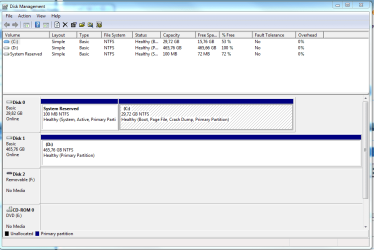
Quote: Originally Posted by whs How does that look like in Disk Management? Like this! | My System Specs | | System Manufacturer/Model Number Brewed OS Microsoft Windows 7 Ultimate: x64 (SP1) CPU Intel® Core™ i5-2500K Processor Motherboard ASUS P8Z68-V PRO Memory Kingston DDR3 HyperX 1600MHz 8GB Graphics Card ASUS GTX 560 TI DirectCU II 900MHz Sound Card Realtek® ALC892 8-Channel High Definition Audio CODEC Monitor(s) Displays ACER LCD P246HBD 1920x1080 (24") - Dell 1280x800 Screen Resolution ACER LCD P246HBD ~ [1920X1080] - DELL ~ [1280x800] Keyboard Logitech G15 Mouse Coolermaster Sentinel Advanced PSU Corsair 750W Power Supply Case Coolermaster CM Scout Cooling Zalman FS-C77 Fatal1ty CPU Cooler Hard Drives 500 GB WD Caviar SE116 7200rpm SATA2 Internet Speed [↓ 10 MB/s DL] [↑ 1 MB/s UL] Other Info - ROCCAT™ Kave – Solid 5.1 Surround Sound Gaming Headset
- Not overclocking |
23 May 2011
|
#8 | | Vista, Windows7, Mint Mate, Zorin, Windows 8 Florida in winter, Black Forest/Germany |
Well, if we go by Disk Management, those zero partitions are non existant. | My System Specs | | System Manufacturer/Model Number HP, Dell, Gateway, Toshiba - 4 laptops and 2 desktops OS Vista, Windows7, Mint Mate, Zorin, Windows 8 CPU from 1.6GHz Duo to i7 Monitor(s) Displays 2x HP w2207 Keyboard with trackball - no mices Mouse Trackball mice Hard Drives 5x HDD, 7x SSD, 12x Externals Internet Speed DSL 6000 |
23 May 2011
|
#9 | | Microsoft Windows 7 Ultimate: x64 (SP1) Denmark |

Quote: Originally Posted by whs Well, if we go by Disk Management, those zero partitions are non existant. True. Maybe we should just ignore them!
I deleted the main, then the unallocated removed totally, but when I re-created the main one, they were back. | My System Specs | | System Manufacturer/Model Number Brewed OS Microsoft Windows 7 Ultimate: x64 (SP1) CPU Intel® Core™ i5-2500K Processor Motherboard ASUS P8Z68-V PRO Memory Kingston DDR3 HyperX 1600MHz 8GB Graphics Card ASUS GTX 560 TI DirectCU II 900MHz Sound Card Realtek® ALC892 8-Channel High Definition Audio CODEC Monitor(s) Displays ACER LCD P246HBD 1920x1080 (24") - Dell 1280x800 Screen Resolution ACER LCD P246HBD ~ [1920X1080] - DELL ~ [1280x800] Keyboard Logitech G15 Mouse Coolermaster Sentinel Advanced PSU Corsair 750W Power Supply Case Coolermaster CM Scout Cooling Zalman FS-C77 Fatal1ty CPU Cooler Hard Drives 500 GB WD Caviar SE116 7200rpm SATA2 Internet Speed [↓ 10 MB/s DL] [↑ 1 MB/s UL] Other Info - ROCCAT™ Kave – Solid 5.1 Surround Sound Gaming Headset
- Not overclocking |
23 May 2011
|
#10 | | Vista, Windows7, Mint Mate, Zorin, Windows 8 Florida in winter, Black Forest/Germany |

Quote: Originally Posted by FredeGail 
Quote: Originally Posted by whs Well, if we go by Disk Management, those zero partitions are non existant. True. Maybe we should just ignore them!
I deleted the main, then the unallocated removed totally, but when I re-created the main one, they were back. I would classify it as a "reporting error". | My System Specs | | System Manufacturer/Model Number HP, Dell, Gateway, Toshiba - 4 laptops and 2 desktops OS Vista, Windows7, Mint Mate, Zorin, Windows 8 CPU from 1.6GHz Duo to i7 Monitor(s) Displays 2x HP w2207 Keyboard with trackball - no mices Mouse Trackball mice Hard Drives 5x HDD, 7x SSD, 12x Externals Internet Speed DSL 6000 two "Unallocated Space" partitions with 0MB problems? All times are GMT -5. The time now is 08:52 PM. | |