| Windows 7: W7 File Explore file selection lost |
28 May 2011
|
#1 | | Windows 7 Enterprise 64 bit |
W7 File Explore file selection lost Is it by design of Windows 7 File Manager (File explorer) that selection is removed when clicking to Explorer right side Window column header, in order to sort by name.
For example:
1. I sort by type, clicking to type column name
2. select all jpeg files
3. I sort by name, clicking to column name and all selection is lost.
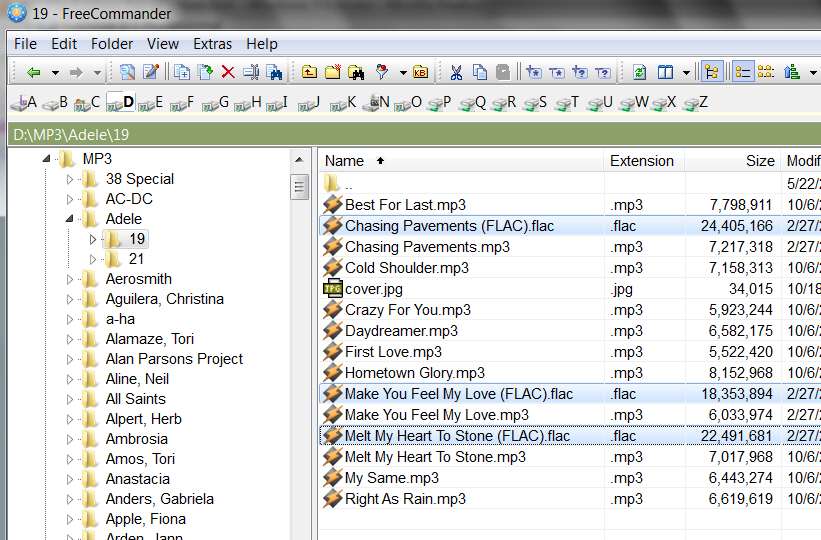
In Windows XP I used this kind of sorting for testing visually that all jpeg files have accordingly named raw file pair and after that as final step, I deleted all jpeg files.
I'm not sure, if it's an user selectable option in Windows 7 File Manager or just incompetent file management solution.
Thanks! | My System Specs |
| OS Windows 7 Enterprise 64 bit CPU Intel I5-760 Motherboard INTEL P55 S1156 DDR3 GLAN RAID BLKDP55WB Memory 8 GB Graphics Card CLUB 3D HD5450 1GB GDDR3 CGAX-54524LI Hard Drives WD150HFLS 150GB/10000rpm
WD10EALS Blue 1TB |
28 May 2011
|
#2 | | Windows 7 Pro X64 Space Coast of Florida |
It's one more thing that is broken in Win 7 Windows Explorer. Add it to a long list.
Some of the Windows Explorer replacements still work this way. PowerDesk for sure, I just tried it. Q-Dir may, don't have it installed any more. | My System Specs | | System Manufacturer/Model Number Dell Precision 370 OS Windows 7 Pro X64 CPU Intel Pentium 4 Dual LP 3.4Ghz Memory 4GB DDR PC2-5200 ECC Graphics Card NVIDIA Quadro FX 3400/4400 Sound Card SoundMAX Integrated Digital Audio Monitor(s) Displays HP 22" w2207 LCD Screen Resolution 1680 x 1050 Hard Drives 300GB Maxtor 6L300RD PATA
128GB Kingston SV200S3128G SSD (boot)
1.5TB Seagate ST3150041AS SATA Internet Speed Cable via Road Runner 2MB Upload, 20MB Download |
04 Jun 2011
|
#3 | | Windows 7 Enterprise 64 bit |
Just checked Windows Classic Shell Explorer - looks like it doesn't bring back this select and sort function.
Can't we just run old 64 bit Windows XP File manager on Windows 7 x64?
Power Desk is not free and as such application tend to have their own limitation, the usage often isn't very long lasting ...
most often there is like a Moore's law - just twice the trial period :-( | My System Specs | | OS Windows 7 Enterprise 64 bit CPU Intel I5-760 Motherboard INTEL P55 S1156 DDR3 GLAN RAID BLKDP55WB Memory 8 GB Graphics Card CLUB 3D HD5450 1GB GDDR3 CGAX-54524LI Hard Drives WD150HFLS 150GB/10000rpm
WD10EALS Blue 1TB |
04 Jun 2011
|
#4 | | Windows 7 Ultimate X64 SP1 Mt. Crumpit/Whoville |
Try this, right click in an empty spot in the folder and pick one of the "sort by" option to see if that does what you need | My System Specs | | Computer type PC/Desktop System Manufacturer/Model Number Home Built Desktop By DataTech OS Windows 7 Ultimate X64 SP1 CPU Intel i5-2550K, Differing ~4.4-4.8GHz No built in GPU Motherboard ASUS P8Z68-V PRO/GEN3 Memory 16GB G.Skill Sniper 2133MHz 4x4GB Graphics Card ASUS ENGTX460 DirectCU/2DI/1GD5 GeForce GTX 460 Sound Card Onboard Realtek 5-1 Monitor(s) Displays Samsung P2570HD Screen Resolution 1920x1080 Keyboard Old, beat-up Dell USB From 10 yrs Ago Mouse Gigabyte m6900 wired PSU Corsair HX650W Case Inwin Dragon Rider Cooling Hyper 212 EVO w/two Noctua fans, push-pull, @1300 RPM Hard Drives Crucial M4 128GB for OS, 750GB Seagate MomentusXT for data, 500GB Seagate Constellation for storage Internet Speed 8-19 Mbs down, 3-4 Mbs up Comcast Cable Antivirus Norton Internet Security Browser IE 9, Opera when needed Other Info 4 case fans, LG BluRay-RE, ASUS DVD-RW, Mr. Fusion power generator with flux capacitor, 1.21 gigawatts. |
04 Jun 2011
|
#5 | | Windows 7 Enterprise 64 bit |
when clicking empty space for sort menu, instantly unselects all previously selected files. When I keep ctrl key down there is no sort menu at all :-( | My System Specs | | OS Windows 7 Enterprise 64 bit CPU Intel I5-760 Motherboard INTEL P55 S1156 DDR3 GLAN RAID BLKDP55WB Memory 8 GB Graphics Card CLUB 3D HD5450 1GB GDDR3 CGAX-54524LI Hard Drives WD150HFLS 150GB/10000rpm
WD10EALS Blue 1TB |
04 Jun 2011
|
#6 | | Windows 7 Ultimate X64 SP1 Mt. Crumpit/Whoville |

Quote: Originally Posted by Britton30 Try this, right click in an empty spot in the folder and pick one of the "sort by" option to see if that does what you need Attachment 158005 Did you do this? No Ctrl key is needed. This will keep the items in a folder sorted in the same way all the time. You cannot select a few items in a folder and then sort only those items unless you move/copy them to a new folder. It has been this way since at least Windows 95. | My System Specs | | Computer type PC/Desktop System Manufacturer/Model Number Home Built Desktop By DataTech OS Windows 7 Ultimate X64 SP1 CPU Intel i5-2550K, Differing ~4.4-4.8GHz No built in GPU Motherboard ASUS P8Z68-V PRO/GEN3 Memory 16GB G.Skill Sniper 2133MHz 4x4GB Graphics Card ASUS ENGTX460 DirectCU/2DI/1GD5 GeForce GTX 460 Sound Card Onboard Realtek 5-1 Monitor(s) Displays Samsung P2570HD Screen Resolution 1920x1080 Keyboard Old, beat-up Dell USB From 10 yrs Ago Mouse Gigabyte m6900 wired PSU Corsair HX650W Case Inwin Dragon Rider Cooling Hyper 212 EVO w/two Noctua fans, push-pull, @1300 RPM Hard Drives Crucial M4 128GB for OS, 750GB Seagate MomentusXT for data, 500GB Seagate Constellation for storage Internet Speed 8-19 Mbs down, 3-4 Mbs up Comcast Cable Antivirus Norton Internet Security Browser IE 9, Opera when needed Other Info 4 case fans, LG BluRay-RE, ASUS DVD-RW, Mr. Fusion power generator with flux capacitor, 1.21 gigawatts. |
04 Jun 2011
|
#7 | | Windows 7 Enterprise 64 bit |
Does it works differently on your PC?
When I select 2-3 files and after that click to empty space to see sort menu, a previous selection is lost and no files is selected. That doesn't make a sense to me as I need to select twice consequently as I did in Windows XP.
First sorting by type jpeg and then by name, to confirm that all raw files had a pair with jpg, followed by deletion. | My System Specs | | OS Windows 7 Enterprise 64 bit CPU Intel I5-760 Motherboard INTEL P55 S1156 DDR3 GLAN RAID BLKDP55WB Memory 8 GB Graphics Card CLUB 3D HD5450 1GB GDDR3 CGAX-54524LI Hard Drives WD150HFLS 150GB/10000rpm
WD10EALS Blue 1TB |
04 Jun 2011
|
#8 | | Windows 7 Ultimate X64 SP1 Mt. Crumpit/Whoville |
Nope, it works the same. IF after making a selection(s) in a folder you click ANYwhere in that window, the selection focus will be lost. That's why I suggested to cut/copy/paste your selection to a new folder or sub-folder, then sort from the new one. That, I think may work albeit not a solution, but a work-around.
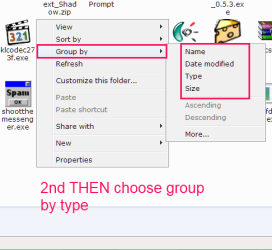
My previous idea was to change the default sort-by. It will sort all files, .xxx, together, and all .yyy, together. If sort by TYPE and Group by TYPE are both selected, is that what you want? | My System Specs | | Computer type PC/Desktop System Manufacturer/Model Number Home Built Desktop By DataTech OS Windows 7 Ultimate X64 SP1 CPU Intel i5-2550K, Differing ~4.4-4.8GHz No built in GPU Motherboard ASUS P8Z68-V PRO/GEN3 Memory 16GB G.Skill Sniper 2133MHz 4x4GB Graphics Card ASUS ENGTX460 DirectCU/2DI/1GD5 GeForce GTX 460 Sound Card Onboard Realtek 5-1 Monitor(s) Displays Samsung P2570HD Screen Resolution 1920x1080 Keyboard Old, beat-up Dell USB From 10 yrs Ago Mouse Gigabyte m6900 wired PSU Corsair HX650W Case Inwin Dragon Rider Cooling Hyper 212 EVO w/two Noctua fans, push-pull, @1300 RPM Hard Drives Crucial M4 128GB for OS, 750GB Seagate MomentusXT for data, 500GB Seagate Constellation for storage Internet Speed 8-19 Mbs down, 3-4 Mbs up Comcast Cable Antivirus Norton Internet Security Browser IE 9, Opera when needed Other Info 4 case fans, LG BluRay-RE, ASUS DVD-RW, Mr. Fusion power generator with flux capacitor, 1.21 gigawatts. |
04 Jun 2011
|
#9 | | Windows 7 Pro X64 Space Coast of Florida |
PowerDesk is not free, true, but I've been using it for at least 10 years, upgrading as I upgraded my OS. Q-Dir is free though. Might be worth giving it a try, see if it does what you need. | My System Specs | | System Manufacturer/Model Number Dell Precision 370 OS Windows 7 Pro X64 CPU Intel Pentium 4 Dual LP 3.4Ghz Memory 4GB DDR PC2-5200 ECC Graphics Card NVIDIA Quadro FX 3400/4400 Sound Card SoundMAX Integrated Digital Audio Monitor(s) Displays HP 22" w2207 LCD Screen Resolution 1680 x 1050 Hard Drives 300GB Maxtor 6L300RD PATA
128GB Kingston SV200S3128G SSD (boot)
1.5TB Seagate ST3150041AS SATA Internet Speed Cable via Road Runner 2MB Upload, 20MB Download |
04 Jun 2011
|
#10 | | Windows 7 Pro x64 (1), Win7 Pro X64 / WinXP Pro x86 on (2) |

Quote: Originally Posted by robilong 1. I sort by type, clicking to type column name
2. select all jpeg files
3. I sort by name, clicking to column name and all selection is lost. I'm puzzled about your "problem" description, which requires a second sort. Maybe it's just semantics, and I'm not getting what you're describing.
The initial display of names in a folder by Explorer is, by default, sorted alphabetically by name. Unless you've previously clicked on a different column heading than "Name", to sort the list by the values in that column (and which "persists", i.e. the sort sequence of that folder by Explorer gets retained across Explorer window close and re-open), presentation alphabetically by name is what happens.
So, the initial presentation is as if you'd clicked on the "Name" column heading, wherein the up-arrow appears in the column heading indicating "ascending sequence using the values in this column" as the controlling sort for display.
Ok. If you then click on the "Type" column heading you cause a re-sort of the list (into ascending sequence) on the values in the "Type" column, but within each value shown in each type sub-set the individual rows of that subset is still in alphabetical order by name.
So... why would you now need to select only, say, the JPG types, and then re-sort alphabetically by "name"? They're already sorted alphabetically by name?
Based on the description of what you typically used this for in WinXP that no longer works in Windows 7, are you actually wanting to select TWO types from within that large folder that contains multiple types... namely JPG and RAW... and then wanting to re-sort that subset of MULTIPLE TYPES... to re-collect both RAW and JPG together, so that you can verify that you have pairs, which then lets you delete all of the JPG files?
Or am I just not understanding why you need this ability to retain a current selection from a pre-sorted list, so that you can then select a subset and click on a different column to now re-sort the subset?
What would you do with the remaining non-selected subset, even if you could re-sort the subset using the different column heading click??? Would they remain as originally presented?
Finally, if you have both RAW and JPG in one large folder, and their filenames are the same except for extension, doesn't the original "Name" arrangement already show you the pairs (if present in pairs), first JPG and then RAW? Can't you already visually scroll through the list and see any "orphans"?
I'm just not clear on why what currently exists is insufficient to meet your "twins/orphans" needs? | My System Specs | | System Manufacturer/Model Number Home-built, two systems (1) and (2) OS Windows 7 Pro x64 (1), Win7 Pro X64 / WinXP Pro x86 on (2) CPU i5-3350p 3.1Ghz/6MB-cache (1); E8400 3.0Ghz/6MB-cache (2) Motherboard ASUS P8Z77-V Pro (1); ASUS P5Q3 (2) Memory 8GB PC3-12800 DDR3 (1); 4GB PC3-10600 DDR3 (2) Graphics Card ATI HD5770 dual-DVI (1), (see TV cards); ATI HD4850 (2) Sound Card Realtek ALC892 HD Audio (1); Realtek ALC1200 HD Audio (2) Monitor(s) Displays Eizo HD2441W LCD, Eizo S2433W (1); Eizo 24" S2433W (2) Screen Resolution 1920x1200, 1920x1200 (1); 1920x1200 (2) Keyboard IBM PS/2 (1) and (2) Mouse Logitech MX Revolution wireless (1); Microsoft wired (2) PSU Nesteq ECS-6001 600W (1); Nesteq ECS-5001 500W (2) Case Acousti-Case 360 (1) and (2) Cooling Noctua NH-U12P SE2 for CPU, 2x120mm case fans (1) and (2) Hard Drives (1) 1TB SATA-II (7200RPM), 2TB SATA-II (7200RPM), 2TB SATA-III (7200RPM), 250GB SATA-III (10000RPM) for OS;
(2) 320GB SATA-II (7200RPM), 750GB SATA-II (7200RPM), 150GB SATA-II (10000RPM) for OS Internet Speed 15mbps down / 2mbps up Other Info Ceton InfiniTV 4-tuner cablecard-enabled TV card as well as Hauppauge HVR-2250 OTA/ATSC 2-tuner TV card in (1), running under Win7 WMC W7 File Explore file selection lost problems? All times are GMT -5. The time now is 05:52 AM. | |