|
Welcome to Windows 7 Forums. Our forum is dedicated to helping you find solutions with any problems, errors or issues you are experiencing with Windows 7. The Windows 7 forum also covers news and updates and has an extensive Windows 7 tutorial section that covers a wide range of tips and tricks.
Windows 7 - Windows 7 beta Aero |
01-10-2009
|
#1 | | |
Windows 7 beta Aero Hi, im new, well i have been reading the forum for a while since the first "leaked versions", and finally decided to make an account  (greetings from mexico)
Anyway, i just installed the new beta version my Toshiba m700, and found something that has been bothering me for a while now. i like how the new aero version keeps the task bar and the top of the windows transparent, but each time i open a system folder, my pc, libraries, control panel, you name it, it goes black solid, and i have to reactivate the effect. the opened windows became transparent again, it works fine till i open a new folder; in the previous versions it didnt change.
So anyone has had the same problem or is just me, maybe something with my drivers, but it doesn't show the "aero has been disable" warning, and i already tried doing two fresh installs. | My System Specs | | System Manufacturer/Model Number Toshiba Portégé M700 OS Win 7 RC1 CPU Core 2 Duo T9300 |
01-11-2009
|
#2 | | Windows 7 Ultimate Beta 7000 |

Quote: Originally Posted by Saga Zero Hi, im new, well i have been reading the forum for a while since the first "leaked versions", and finally decided to make an account  (greetings from mexico)
Anyway, i just installed the new beta version my Toshiba m700, and found something that has been bothering me for a while now. i like how the new aero version keeps the task bar and the top of the windows transparent, but each time i open a system folder, my pc, libraries, control panel, you name it, it goes black solid, and i have to reactivate the effect. the opened windows became transparent again, it works fine till i open a new folder; in the previous versions it didnt change.
So anyone has had the same problem or is just me, maybe something with my drivers, but it doesn't show the "aero has been disable" warning, and i already tried doing two fresh installs.  i had the exact same problem and it stopped right after i uninstalled microsoft's live mesh beta. i dont know if you have this installed but when i uninstalled it, it stopped so i dont know if that is what fixed it or it was coincidence. if you have it try it and let me know | My System Specs | | OS Windows 7 Ultimate Beta 7000 CPU AMD Athlon 64 X2 5000+ Brisbane 2.6GHz Black Edition Motherboard ASUS M2A-VM Memory Kingston 2GB DDR2 667 Monitor(s) Displays Acer AL2216Wbd 22" Widescreen Screen Resolution 1680x1050 Hard Drives HITACHI 500GB SATA Other Info Laptop: Compaq C700 |
01-11-2009
|
#3 | | |

Quote: Originally Posted by tdk08 i had the exact same problem and it stopped right after i uninstalled microsoft's live mesh beta. i dont know if you have this installed but when i uninstalled it, it stopped so i dont know if that is what fixed it or it was coincidence. if you have it try it and let me know  i just tried that and worked  seems win 7 doesn't like live mesh at the moment, thanks for the info, ill keep testing the os and post findings (or problems  ) | My System Specs | | System Manufacturer/Model Number Toshiba Portégé M700 OS Win 7 RC1 CPU Core 2 Duo T9300 |
01-11-2009
|
#4 | | |
In a list posted in another thread regarding known issues with the beta: Quote: Windows Aero
If you install Windows Live Mesh, the Windows Aero® experience stops working. If you must use the desktop with the Aero experience, uninstall Windows Live Mesh. | My System Specs | | System Manufacturer/Model Number Home Made / Numero Uno OS Win7 x64 Ultimate RTM CPU Intel i7 920 Motherboard Gigabyte GA-EX58-UD4P Memory G.SKILL 6GB DDR3 1333 Graphics Card VisionTek ATI 4870 512 x2 (Crossfire) Sound Card Onboard Realtek HD Monitor(s) Displays HP W2408 24 inch Screen Resolution 1920x1200 Keyboard Microsoft Basic (love it) Mouse Logitech 518 PSU KINGWIN Mach 1 1000w Case Antec 900 Cooling Air - Coolmaster V8 CPU Heatsink Hard Drives WD VelociRaptor x2 (Raid 0)
Western Digital Caviar Black WD1001FALS 1TB (2 partitions) Internet Speed Not as fast as I would like |
01-11-2009
|
#5 | | Windows 7 Ultimate Beta 7000 |

Quote: Originally Posted by VegasDen In a list posted in another thread regarding known issues with the beta: Ah, I thought I remembered seeing it somewhere before! | My System Specs | | OS Windows 7 Ultimate Beta 7000 CPU AMD Athlon 64 X2 5000+ Brisbane 2.6GHz Black Edition Motherboard ASUS M2A-VM Memory Kingston 2GB DDR2 667 Monitor(s) Displays Acer AL2216Wbd 22" Widescreen Screen Resolution 1680x1050 Hard Drives HITACHI 500GB SATA Other Info Laptop: Compaq C700 |
01-11-2009
|
#6 | | |
guys, forgive me being noob, but... the aero theme, isn't actually a theme named aero, right? lol, i mean, you choose one of the themes available, and just activate the transparency, right? because i don't have nay theme called "aero". just "nature" "landscape" and "light auras" right? | My System Specs | | System Manufacturer/Model Number HP OS Windows 7 Build 7000 CPU Mobile DualCore Intel T7500 2.20 Ghz Motherboard Intel Crestline PM965 Memory 2048 DDR2 SDram Graphics Card Nvidia GeForce 8400M GS 128Mb Sound Card Realtek ALC268 HDA Monitor(s) Displays LG Philips LP154WX4 15.4" Lcd Screen Resolution 1280*800 Hard Drives Local disk: Samsung HM250JI ATA Device (250 GB, 5400 RPM, SATA) Internet Speed 4000/512 K |
01-11-2009
|
#7 | | |
I think the transparency effect is the Aero Theme.
After That you just change wallpaper and the color to get different combinations, which we again call themes.
btw, People were saying they got Theme of Africa and others. I only got for America. Any reason for that?
Also any idea where we can get more of em' ? | My System Specs | | System Manufacturer/Model Number Hp 530 OS Windows 7 RC1 CPU Core Duo,1.6Ghz Motherboard T2300 Memory 1GB |
01-11-2009
|
#8 | | Windows 7 Build 7100 32-bit, Windows Vista 32-bit |
It was almost certainly called Aero in Vista. It's called Windows 7 in Windows 7 | My System Specs | | System Manufacturer/Model Number Dell Vostro 1510 OS Windows 7 Build 7100 32-bit, Windows Vista 32-bit CPU Intel Core Duo T8100 2,1GHz Memory 3GB Graphics Card NVIDIA GeForce 8400M GS Screen Resolution 1440x900 Hard Drives 250GB |
01-11-2009
|
#9 | | Windows 7 Ultimate Vista Ultimate x64 |
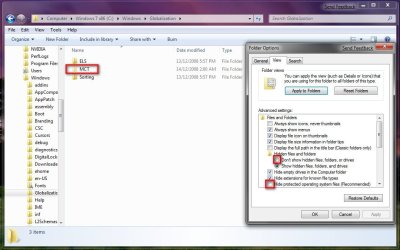
To get regional themes go to this folder C:\Windows\Globalization\MCT and change folder option as follows.
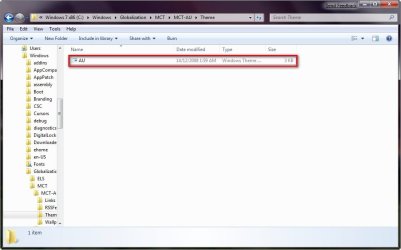
Now select each of the different themes and then they will become active.
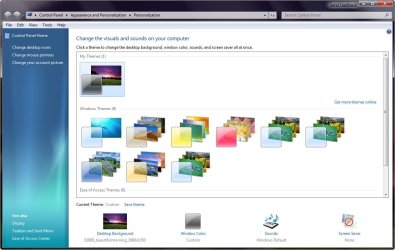
Now when you go in to Personalization you should have all the themes for each country as shown. | My System Specs | | System Manufacturer/Model Number Home Brew OS Windows 7 Ultimate Vista Ultimate x64 CPU Core 2 Duo E8500 3.16Ghz @ 3.8Ghz Motherboard eVGA 750i FTW Memory 2x2Gigs Patriot PC2-6400 LL Graphics Card Inno3D GeForce GTX260 216 SP Monitor(s) Displays ASUS VW222U 22" 2ms Response time Screen Resolution 1680x1050 Keyboard Logitech G15 Gaming Keyboard Mouse Logitech G9 Gaming Mouse PSU HYTEC 600W & Thermaltake 650W Toughpower Power Exp Case Thermaltake Armor LCS (Liquid Cooling System) Cooling Liquid Cooling System Hard Drives SATA 150GB
SATA II 250GB
USB IDE 750GB Ext. |
01-11-2009
|
#10 | | |
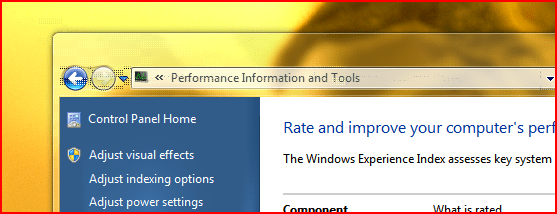
aero issue anybody else experiencing line distortion in the aero glass? I have an ati mobility radeon 9600/9700. update installed a new driver for my graphics, but it did not resolve the issue. it happens on all resolutions. it looks like this | My System Specs | | Windows 7 beta Aero problems? All times are GMT -5. The time now is 12:07 AM. |  |