Windows 7 Forums Search
Welcome to Windows 7 Forums. Our forum is dedicated to helping you find solutions with any problems, errors or issues you are experiencing with Windows 7. The Windows 7 forum also covers news and updates and has an extensive Windows 7 tutorial section that covers a wide range of tips and tricks.


Windows 7 - Windows 7 isn't displaying foreign fonts correctly

 
06-02-2011   #1


Windows 7


Windows 7 isn't displaying foreign fonts correctly

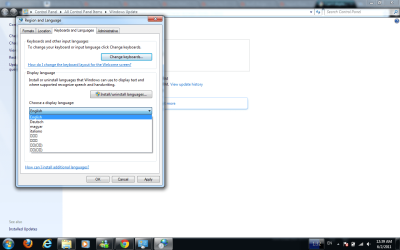
I've installed the pacts, and on the first day, all the chinese characters were correct, but now they're all squares. Even when I go to the regions and languages option in control panel, it's squares (see attachment). What gives? This is Windows 7, 64 bit.

Thanks in advance!!

Attached Thumbnails
Windows 7 isn't displaying foreign fonts correctly-display-languages.png  
My System SpecsSystem Spec
06-02-2011   #2


Windows 7 x86 since December 2008


Please go to Administrative tab of that window, you posted screenshot of, and click Change system locale button in the Language for non-Unicode programs section, select Chinese there.
My System SpecsSystem Spec
Reply

 Windows 7 isn't displaying foreign fonts correctly problems?


Thread Tools


Similar Threads for: Windows 7 isn't displaying foreign fonts correctly
Thread Forum
Gadgets not Displaying Correctly in Windows 7 - Fix Tutorials
Firefox - fonts not displaying correctly - screenshots included Browsers & Mail
Solved Seven Forums not displaying correctly General Discussion
Desktop Icons Not Displaying Correctly General Discussion
sevenforums not displaying correctly Browsers & Mail


All times are GMT -5. The time now is 12:08 AM.


Windows 7 Forums is an independent web site and has not been authorized,
sponsored, or otherwise approved by Microsoft Corporation.
"Windows 7" and related materials are trademarks of Microsoft Corp.
© Designer Media Ltd
  

1 2 3 4 5 6 7 8 9 10 11 12 13 14 15 16 17 18 19 20 21 22 23 24 25 26 27 28 29 30