| Windows 7: Partition Access Denied |
02 Jun 2011
|
#1 | | Windows 7 Ultimate 32bit. |
Partition Access Denied I have to HDDs, one with windows XP installed on it [17GB], and another one with 7 [500GB], I installed each one without the other HDD plugged into my computer, so when i want to use XP i boot from the 17 HD, and when I want to boot from 7 I boot from the 500 HD, which is my 1st boot device.
So, on windows XP all the partitions are working fine, on 7 there's one partition that doesn't open and tells me that access is denied, I searched a bit around and knew that I need to give my account the authority to fully control the partition and the ownership, I did so but nothing happened, activated the Administrator account from cmd, and it's working fine on it, but can't make it work on any other account, what should I do other than reinstalling the windows?
PS: this partition is not the system partition, it's just my movies partition[size 143 GB, free 3GB] | My System Specs |
| OS Windows 7 Ultimate 32bit. CPU Pentium 4 3.2/1 Motherboard Gigabyte 945 Memory 1 GB ddr2 Graphics Card Intel GMA 950 Hard Drives 500GB W.D. Blue Caviar |
02 Jun 2011
|
#3 | | Windows 7 Pro x64 (1), Win7 Pro X64 / WinXP Pro x86 on (2) |

Quote: Originally Posted by Rek I have two HDDs, one with windows XP installed on it [17GB], As has been requested, please post a screenshot from DISKMGMT.MSC in your Windows 7 partition.
But I'm going to guess that your 17GB WinXP partition was on one hard drive where there is also the 143GB "movies" partition. Total size 160GB or so for that drive?
Those two are probably C and D when you are booted to WinXP. Quote: and another one with 7 [500GB], I installed each one without the other HDD plugged into my computer, so when i want to use XP i boot from the 17 HD, and when I want to boot from 7 I boot from the 500 HD, which is my 1st boot device. Did you have reason why you installed Windows 7 as your second OS this way?
Just because you have a second hard drive and wanted to install Windows 7 there, you didn't need to (a) manually change "hard disk #1" in the BIOS to your new drive, or (b) disconnect the original hard drive to force the BIOS to change to the new drive as "hard disk #1", in order to install Windows 7 on the second drive.
If you had left the WinXP drive plugged in and still set as "hard disk #1" to the BIOS with the new second drive also present and visible to the Windows 7 installer, then the Windows 7 installer would have seen the previously existing WinXP already installed on hard drive one, and planted its own "boot manager" onto that WinXP system partition (since that's marked as the "active" partition on "hard disk #1"). Then it would have offered you the choice of where to install Windows 7... and you would have selected your second hard drive, and Windows 7 would have created the Windows 7 partition on that second drive.
Both WinXP and Windows 7 would then have been placed into a "boot manager menu" list, which would be presented to you at each boot... allowing you to then choose which OS you wanted to boot to. Windows 7 is normally the default in that list, following a Windows 7 install, but you could change that back to WinXP if you preferred that OS to be your default on this boot manager menu list.
Then, at boot time, the BIOS would always go to the "active" partition on what it sees as "hard disk #1", which is your original WinXP partition on the first hard drive, boot manager selected and run from that "active" partition on "hard disk #1". The boot manager menu list would be presented showing both WinXP and Windows 7 as options, and you'd then choose which Windows you wanted to boot to... either WinXP on the original hard drive, or Windows 7 on the second hard drive.
This approach would mean you'd never have to fool with BIOS settings or hard drive cables to boot... just pick your Windows from the boot manager menu. That's normally the preferred installation method for a new Windows 7 added to an existing WinXP environment, whether you have multiple partitions on one hard drive or multiple hard drives. Boot manager. Quote: So, on windows XP all the partitions are working fine, on 7 there's one partition that doesn't open and tells me that access is denied, I searched a bit around and knew that I need to give my account the authority to fully control the partition and the ownership, I did so but nothing happened, activated the Administrator account from cmd, and it's working fine on it, but can't make it work on any other account, what should I do other than reinstalling the windows?
PS: this partition is not the system partition, it's just my movies partition[size 143 GB, free 3GB] If you're the administrator userid on Windows 7 (and I assume you are) you can "take ownership" of that drive, which will eliminate the "access is denied" for the entire drive.
Presumably your own userid (only user, first user) has "administrator" rights. Also, you should have a password... as opposed to a non-password user. Yes?
One other final thought... you won't need 500GB for a Windows 7 partition on the second drive. My own recommendation would be to use Partition Wizard to partition that second drive, into say 150GB for Windows 7 and 350GB for a second data partition over there. Windows 7 won't really require more than 30-45GB for itself, and the rest is "user documents", etc. on what will be C to Windows 7 when you boot to Windows 7.
All four of your partitions (two on the first hard drive, and two on the second hard drive) can be lettered by each OS as you see fit. For convenience, I'd suggest making D and E your two "data partitions" when viewed from each OS, WinXP and Windows 7. Then make F your "opposite OS" partition when viewed from each OS. So F is your Windows 7 partition when you're booted to WinXP, and F is your WinXP partition when booted to Windows 7. Keeping consistent and intuitive drive letters for both Windows environments will make it easier for you to navigate no matter which OS you're booted to.
Please post a screenshot from DISKMGMT. | My System Specs | | System Manufacturer/Model Number Home-built, two systems (1) and (2) OS Windows 7 Pro x64 (1), Win7 Pro X64 / WinXP Pro x86 on (2) CPU i5-3350p 3.1Ghz/6MB-cache (1); E8400 3.0Ghz/6MB-cache (2) Motherboard ASUS P8Z77-V Pro (1); ASUS P5Q3 (2) Memory 8GB PC3-12800 DDR3 (1); 4GB PC3-10600 DDR3 (2) Graphics Card ATI HD5770 dual-DVI (1), (see TV cards); ATI HD4850 (2) Sound Card Realtek ALC892 HD Audio (1); Realtek ALC1200 HD Audio (2) Monitor(s) Displays Eizo HD2441W LCD, Eizo S2433W (1); Eizo 24" S2433W (2) Screen Resolution 1920x1200, 1920x1200 (1); 1920x1200 (2) Keyboard IBM PS/2 (1) and (2) Mouse Logitech MX Revolution wireless (1); Microsoft wired (2) PSU Nesteq ECS-6001 600W (1); Nesteq ECS-5001 500W (2) Case Acousti-Case 360 (1) and (2) Cooling Noctua NH-U12P SE2 for CPU, 2x120mm case fans (1) and (2) Hard Drives (1) 1TB SATA-II (7200RPM), 2TB SATA-II (7200RPM), 2TB SATA-III (7200RPM), 250GB SATA-III (10000RPM) for OS;

(2) 320GB SATA-II (7200RPM), 750GB SATA-II (7200RPM), 150GB SATA-II (10000RPM) for OS Internet Speed 15mbps down / 2mbps up Other Info Ceton InfiniTV 4-tuner cablecard-enabled TV card as well as Hauppauge HVR-2250 OTA/ATSC 2-tuner TV card in (1), running under Win7 WMC |
03 Jun 2011
|
#4 | | Windows 7 Ultimate 32bit. |
Thanks for this very detailed replay (: , actually I've installed both operating systems this way to completely separate them from each other, also wanted the boot to be as fast as possible.
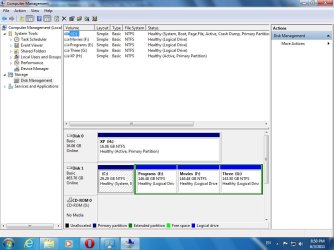
Also I tried to take the ownership with my normal administrator account but still access denied, while it's available at the other administrator that I've activated from cmd. | My System Specs | | OS Windows 7 Ultimate 32bit. CPU Pentium 4 3.2/1 Motherboard Gigabyte 945 Memory 1 GB ddr2 Graphics Card Intel GMA 950 Hard Drives 500GB W.D. Blue Caviar |
03 Jun 2011
|
#5 | | Windows 7 Ultimate X64 SP1 Mt. Crumpit/Whoville |
Try rewiring the two HDD's so the one with Win 7 becomes Disk 0, that is swap the data cables on them. | My System Specs | | Computer type PC/Desktop System Manufacturer/Model Number Home Built Desktop By DataTech OS Windows 7 Ultimate X64 SP1 CPU Intel i5-2550K, Differing ~4.4-4.8GHz No built in GPU Motherboard ASUS P8Z68-V PRO/GEN3 Memory 16GB G.Skill Sniper 2133MHz 4x4GB Graphics Card ASUS ENGTX460 DirectCU/2DI/1GD5 GeForce GTX 460 Sound Card Onboard Realtek 5-1 Monitor(s) Displays Samsung P2570HD Screen Resolution 1920x1080 Keyboard Old, beat-up Dell USB From 10 yrs Ago Mouse Gigabyte m6900 wired PSU Corsair HX650W Case Inwin Dragon Rider Cooling Hyper 212 EVO w/two Noctua fans, push-pull, @1300 RPM Hard Drives Crucial M4 128GB for OS, 750GB Seagate MomentusXT for data, 500GB Seagate Constellation for storage Internet Speed 8-19 Mbs down, 3-4 Mbs up Comcast Cable Antivirus Norton Internet Security Browser IE 9, Opera when needed Other Info 4 case fans, LG BluRay-RE, ASUS DVD-RW, Mr. Fusion power generator with flux capacitor, 1.21 gigawatts. |
03 Jun 2011
|
#6 | | Win7 x 6 PC's California, Florida, Boston |
You were wise to install with the other HD unplugged, then use the BIOS Boot Menu key to boot the HD not set as first to boot in BIOS setup. This keeps the HD's independent to come and go as you please, whereas a Windows-managed Dual Boot interlocks them requiring surgery to remove one.
This has nothing to do with how the OS's are booted.
Are you running an Admin-level account, which is not the same as the hidden Admin?
Try Britton's idea to swap Windows 7 into Disk0 slot while keeping it first to Boot in BIOS setup.
Next try adding this Take Ownership shortcut to your right-click context menu, run it on the partition not seen from C to see if it will help: Take Ownership Shortcut
Next move the data off of the partition and recreate it in Windows 7 DIsk Mgmt: Partition or Volume - Delete Partition or Volume - Create New | My System Specs | | |
03 Jun 2011
|
#7 | | Windows 7 Ultimate 32bit. |
Can't swap cables because one of them is SATA and the Other is IDE.
And I'm using the hidden admin account now to access the drive, typed "net user administrator /active:yes" in CMD to show it Quote: Next try adding this Take Ownership shortcut to your right-click context menu, run it on the partition not seen from C to see if it will help: Take Ownership Shortcut Done, still access denied. Quote: Next move the data off of the partition and recreate it in Windows 7 DIsk Mgmt:
Partition or Volume - Delete
Partition or Volume - Create New If I do that I'd lose most of the data as I don't have enough space
By the way the partition is accessible from admin account and XP, I need to know how to fix more than I need to fix it.
As I'm a beginner freelance tech, specially with windows 7 as I didn't use it much before. | My System Specs | | OS Windows 7 Ultimate 32bit. CPU Pentium 4 3.2/1 Motherboard Gigabyte 945 Memory 1 GB ddr2 Graphics Card Intel GMA 950 Hard Drives 500GB W.D. Blue Caviar |
03 Jun 2011
|
#8 | | Windows 7 Pro x64 (1), Win7 Pro X64 / WinXP Pro x86 on (2) |
Just out of curiosity, do you have "full control" specified for that partition for your user?
Also, when I've fought this same type of problem in the past (most commonly during the struggle between getting NTFS partitions to be fully acceptable to both WinXP and Windows 7 on both of my dual-boot home LAN machines, so that I can read/write any partition on either machines from either booted OS on either machine), I've had to "take ownership" in a brute force way... first removing all users shown and then adding "Everyone".
And most importantly, I then granted "full control" permission to "everyone".
This has stood me in good stead over the years, and now I never have an "access denied", even when WinXP or Windows 7 gets reinstalled. | My System Specs | | System Manufacturer/Model Number Home-built, two systems (1) and (2) OS Windows 7 Pro x64 (1), Win7 Pro X64 / WinXP Pro x86 on (2) CPU i5-3350p 3.1Ghz/6MB-cache (1); E8400 3.0Ghz/6MB-cache (2) Motherboard ASUS P8Z77-V Pro (1); ASUS P5Q3 (2) Memory 8GB PC3-12800 DDR3 (1); 4GB PC3-10600 DDR3 (2) Graphics Card ATI HD5770 dual-DVI (1), (see TV cards); ATI HD4850 (2) Sound Card Realtek ALC892 HD Audio (1); Realtek ALC1200 HD Audio (2) Monitor(s) Displays Eizo HD2441W LCD, Eizo S2433W (1); Eizo 24" S2433W (2) Screen Resolution 1920x1200, 1920x1200 (1); 1920x1200 (2) Keyboard IBM PS/2 (1) and (2) Mouse Logitech MX Revolution wireless (1); Microsoft wired (2) PSU Nesteq ECS-6001 600W (1); Nesteq ECS-5001 500W (2) Case Acousti-Case 360 (1) and (2) Cooling Noctua NH-U12P SE2 for CPU, 2x120mm case fans (1) and (2) Hard Drives (1) 1TB SATA-II (7200RPM), 2TB SATA-II (7200RPM), 2TB SATA-III (7200RPM), 250GB SATA-III (10000RPM) for OS;
(2) 320GB SATA-II (7200RPM), 750GB SATA-II (7200RPM), 150GB SATA-II (10000RPM) for OS Internet Speed 15mbps down / 2mbps up Other Info Ceton InfiniTV 4-tuner cablecard-enabled TV card as well as Hauppauge HVR-2250 OTA/ATSC 2-tuner TV card in (1), running under Win7 WMC |
03 Jun 2011
|
#9 | | Win7 x 6 PC's California, Florida, Boston |
But is it an Admin-level user account which is being denied? This is not the same as hidden Admin but is the type of account created normally during install.
Look at Control Panel>User accounts>Change your Account type.
If you have a Standard account, change it to Admin. If you have an Admin-level User account which is being denied after taking ownership and/or permissioning Everyone then you may have corrupt user account. | My System Specs | | Partition Access Denied problems? All times are GMT -5. The time now is 05:58 PM. | |