Windows 7 Forums Search
Welcome to Windows 7 Forums. Our forum is dedicated to helping you find solutions with any problems, errors or issues you are experiencing with Windows 7. The Windows 7 forum also covers news and updates and has an extensive Windows 7 tutorial section that covers a wide range of tips and tricks.


Windows 7 - When making new volume from Unallocated disk I'm getting this

 
06-10-2011   #1


Windows 7 64bit


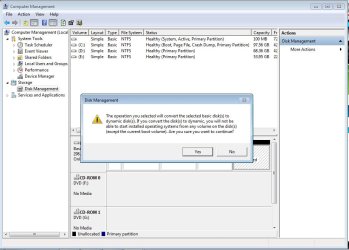
When making new volume from Unallocated disk I'm getting this

i was shrink 80 from 130 gb Partition but when iam going to make new volume from Unallocated disk iam getting this


Please help me how can i fix this and what is the problem ?

Attached Thumbnails
When making new volume from Unallocated disk I'm getting this-error.jpg  
My System SpecsSystem Spec
06-10-2011   #2


Windows 7 Ultimate 64Bit


Which partition are you trying to shrink ? D or E ? It looks as if you only have the 100 MB unallocated space there. Don`t mess with it.

Can you give us a shot of disk mgmt b4 you attempt anything ?
My System SpecsSystem Spec
06-10-2011   #3


Windows 7 64bit


Quote   Quote: Originally Posted by Zomby88 View Post
Which partition are you trying to shrink ? D or E ? It looks as if you only have the 100 MB unallocated space there. Don`t mess with it.

Can you give us a shot of disk mgmt b4 you attempt anything ?
i was Shrink from E drive and 100 mb drive i think this is recover partition ...
My System SpecsSystem Spec
.


06-10-2011   #4


Windows 7 Ultimate 32-bit & 64-bit both SP1


Hi Maudasir and welcome to Windows 7 Forums

You can only have a maximum of 4 primary partitions on a Basic disk. Trying to create another partition will take it over this limit. The only way to do this previously was to make a maximum of 3 primary and 1 extended partitions. The extended partition acts as a container for 1 or more logical partitions, subject to system constraints (drive letter availability).

In older OSes prior to Vista, the only way to achieve this was to convert one of the existing partitions (usually the last listed on the disk) from primary to extended, a procedure that involved making a back-up of all information in the old partition, deleting the old partition and then recreating it as extended, followed by creating as many logical partitions as required subject to the constraints mentioned above, and finally copying the backed-up data back to one of the newly created logical partitions.

Since Vista, things have become easier and, as well as Basic disks (which are the default), you can also have Dynamic disks. You can either allow the system to do the conversion automatically, in which case the volumes (aka partitions) on the disk are converted to the appropriate type without loss of data, or you can convert the disk manually Convert a Basic Disk to a Dynamic Disk.

I recommend that you allow the system to do the conversion automatically, as it will take care of everything for you. Should you have important data that you don't want to lose, back it up prior to converting the disk, whether you do it manually or allow it to be done automatically. We are not responsible for the loss of any data that may, or may not, occur during this procedure.
My System SpecsSystem Spec
06-10-2011   #5


Windows 7 64bit


if i delete the 100 MB partition then ? if yes please let me know how to delete 100 mb disk
My System SpecsSystem Spec
Reply

 When making new volume from Unallocated disk I'm getting this problems?


Thread Tools


Similar Threads for: When making new volume from Unallocated disk I'm getting this
Thread Forum
Solved Can't create new volume in unallocated space Hardware & Devices
How do I create a new volume with unallocated space on 3TB hard drive General Discussion
Solved can't turn second unallocated partition into a simple volume General Discussion
I have unallocated space but i cant extend the volume Installation & Setup
Making a volume active ? General Discussion


All times are GMT -5. The time now is 12:13 AM.


Windows 7 Forums is an independent web site and has not been authorized,
sponsored, or otherwise approved by Microsoft Corporation.
"Windows 7" and related materials are trademarks of Microsoft Corp.
© Designer Media Ltd
  

1 2 3 4 5 6 7 8 9 10 11 12 13 14 15 16 17 18 19 20 21 22 23 24 25 26 27 28 29 30