| Windows 7: Privileges problem after clean re-install |
10 Jun 2011
|
#1 | | |
Privileges problem after clean re-install Hi,
Several days ago I did a clean reinstall of mi Windows 7 Ultimate x64 OS. I did such an operation several times before, on my PC and on some other computers, and I have never encountered such a problem.
My HDD has two partitions - C, on which the OS is installed, and D where I keep all my programs, photos, etc.
The problem is that after I have reinstalled Windows on the C: partition formatting the drive during the process. Installation went fine, but some folders on t he D: drive are not accessible for me to write/delete in them, and selection of them is quite random e.g. "downloads" or "photos" and also RecycleBin. However I think it may be related to my old network shares - they were shared for my homegroup as far as I remember.
I tried advanced security tab where I wanted to set full control flag on the D:\ for my profile (kuki - administrator level which is actually the same as in my old system) including all subfolders and files (box checked). During that procedure I get the message on folders mentioned before (photos,downloads,recycle bin) - "windows can not read security settings for specified folder".
How can I handle that? I do not like to use my C drive as download and temp folder, so I have a DOWNLOADS folder on D: drive but now I can't use it.. i mean i can make downloads2 etc... but I would like to know the solution if that ever happens again to me.
Any help apprecieted.
Regards, | My System Specs |
| OS Windows 7 Ultimate 64bit |
10 Jun 2011
|
#2 | | Windows 7 Home Premium SP1, clean install, upgrade disc CT |
Try using the built in adminstrator Built-in Administrator Account - Enable or Disable[2]=User Accounts
Your just the owner hes the boss | My System Specs | | System Manufacturer/Model Number Dell XPS 420 OS Windows 7 Home Premium SP1, clean install, upgrade disc CPU Intel Core2 processsor Q8200(2.33Ghz 1333FSB) Quad Core Tech Motherboard Dell Memory 6 gb Graphics Card ATI Radeon 256MB HD3650 Sound Card Intergrated 7.1 Channel Audio Monitor(s) Displays Dell SP2009W 20" Keyboard Dell USB Keyboard Mouse Dell Premium Optical USB Cooling Fan Hard Drives 640 GB Serial ATA Hard drive Internet Speed DSL 2.85 |
10 Jun 2011
|
#3 | | |
Will try, but can you tell whether a drive, like my D: partition, connected to the system, like mine, is recognized? if that is NTFS who is the owner of the files if they were not created by that particular system?
UPDATE:
That is not working. Using "da boss" account I gave to D: privileges to Administrators (full)(kuki belongs to that group), Users (r&e). Operation finished with no errors, but I still can't save files from web in Downloads nor save edited photos, UNLESS I elevate program I am using to Administrator level.
UPDATE2:
I have a drive I use for backups. I have connected it and my D: settings are the same as my newly connected drive, but now I have to confirm administrator proviliges for every change, delete or creation in any place in the D: drive... that did not work.
Last edited by kuki; 10 Jun 2011 at 03:35 PM..
| My System Specs | | OS Windows 7 Ultimate 64bit |
10 Jun 2011
|
#4 | | Win7U 64 RTM Ellesmere Island |
The drive, having permissions from your other install, may take exception to the new install (perhaps ownership not being exactly the same on all counts...)
If no luck with enabling the hidden admin, you could try TakeOwnership. But do take serious note of the warning not to use it on your system drive or user files.
If that doesn't work (and you have the free space and time), you could copy all of the data on the drive to another partitition or drive, delete the original and paste the files back (hat tip to Boohbah), which, in my experience, is almost guaranteed to return ownership to you.
James | My System Specs | | OS Win7U 64 RTM CPU Q9550 Motherboard GA-EP45-UD3R Memory 8GB Gskill Graphics Card ASUS|EAH4850/HTDI/1GD3/A Sound Card xfi Plat Monitor(s) Displays Dell 2405fpw Screen Resolution 1920x1200 Keyboard MS Natural Ergonomic 4000 Mouse Logitech MX610 USB Cordless PSU Antec Case Antec Hard Drives Seagate & WD sata Drives |
10 Jun 2011
|
#5 | | Windows 7 Ultimate x64 + x86 + Windows 8 x64 Newport, South Wales, UK |
This issue has applied to every re-install since the inception of the NTFS file system back in the last century ....
Although we see user names as the same on re-installs the system sees users as numbers that are set for certain system accounts but are variable for user generated users. This results in the administrators group and things such as system account working fine but user accounts borking as you describe.
The way around this problem is at least a two part one and is further complicated in recent Microsoft operating system due to the additional security provided by the UAC and the dual token system.
First thing to do is to take ownership of the root of the Data,(D), drive, using either the available right click option mentioned above or manually - right click on the drive and open the security tab - select advanced and then ownership.
At this point I normally set the owner to my user name from the list available as this circumvents possible UAC glitches in future, also ensure that the option to apply the changes to sub-folders and files is ticked, and statrt the process with apply or OK.
In some cases you may see error messages make a note of these locations for later.
When the process is complete manually navigate to the root of any problem folders noted above and repeat the process until all items are owned correctly.
At this point go back to the permissions tab in the advanced screen at the root of the drive and remove any unknown accounts ( I have seen 10 or more of these on multi-user systems which have been re-installed ), and add your own user account to the list with full rights - if you wish others to be able to access these files over a network it is a good idea to add the permissions for these users or the everyone user also at this time - ensure that the apply to subfolders and files is checked and again make note of and manually change any problem areas.
This can take some time to complete depending on the complexity of the file structure and number of problem areas - it may of course work straight through first time .
sorry for the long explanation but it can be rather involved, which is the price we pay for security | My System Specs | | Computer type PC/Desktop System Manufacturer/Model Number Real World Computing (Me + a little help from Acer) OS Windows 7 Ultimate x64 + x86 + Windows 8 x64 CPU AMD Phenom II X6 1035T 2.6 GHz Motherboard Aspire M3400 Memory 4Gb PC10600 DDR3 1333 MHz Graphics Card NVIDIA GeForce 315 512MB Sound Card OnBoard - Realtek High Definition Audio Monitor(s) Displays Philips 32" HDTV, (HDMI) + 26" TV (VGA) Screen Resolution 1920 x 1080 @60Hz + 1360 x 768 @60Hz Keyboard Microsoft Wireless 800 or Stock Acer, (depends where I sit) Mouse Microsoft Wireless 800 or Stock Acer, (depends where I sit) PSU Stock (400W) Case Acer M3400 Cooling Stock Hard Drives 500 GB Seagate ST3500418AS SATA II
1 TB Hitachi HDS5C1010CLA382 SATAII
1 TB Samsung Spinpoint F1 HD103SI SATA II (external)
Plus various other (client ) HDDs as needed Internet Speed Temporaray 3G Dongle Antivirus Avast Browser Chrome Other Info USB Capture + Webcam(s) Bamboo Digitizer tablet
Also run Acer AspireOne 530h Netbook, Dual Core Atom + 1GB (Win7 Ult x86) Plus various test systems for new projects |
11 Jun 2011
|
#6 | | |
Thank you for explanation. That is good. What you are describing is something, I think I have already done.
I have enabled Administrator account, and using it, I took ownership of the root of the partition D: (there were some items with no owner at all - they are problematic - however I think Windows 7 during reinstall should take ownership of the files from every installed drive, at least I never have had such an issue before SP1 for Windows 7).Afterwards I have changed owner to Kuki. Then in security tab I gave a full control permission to Administrators group and to my account (which is also in Administrators group actually). I have switched to Kuki (my account) - and I do not see permissions for account "Kuki" at all!!! When I want to copy a file - I have to elevate, torrent - access denied, batch photo processing - access denied. Now the whole D: is like that, before that were only locations that were shared for the network in my previous windows installation. | My System Specs | | OS Windows 7 Ultimate 64bit |
11 Jun 2011
|
#7 | | Windows 7 Ultimate x64 + x86 + Windows 8 x64 Newport, South Wales, UK |
Ok it appears that something is amiss.
what I would suggest is completely removing all permissions on the drive and re-setting them to how you want them ....
Log in as the built in administrator (takes UAC out of the loop), at the root of the drive in the advanced permissions screen
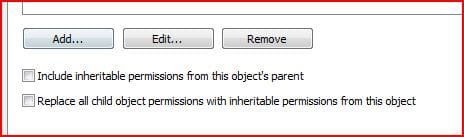
make sure that the two check boxes are not checked, remove all permissions and then set the permissions you want for the drive. this just sets the permissions on the root
Remember that due to the way that UAC works, giving permissions to the administrators group, will not give permissions to your user for normal use, so both needs to be added
now go to each folder in the level directly beneath the top level and in the Advanced permissions check the both boxes and apply - agree to the warning box and let the system set the permissions - this will take a while depending on the number of files | My System Specs | | Computer type PC/Desktop System Manufacturer/Model Number Real World Computing (Me + a little help from Acer) OS Windows 7 Ultimate x64 + x86 + Windows 8 x64 CPU AMD Phenom II X6 1035T 2.6 GHz Motherboard Aspire M3400 Memory 4Gb PC10600 DDR3 1333 MHz Graphics Card NVIDIA GeForce 315 512MB Sound Card OnBoard - Realtek High Definition Audio Monitor(s) Displays Philips 32" HDTV, (HDMI) + 26" TV (VGA) Screen Resolution 1920 x 1080 @60Hz + 1360 x 768 @60Hz Keyboard Microsoft Wireless 800 or Stock Acer, (depends where I sit) Mouse Microsoft Wireless 800 or Stock Acer, (depends where I sit) PSU Stock (400W) Case Acer M3400 Cooling Stock Hard Drives 500 GB Seagate ST3500418AS SATA II
1 TB Hitachi HDS5C1010CLA382 SATAII
1 TB Samsung Spinpoint F1 HD103SI SATA II (external)
Plus various other (client ) HDDs as needed Internet Speed Temporaray 3G Dongle Antivirus Avast Browser Chrome Other Info USB Capture + Webcam(s) Bamboo Digitizer tablet
Also run Acer AspireOne 530h Netbook, Dual Core Atom + 1GB (Win7 Ult x86) Plus various test systems for new projects |
11 Jun 2011
|
#8 | | |
Thanks a lot! It seems to be working. However for the root D: I had only one check box available, for the 1st level dirs - both of them. I have also removed the read only flag. Recycle bin reports it is corrupt. I think now it is OK.
How should I treat "system volume information" dir?
UPdate: I usually delete with shift+del, so I do not use recycle bin, but sometimes my apps use it and now every time a file is moved to a recycle bin, it reports it is corrupted. How can I fix this? | My System Specs | | OS Windows 7 Ultimate 64bit |
11 Jun 2011
|
#9 | | Windows 7 Ultimate x64 + x86 + Windows 8 x64 Newport, South Wales, UK |
If you are logged in as the hidden administrator you should be able to take ownership of the recycle bin tree (show hidden and system files ), you will not be able to delete the root level of the recycle bin but should be able to delete the recycle bins that are nested beneath this level, (these normally show a SID S.....)
you may be able to remove some of the system information entries but the easiest way is to tempraraly switch off the system protection and swapfile entries for the drive concerned (system advanced options) | My System Specs | | Computer type PC/Desktop System Manufacturer/Model Number Real World Computing (Me + a little help from Acer) OS Windows 7 Ultimate x64 + x86 + Windows 8 x64 CPU AMD Phenom II X6 1035T 2.6 GHz Motherboard Aspire M3400 Memory 4Gb PC10600 DDR3 1333 MHz Graphics Card NVIDIA GeForce 315 512MB Sound Card OnBoard - Realtek High Definition Audio Monitor(s) Displays Philips 32" HDTV, (HDMI) + 26" TV (VGA) Screen Resolution 1920 x 1080 @60Hz + 1360 x 768 @60Hz Keyboard Microsoft Wireless 800 or Stock Acer, (depends where I sit) Mouse Microsoft Wireless 800 or Stock Acer, (depends where I sit) PSU Stock (400W) Case Acer M3400 Cooling Stock Hard Drives 500 GB Seagate ST3500418AS SATA II
1 TB Hitachi HDS5C1010CLA382 SATAII
1 TB Samsung Spinpoint F1 HD103SI SATA II (external)
Plus various other (client ) HDDs as needed Internet Speed Temporaray 3G Dongle Antivirus Avast Browser Chrome Other Info USB Capture + Webcam(s) Bamboo Digitizer tablet
Also run Acer AspireOne 530h Netbook, Dual Core Atom + 1GB (Win7 Ult x86) Plus various test systems for new projects |
11 Jun 2011
|
#10 | | |
ok, so the best way is to switch off system protection ( which i do not use at all) and pagefile on the drive, then delete system volume information & recycle bin, enable the options above, and i will get a standard working situation under Windows OS?
UPDATE:
OK, problem solved - I did not realize if I do not see the folder because it is hidden, UAC does not see it as well.
Recycle bin fixed.
Thanks a lot again.
Last edited by kuki; 11 Jun 2011 at 09:50 AM..
| My System Specs | | OS Windows 7 Ultimate 64bit Privileges problem after clean re-install problems? All times are GMT -5. The time now is 03:15 PM. | |