Windows 7 Forums


Windows 7: I wish to delete the DATA partition

22 Jun 2011   #1

win 7
 
 
I wish to delete the DATA partition

Hi,


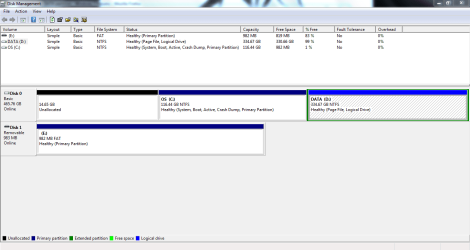
Similar issue to many here; I manuf. has partitioned a single HDD into an OS and a DATA partitions. And since everything defaults to saving and installing in the OS partition... it's gotten full

I wish to delete the DATA partition (logical drive) and extend the OS partition into it.
I wish to delete the DATA partition-capture.png

However, despite reading what has worked for so many here, I have run into a problem: the delete volume function for the DATA partition is not available (greyed out). The left most partition was the only one that could be deleted; I have done so (and hopefully that was not a bad thing?)

I know it's been about half a year since the last post, so hopefully someone will see this and be able to help.
My System SpecsSystem Spec

23 Jun 2011   #2

ME/XP/Vista/Win7
uk Hampshire


As you deleted your Recovery Partition, I hope you made the Recovery Disks first.
You do have data on that partition backup first.

Try method two in this tutorial:
Partition or Volume - Delete
Partition or Volume - Extend
My System SpecsSystem Spec
23 Jun 2011   #3

Windows 7 Ultimate x64 SP1, Windows 8 Pro x64
Florida, USA


It may not let you delete it because the page file is stored there.
Right click on Computer, select Properties.
Select Advanced System settings
Under Performance, select Settings.
Then the Advanced tab.
Next to Virtual memory, select Change.
Make sure the page file is set to the C: drive not the D: drive.
My System SpecsSystem Spec
.


23 Jun 2011   #4

MS Windows 7 Ultimate SP1 64-bit
Austin, Texas


jingseng,
Post a copy of the output of diskmanagement.


HOW TO POST A SNAPSHOT OF DISK MANAGEMENT DISPLAY

Run disk management:
WIN | type DISKMGMT.MSC | ENTER
WIN is the key with the wavy flag.

Maximize the output of Disk Management:
ALT-Spacebar key combo (this pops up a menu) |
X key (selects Maximize) |
Drag the field separators (such as between Status and Capacity) to show entire field. This is very important, otherwise, needed info is not visible.

Make a snapshot:
WIN | type SNIPPING | ENTER
Click the New button.
Drag the cursor around the area you want to snip.
File | Save as | select save location and name | Save button

Post the snapshot:


Take a look at Partition Wizard (NOT Partition Magic).

Let's see if I've the link handy.
Free Download Magic Partition Manager Software - Partition Wizard Online
My System SpecsSystem Spec
23 Jun 2011   #5

Windows 7 Ultimate SP1 64-Bit
Peterborough, England


The logical partition cannot be deleted unless it is empty, which means you need to move the data to somewhere like an external drive or another partition first.

Once you've done that you should be able to delete the logical partition and extend your C drive.
My System SpecsSystem Spec
23 Jun 2011   #6

win 7


I wish to delete the DATA partition-capture2.png

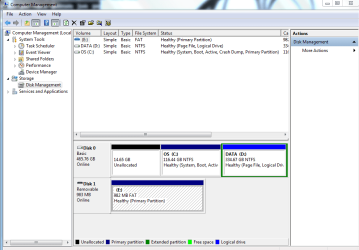
Here is the requested full view

THe only thing that was in Data partition, that i could see, was a TON of txt files... eula's. I deleted everything, and it remains impossible to delete the partition =(
My System SpecsSystem Spec
23 Jun 2011   #7

MS Windows 7 Ultimate SP1 64-bit
Austin, Texas


Excellent!

Now put your pagefile on your C drive and try again.
My System SpecsSystem Spec
23 Jun 2011   #8

win 7


Quote   Quote: Originally Posted by karlsnooks View Post
Excellent!

Now put your pagefile on your C drive and try again.
My what? >.> and how?
My System SpecsSystem Spec
23 Jun 2011   #9

MS Windows 7 Ultimate SP1 64-bit
Austin, Texas


Excellent.


Your problem is caused by the paginbg file being on the D rather than the C drive.

follow this procedure which will remove the paging file from your D and put the paging file on the C.


WIN + PAUSE/BREAK key combo |
Advanced system settings (left-hand column) |
SETTINGS button in the Performance Section of the Advanced tab |
ADVANCED tab of the resulting dialog window |
CHANGE button in the Virtual Memory section |

uncheck Automatically manage page file size for all drives |
select the C: drive in the list of drives |
select the System managed size radio button |
click on the SET button |

select the D: drive in the list of drives |
select the No paging file radio button |
click on the SET button |

recheck Automatically manage page file size for all drives |
OK button till your back out and also approve the RESTART prompt.

Restart your computer.

After all of this, you should be able to delete the drive.
My System SpecsSystem Spec
24 Jun 2011   #10

win 7


ty everyone ^^b
My System SpecsSystem Spec
Reply

 I wish to delete the DATA partition problems?


Thread Tools


Similar help and support threads for: I wish to delete the DATA partition
Thread Forum
Solved How to change active partition without removing data from partition? General Discussion
Can't delete my data partition or format it General Discussion
are the days of separating OS partition and data partition over? General Discussion
Mystery Partition - Accidentally Put Data on System Partition?? Performance & Maintenance
Must Return my Laptop,How to Delete Data? General Discussion


All times are GMT -5. The time now is 08:57 PM.


Seven Forums Android App Seven Forums IOS App Follow us on Facebook

Windows 7 Forums is an independent web site and has not been authorized,
sponsored, or otherwise approved by Microsoft Corporation.
"Windows 7" and related materials are trademarks of Microsoft Corp.
© Designer Media Ltd
  

1 2 3 4 5 6 7 8 9 10 11 12 13 14 15 16 17 18 19 20 21 22 23 24 25 26 27 28 29 30 31 32